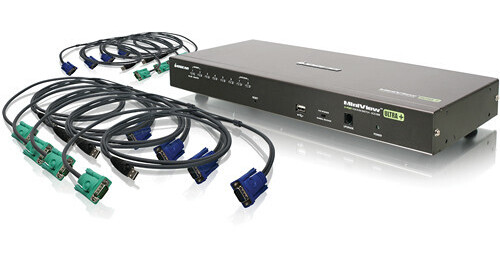
Utilizing the 8-Port USB PS/2 Combo KVMP Switch from Iogear, connecting a single workstation to multiple servers is easy. The switch can connect directly to eight servers, and, utilizing a 2-level cascade setup, you can manage up to 128 computers using a single keyboard, mouse, and monitor. With support for both PS/2 and USB KVM connectors, as well as compatibility support for all major operating systems, the switch is versatile enough to manage complex arrangements of servers. The streamlined form factor allows the switch to be quickly mounted to a 1U system rack. The switch comes packaged with eight USB KVM cables, so you can start connecting servers to your workstation right out of the box. Whether you have a small handful of servers or a few dozen, the 8-Port USB PS/2 Combo KVMP Switch provides simple, powerful and efficient management.
Ask Our Experts800-606-6969
Hello, Log InAccount & Orders
Key Features
- Connects Directly to 8 Computers
- Supports 2-Level Cascade (128 Computers)
- USB and PS/2 Support
- Rack Mount Ready
Utilizing the 8-Port USB PS/2 Combo KVMP Switch from Iogear, connecting a single workstation to multiple servers is easy. The switch can connect directly to eight servers, and, utilizing a 2-level cascade setup, you can manage up to 128 computers using a single keyboard, mouse, and monitor. With support for both PS/2 and USB KVM connectors, as well as compatibility support for all major operating systems, the switch is versatile enough to manage complex arrangements of servers. The streamlined form factor allows the switch to be quickly mounted to a 1U system rack. The switch comes packaged with eight USB KVM cables, so you can start connecting servers to your workstation right out of the box. Whether you have a small handful of servers or a few dozen, the 8-Port USB PS/2 Combo KVMP Switch provides simple, powerful and efficient management.
More DetailsIn Stock
Protect Your Gear
Add a protection plan from $28.00
See Options
IOGEAR GCS1808 Overview
Compatible with Windows, Mac, Sun Solaris and Linux
Supports both USB and PS/2
Equipped with 8 USB KVM cables (4x 6' and 4x 10')
Computer selection via front panel LED's, intuitive OSD (on screen display) and hotkeys
Cascade up to 2 levels and control up to 128 computers from a single console
The switch is secure with a 2-level password protection for OSD
Supports resolutions up to 2048 x 1536
Front USB port for system upgrades and shared peripherals (fully compliant with USB 1.1)
Rack mountable in a 19" (1U) system rack
Custom ASIC provides an auto-sensing function that recognizes the position of each station on the installation
Fully supports DDC2B
UPC: 881317505217
IOGEAR GCS1808 Specs
Key Specs
| # of Systems Supported | |
| Console I/O | |
| KVM I/O | |
| Supported Resolutions |
| # of Systems Supported | |
| Console I/O | |
| KVM I/O | |
| OS Compatibility | |
| Supported Resolutions | |
| USB Keyboard/Mouse Emulation | |
| Rack Mountable | |
| Dimensions | |
| Weight |
Packaging Info
| Package Weight | |
| Box Dimensions (LxWxH) |
IOGEAR GCS1808 Reviews
Works great
By John
Rated 5 out of 5
Date: 2020-04-19
I've only had a for a couple weeks but so far it has been great
Tried the rest - this is the best
By Keith Eggel
Rated 5 out of 5
Date: 2014-12-08
We use several USB KVM's and this one is great for two reasons: 1. it comes complete with a full set of cables, and 2. it has keyboard commands that allow switching capability from the keyboard if the KVM itself is not located conveniently in the rack. - I have ordered more of these. Keith Eggel
See any errors on this page?
question
is this product UL certified?
Iogear lists this with FCC, and CE certifications. They do not provide documentation of UL certification.
Date published: 2018-08-27
Can this KVM switch be controlled via http or ...
Can this KVM switch be controlled via http or other network commands? I am looking to integrate this with Companion.
The IOGEAR 8-Port USB HDMI KVMP Switch does not have network support.
Date published: 2023-02-20
question
Can i connect 8 Mac Mini to 1 monitor/keyboard/mouse with this or do I need to by additional equipment?
Thank you for choosing IOGEAR and we apologize for the inconvenience. We would need to know more about your setup. To better service you and understand your set up, please feel to contact our customer support at 1-866-946-4327 or email us: [email protected]. Once again, thank you for choosing IOGEAR.
Date published: 2018-08-27