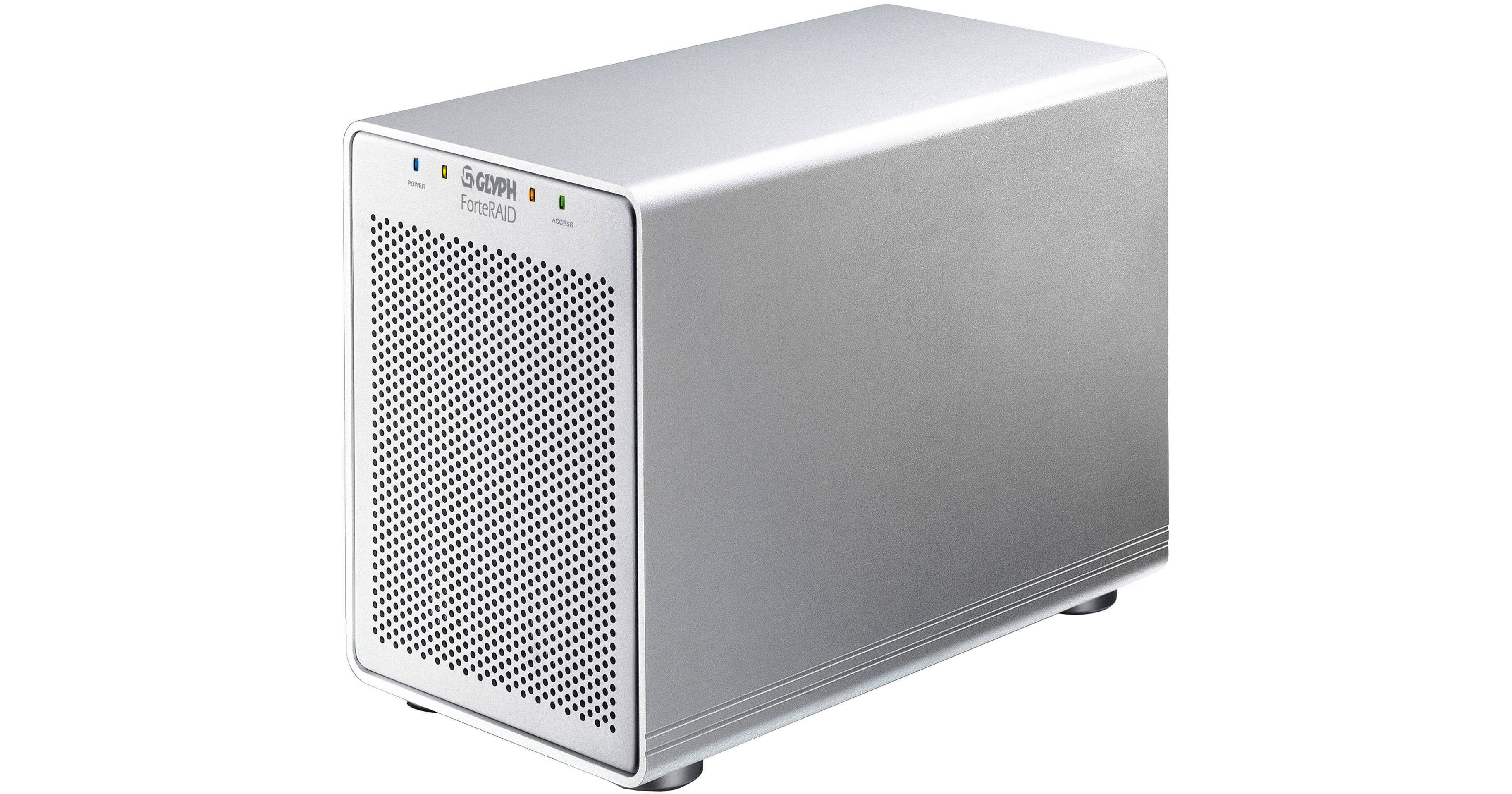
Glyph Technologies 6TB ForteRAID External Hard Drive Array

BH #GLFTRD6000 • MFR #FTRD-6000
Print
Glyph Technologies 6TB ForteRAID External Hard Drive Array
Key Features
  • SATA II 3Gb/s 7200 RPM Hard Drives
  • RAID 0, 1, 3, 5, 10 & Spanning
  • eSATA Port x 1
  • FireWire 800 (9-Pin) Ports x 2
The 6TB ForteRAID External Hard Drive Array from Glyph-Technologies is a desktop array system with a dedicated hardware RAID controller. It can connect to a computer via eSATA, FireWire-800, FireWire-400, or USB 2.0, and is fully compatible with Windows, Mac, Unix, Linux, and BSD operating systems.
More Details
No Longer Available
No Store Display
Ask an Expert
800-952-1815

Glyph Technologies ForteRAID Overview

The 6TB ForteRAID External Hard Drive Array from Glyph-Technologies is a desktop array system with a dedicated hardware RAID controller. It can connect to a computer via eSATA, FireWire-800, FireWire-400, or USB 2.0, and is fully compatible with Windows, Mac, Unix, Linux, and BSD operating systems.

The array supports numerous RAID configurations, which can be set using the included Glyph Manager software. You can choose RAID 0 for maximum performance with no data protection, RAID 1 for drive mirroring, or RAID 5 for parity-based data protection. The array also supports RAID 3, RAID 10, and spanning.

The ForteRAID is housed in an aluminum chassis with a scratch-resistant finish. It features an 80mm low-RPM fan for quiet cooling. Thanks to its aluminum design, the array efficiently dissipates heat and is also lightweight for easy portability.

Your New Production Partner
ForteRAID squeezes a ton of technology in a compact tabletop enclosure. Building on the same technology in the GT 062E, it uses an Oxford 936 chip which is capable of Hardware RAID 0, 1, 3, 5, 10, and Spanning modes. These RAID modes provide speed, fault-tolerance, or a combination of both. If a drive fails when running in one of the fault-tolerant drive modes (RAID 1, 3, 5, 10), you can remove and replace it with another without losing any data. ForteRAID also allows for a "hot-spare": an online spare drive present in the chassis, allowing for immediate rebuild without user intervention. Connected by FireWire 800, USB 2.0, or eSATA (with Glyph's HighPoint card on Mac OS), the ForteRAID reports the health of the four internal drives using Glyph Manager software
Designed for Audio and Video Production
ForteRAID features an eSATA port, which enables over 230MB/s sustained transfer rate in RAID 0 mode. With up to 8TB capacity, it supports NLE applications such as Avid Xpress, and Adobe Premiere; and has been tested with Final Cut Pro. With large capacities, fast transfer rates and fault-tolerant RAID modes, ForteRAID is also perfect for digital photography applications, content creation, and huge sound libraries. Audio production users may choose to configure the unit in RAID 5 or RAID 10 mode, both of which are fault-tolerant modes, and can survive a disk failure without losing valuable data. ForteRAID has been tested with Digidesign Pro Tools in multiple RAID modes, check our Pro Tools track count page for test results
Note:
ForteRAID supports 2 streams of ProRes 422 1080i, 60 fps (HQ and lower); and 4 streams of Apple AIC 720p, 24 fps. Tested under FW800 and eSATA on Mac Pro with OS 10.5.8. Not qualified for Uncompressed HD (8-bit or 10-bit) playback or editing.

There is a current limitation with Pro Tools and volume size. Pro Tools does not support record or playback on volumes 2TB or larger.
Configured with Glyph Manager
A software utility for setting the internal RAID mode, Glyph Manager 4 also displays health status of the enclosure and drives inside. While many other RAID systems are configured using a rotary switch and LEDs, Glyph Manager offers a rich user interface which reports case temperature, fan speed, individual drives' health status and temperature, as well as any drive errors or rebuild failures. Glyph Manager constantly monitors the health of the ForteRAID as a background task using S.M.A.R.T. commands. If a problem is detected, it blinks the front LEDs red, and bounces an icon in the Mac OS X dock or displaying an error balloon from the Windows System Tray, alerting the user to open Glyph Manager for more information. By constantly monitoring the drives, you have a chance to backup your data before any is lost due to drive failure
Configurable Drive Modes
RAID 0 (Striping)
RAID 0 (striping) is designed for increased speed but offers no redundancy benefits. RAID 0 spreads data across array members in blocks, and is ideal for situations where speed and capacity are most important. It's a proven technology for video editing, working with huge graphics files, sound libraries, and streaming instruments that play hundreds of samples simultaneously. RAID 0 provides the full capacity of the drives, and is the default shipping drive mode
RAID 1 (Mirroring)
RAID 1 (mirroring) uses only two of the 4 internal drives. It offers the data redundancy and real-time backup by writing the same data to two hard drives at the same time. Should a drive failure happen, data is still available on the remaining drive. Usable capacity is equal to capacity of 1 drive
RAID 3 (Striping with a Dedicated Parity Drive)
RAID 3 (striping with a dedicated parity drive) offers speed and data redundancy by using parity data which is stored on a dedicated drive. Should a drive failure happen, the remaining members of the array calculate the missing data and rebuild to a spare drive. The spare drive can be inserted after the failure, or can be online and waiting (hot spare). For RAID 3, usable capacity is 3/4 of the entire capacity. For RAID 3 + hot spare, usable capacity is half the entire capacity
RAID 5 (Striping with Distributed Parity)
RAID 5 (striping with distributed parity) offers speed and data redundancy by using parity data which is striped across all drives. Should a drive failure happen, the remaining members of the array calculate the missing data and rebuild to a spare drive. The spare drive can be inserted after the failure, or can be online and waiting (hot spare). For RAID 5, usable capacity is 3/4 of the entire capacity. For RAID 5 + hot spare, usable capacity is half the entire capacity
RAID 10 (Striping + Mirroring)
RAID 10 (striping + mirroring) creates two pairs of mirrored drives, and stripes across them for a very good balance of speed and redundancy. Usable capacity is equal to half of the entire capacity. RAID 10 is perfect for situations where the data integrity is more important than the capacity, such as audio recording and editing, photography, and sample libraries/sound libraries
Spanning Mode
Spanning mode simply shows all four drives as one large volume. Spanning provides the full capacity of the drives, with no benefits to speed or redundancy
Design, Construction, and Support
Stylish Protective Enclosure
The ForteRAID is constructed with a scratch-resistant aluminum chassis, and includes a large 80mm low-RPM fan. The aluminum chassis offers additional heat transfer properties while allowing the system to be lightweight and portable
Professional Power
Professionals know that a high quality power supply is one of the most important components in any piece of equipment. Glyph uses an internal power supply in the ForteRAID for this reason. All internal power supplies are fully auto-switching for international use
The Warranty
The ForteRAID is covered by a 3-year manufacturer's warranty. As an added benefit, Glyph offers advance replacement service for any drive failures that occur within the first year after purchase

Glyph Technologies ForteRAID Specs

Performance
Capacity
6TB
Interface / Transfer Rate (Max)
eSATA x 1 / 3Gbps
FireWire 800 (9-Pin) x 2 / 800Mbps
FireWire 400 (6-Pin) x 1 / 400Mbps
USB 2.0 x 1 / 480 Mbps
Drive Speed
7200rpm
Buffer
6TB
Average Seek Time
8 ms
Sustained Data Transfer Rate
230MB/sec (RAID 0, eSATA)
System Requirements
Mac OS 8.6, 9.x; Mac OS X; Windows 98SE, Me, 2000, XP, Vista, 7; Modern Unix-based, Linux, or BSD

Older versions of Windows, such as 2000 and XP 32-bit, use Master Boot Record which doesn't support volumes larger than 2TB. When the total capacity of the RAID is 2TB or higher, you must format the array using GPT in Windows. GPT format is only supported by Windows XP 64-bit Edition, Windows 2003 Server, Windows Vista, Windows 7, and Mac OS X. GPT format will not work with XP 32-bit or older Windows operating systems. If you want to use Windows 2000 and/or XP 32-bit, you'll need to run the ForteRAID in a RAID mode that creates a usable volume that is 2TB or less. The following models are smaller than 2TB and are compatible: 1TB and 2TB (any drive mode); 3TB and 4TB (RAID 1, RAID 3 + hot spare, RAID 5 + hot spare, RAID 10); 6TB and 8TB (RAID 1).
General
Mounting
Desktop
Power Requirements
AC: 100-240VAC, 50/60Hz
Environmental Requirements
None
Dimensions
5.3 x 7 x 9.6" (13.5 x 17.8 x 24.4cm)
Weight
8.6 lb (3.9kg)

Glyph Technologies ForteRAID Reviews

See any errors on this page?
Whatever You Need, We've Got It