Video Chat with a Pro Video Expert - Live

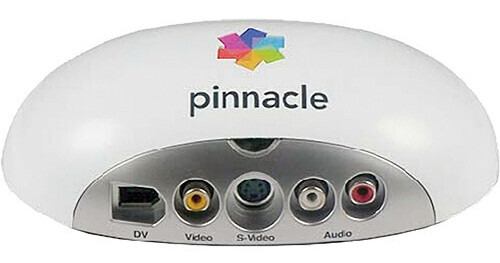
Pinnacle Studio Movie Box HD

BH #PISMBHD • MFR #82301006771
Print
Pinnacle Studio Movie Box HD
Key Features
  • Easy Video Capturing & Editing
  • Hollywood-style Animations and Effects
  • Share Videos on YouTube / Web
  • Professional DVD Menus
The Pinnacle Studio Movie Box HD efficiently captures and edits home videos. Hollywood style animations, transitions and effects can be added to the videos; they can be directly copied to a DVD or shared on YouTube or the web. The Studio HD software's smart DVD menu gives movies a professional look. Over 130 templates offer the advantage of working with user-friendly animations, transitions, and titles. The stop-motion capture feature is used for animation or fast motion effects.
More Details
No Longer Available
No Store Display
Ask an Expert
800-606-6969

Pinnacle Moviebox Overview

The Pinnacle Studio Movie Box HD efficiently captures and edits home videos. Hollywood style animations, transitions and effects can be added to the videos; they can be directly copied to a DVD or shared on YouTube or the web. The Studio HD software's smart DVD menu gives movies a professional look. Over 130 templates offer the advantage of working with user-friendly animations, transitions, and titles. The stop-motion capture feature is used for animation or fast motion effects.

Video Input
Import videos and photos from camcorders, digital cameras, cell phones, game systems, and more.
Easy Editing
Quickly add Hollywood-style animations, effects, sound, and music with over 130 templates.
Video Sharing
Export and share videos on Flash, QuickTime, YouTube (in widescreen), AVCHD, PS3, Nintendo Wii, Xbox, and more
User-friendly Drag-and-drop Interface
Plug in the device to start capturing, editing, and sharing videos
Input Options
  • Capture from DV, HDV, and Digital8 camcorders or VCRs
  • Capture from analog camcorders, 8mm, HI8, VHS, SVHS, VHS-C, SVHS-C, or VCRs (NTSC/PAL/SECAM)
  • Import from AVCHD and other file based camcorders, digital still cameras, mobile devices, and webcams via USB
Output Options
Output to DV, HDV(High Definition Video) or Digital8 tape (requires camcorder with FireWire Input port) and analog videotape (requires DirectShow compatible device with video output)
External Options
  • AVCHD, DVD (DVD-R, DVD-RW, DVD+R or DVD+RW, dual layer), S-VCD, Video CD (VCD)
    Apple iPod, Sony PSP / PS3, Nintendo Wii, Microsoft Xbox compatible formats
    DV, HDV, AVI, DivX*, RealVideo 8, WMV, MPEG-1, MPEG-2, MPEG-4, Flash, 3GP, WAV, MP3, QuickTime (SD format) files
  • Dolby Digital 2 channel and 5.1 channel audio
Analog Video Capture to Computer
  • Analog PAL & SECAM / NTSC input
  • HDV/DV (IEEE 1394) camcorder capture and full camera control support
  • Compression - MPEG-2, DV, MJPEG (User selectable and available real-time capture formats depend on CPU speed)
Video Playback from Computer
HDV/DV (IEEE 1394) output to camcorder and full camera/device control support

Pinnacle Moviebox Specs

Hardware Specification
Inputs & Outputs

Composite video input (RCA connector) PAL, SECAM, NTSC
S-Video input (mini-DIN connector) PAL, SECAM, NTSC
Stereo audio input (2 x RCA connectors)
IEEE 1394 In/Out connector (6-pin type)

Analog Video Capture to Computer

Analog PAL & SECAM/NTSC input
HDV/DV (IEEE 1394) camcorder capture. Full camera control support
Compression: MPEG-2, DV, MJPEG (User selectable. Available real- time capture formats depend on CPU speed.)

Video Playback from Computer

HDV/DV (IEEE 1394) output to camcorder. Full camera/device control support
Input Options
Capture from DV, HDV and Digital8 camcorders or VCRs

Capture from analog camcorders, 8mm, HI8, VHS, SVHS, VHS-C, SVHS- C, or VCRs (NTSC/PAL/SECAM)

Import from AVCHD and other file based Camcorders, Digital Still Cameras, Mobile Devices and Webcams via USB
Output Options
Output to DV, HDV or Digital8 tape (requires camcorder with FireWire Input port)

Output to analog videotape (requires DirectShow compatible device with video output)
Import Formats
Video: AVCHD, BD Blu-ray, DV, HDV, AVI, MPEG-1, MPEG-2, DivX, MPEG-4, 3GP(MPEG-4), WMV, Non-encrypted DVD titles (incl. DVD- VR/+VR), QuickTime (DV, MPEG-4, H.264)

Audio: MP3, MPA, WAV, AC3, WMA

Graphic: BMP, GIF, JPG, PCX, PSD, TGA, TIF, WMF, PNG, J2K
Export Formats
AVCHD, DVD (DVD-R, DVD-RW, DVD+R or DVD+RW, dual layer), S-VCD, Video CD (VCD)

Apple iPod, Sony PSP/PS3, Nintendo Wii, Microsoft Xbox compatible formats

DV, HDV, AVI, DivX, RealVideo 8, WMV, MPEG-1, MPEG-2, MPEG-4, Flash, 3GP, WAV, MP3, QuickTime (SD format) files

Dolby Digital 2 channel and 5.1 channel audio
System Requirements
• Windows 7, Windows Vista (SP2),Windows XP (SP3) , recommended)
• Intel Core2 Duo 2.4 GHz required for AVCHD, Intel Core2 Quad 2.66 GHz or Intel Core i7 required for AVCHD 1920
• 1 GB system memory recommended, 2 GB required for AVCHD
• DirectX 9 or 10 compatible graphics card with 64 MB (128 MB or higher recommended)
• 256 MB required for HD and AVCHD
• DirectX 9 or higher compatible sound card
• 3.2 GB of disk space
• DVD-ROM drive to install software
• 1 USB 2.0 port

Optional

• CD burner for creating Video CDs or Super Video CDs (S- VCDs)
• DVD burner for creating DVD and AVCHD discs
• Sound card with surround sound output required for preview of surround sound mixes

Pinnacle Moviebox Reviews

See any errors on this page?
Whatever You Need, We've Got It