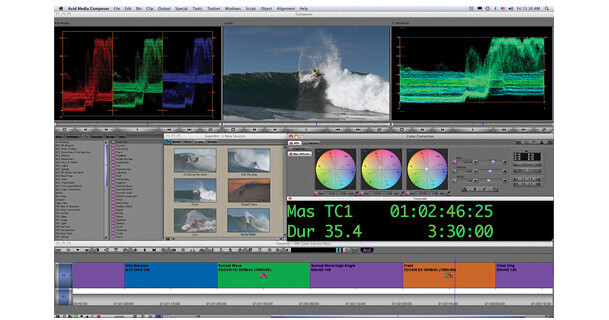
The Media Composer 4 (Academic) from Avid is a professional nonlinear editor (NLE) designed to provide a comprehensive and powerful set of creative editing tools to any video production. The educational version is identical to the full Media Composer, but without the third-party software that's included in the Production Suite. As an industry standard, Media Composer provides the perfect training ground for film students, being well suited for use in feature films, television, commercial work, and digital media, among many other possible career paths.
What's New
New Features Checklist
- Mix and match frame rates (in addition to formats and resolutions) in the same timeline
- Share Mac-based Media Composer projects with Pro Tools editors through Video Satellite
- Encode and deliver final masters in Panasonic AVC-Intra format
- Instantly access and edit GFCAM 100 Mb-formatted media through AMA
- Create low-res proxies of archived HD 720p media for faster reviewing and retrieval
- Capture and preserve ancillary and closed captioning data on Nitris DX and Mojo DX systems
- Monitor 1080p24 projects on NTSC monitors with Symphony Nitris DX systems
- View stereoscopic material side-by-side for a more natural line of sight
- Get more monitor choices for viewing stereoscopic media
- Experience improved playback with DV100 media
- Get improved playback of QuickTime DNxHD media in Pro Tools
- View 16 tracks at a time in the audio mixer, in addition to 4- and 8-track display
- Work with AAF files larger than 2 GB
- Get more levels of undo
- Work with complex scenes even easier with multicamera editing improvements
- Gain precision and save time with auto-zoom for motion tracking and stabilization
- Move clips without having to rebuild transitions with transition preservation
- Get better archive and restore control with new recapturing and decomposing features
- Manage clips in the timeline easier with improvements to clip color coding
- Gain better edgecode handling when using the Timecode burn-in effect
- Enter timecode more easily when using a keyboard without a numeric keypad
- Directly register Media Composer through the activation dialog (may require an Internet connection)
- Get support for the latest qualified NVIDIA hardware with the updated driver
Mix and Match Frame Rates
Work with mismatched media without rendering or restriction. With the new Frame Rate Mix & Match feature, you can mix and match SD and HD formats at 24, 29.97, 30, 50, and 59.94 fps in the same timeline. Eliminate the time and money spent on external transcoding and frame rate conversions, and enjoy real-time, broadcast-quality playback
Sync with Pro Tools Editors
With the Video Satellite option, Pro Tools editors can now use a Mac OS X-based Media Composer system (in addition to Windows Vista and XP) as a Pro Tools Video Satellite, meaning you won't have to transcode video, render effects, or copy files for them.
Deliver Masters in AVC-Intra Format
Easily integrate into the popular Panasonic AVC-Intra pipeline and deliver final masters in AVC-Intra (P2) format for further handling and playout. With new AVC-Intra encoding, you can work with any P2 project in its original native format, from acquisition to delivery, for the quickest project turnarounds.
Expanded GFCAM Support
With this latest release, you can instantly access and edit Ikegami GFCAM 100 MB-formatted material (in addition to GFCAM 50MB material) directly on GFPAK media or an AMA Virtual Volume through AMA (Avid Media Access). Get the fastest GFCAM workflow from shoot to edit with full native support for the format and all metadata.
Editing
Storytelling
Cut smarter and faster, trim on the fly with your mouse or keyboard, use dual-rolling trim, or nudge frame-by-frame. Slip and slide clips quickly with comprehensive 2-, 4-, or 6-frame display modes. Customize the interface, shortcuts, and keyboard layout to maximize your speed and comfort.
Scripted Editing
Take the work out of editing movies, television shows, and other script- and transcript-based projects, such as documentaries and reality TV. The ScriptSync feature automatically syncs all relevant clips to your script phonetically, so you can find the best takes fast. Line up dailies to the script in minutes, not hours, giving you more time to refine the story instead of digging through bins.
Mix & Match Media
Add and edit practically any combination of PAL, NTSC, SD, and HD formats in real time, regardless of the resolution or frame rate in the same timeline, without rendering or transcoding. Whether you're editing online or offline, you can mix and match media of different formats, codecs, resolutions, and frame rates, and enjoy real-time broadcast-quality playback.
Management
Whether you work alone or as a team, never worry about losing source material and rendered files with the most reliable and robust media management available keeping track of all project assets and metadata for you. Create custom metadata fields to track media the way you want. Easily search, sift, and sort to find information beyond the scope of OS-level searches.
Real-Time HD Editing
Edit HD material in real time, and in optimal mastering picture quality, using Avid DNxHD encoding. Whether your HD workflow is online or offline, you can maximize your productivity, reduce storage requirements, and maintain the highest image quality without additional hardware.
Seamless Integration
Tapeless
Experience the fastest tapeless workflows in the industry with AMA (Avid Media Access). Directly access XDCAM HD/EX, P2/AVC-Intra, and GFCAM media and metadata on a connected disc/card or device without having to transcode, import, or rewrap files. And download support for additional formats as they become available.
Work Natively with SD and HD Codecs
Start editing footage right away, with native support for a wide range of SD and HD codecs, including DV, HDV, XDCAM HD/EX, DVCPRO HD, AVC-Intra, and GFCAM. No need to transcode, even when mixing codecs in the same timeline.
Total Conform
Streamline your offline/online workflow, and get a seamless path to finish and master projects, with complete integration between Media Composer and Avid Symphony and DS systems. Directly share offline projects and media for finishing, with all media clips, edits, and effects directly available, so you can start the online without delay.
Work with RED, Stereoscopic, and Other Single-Frame Files
With MetaFuze, you can quickly merge RED (R3D), DPX, TIFF, QuickTime, or even stereoscopic 3D files from film scanning or CGI systems into a single native Avid DNxHD or uncompressed media clip for editing. You can even display and edit 3D material offline without conforming using industry-first stereoscopic editing tools and workflows.
Sync with Pro Tools Editors
Make the audio post workflow easier by making projects directly accessible to Pro Tools audio editors through Video Satellite. No need to render effects, transcode video, or copy files for the audio team, as they can simply tap into any Media Composer system to open and play Avid HD and SD sequences (including DNxHD) in high quality, in full resolution, and in sync with their sessions.
Film Focused
Included is the award-winning Avid Film Composer toolset. Save time with automatic audio and video syncing and seamless tracking of timecode, Keykode, and other metadata.
Timecode and Subtitling Ease
With the Timecode Generator, you can create onscreen timecode displays in real time to speed up any online or audio post workflow. And with the SubCap Generator, you can easily create open captions and subtitles, and import and export in Avid DS and standard EBU N19 subtitle formats.
Ready For Delivery
Whether you need to output your project for the web, electronic delivery, or back into the tapeless pipeline, you have the tools you need to quickly deliver your work in the absolute highest quality. Optimize your video for the web, and burn projects to DVD and CD. If you're using a Windows-based system, you can also author DVDs, Blu-ray Discs, and fast-turnaround approval DVDs (use native authoring tools on a Mac).
Smoother BWF Workflows
Ease the post audio workflow when exporting timeline audio tracks as BWF (Broadcast WAV) files. Just insert the sequence timecode based on your project and type as you're exporting the tracks, to create a fast and easy sync reference for downstream processes that don't support OMF or AAF, such as slave playback devices.
Realize Your Vision
Complete Color Correction
Save time and maintain the highest quality production with the fully integrated and flexible 10-bit color correction toolset. Quickly and accurately match colors from shot to shot using NaturalMatch. Get fine control over shots with animatable color correction, or dive into the large palette of easy-to-use tools to manually refine settings or get creative with the color.
FluidMotion and FluidFilm Effects
Create incredibly smooth slow-motion effects and "fit-to-fill" video using Avid's patented FluidMotion pixel morphing technology. And get the look of progressive film with interlaced video material using the exclusive FluidFilm feature.
SpectraMatte Chroma Key Effect
Create a high-quality key, even with compressed HD codec material. With SpectraMatte, you can eliminate all guesswork, correct common keying issues, and get perfect keys using the interactive interface. Preview your keys in real time and in online quality with 16-bit SpectraGraph technology.
FluidStabilizer Tracking Engine
Easily stabilize shots that contain even the most jittery camera movements. FluidStabilizer works in conjunction with SteadyGlide and Stabilize to deliver extremely precise image stabilization, enabling you to filter out unwanted motion while retaining any underlying motion you do want, such as a camera pan.
Get More Effects with Plug-Ins
Get the look and effects you want through AVX and AVX2 plug-ins, which you can install and use right from your editing interface. Build up your effects library by choosing from tons of third-party AVX plug-ins available.
Powerful Effects Performance
With Avid's advanced effect acceleration architecture that closely ties multi-core CPU processing, GPU (Graphics Processor Unit), and PCI Express I/O hardware into a single high-performance pipeline you get the best real-time effects performance around.
Collaboration
Share Media, Projects, and Ideas
Experience the most collaborative workflow and get things done on time and on budget. Seamlessly integrate with Avid Unity media networks, and you and your team can access and play the same files and capture media to the same volume simultaneously, in real time. And because media bins aren't linked to specific projects or users, you can open bins and access files from other projects even when in use by others without having to copy media.
Share Projects for Audio Post
Collaborating with Pro Tools audio editors, remixers, and sound designers is easy. Export audio from your video projects to Pro Tools for audio production, with all media and metadata intact. Or for the fastest workflow, add Video Satellite to have Pro Tools editors sync directly with Media Composer projects, eliminating having to render, transcode, or copy files.
Portable Settings
Forget about tweaking settings or re-orienting your workspace each time you move from one Avid system to another. Take all of your settings with you to any project through your own user profile, even when moving from an offline workstation to an online Avid Symphony finishing system. All shortcuts, keyboard, and screen customization are accessible, so you'll be up and running in no time.
Interplay
When the stakes are high, bring collaboration to the highest level with Avid Interplay asset management systems. Instantly access media and secure files from unauthorized use. Always have the current production elements in play and synced through automated tracking. And with sophisticated multi-contributor asset management, multi-resolution workflows, and rules-based transcoding, you can put the flow in workflow for total facility-wide collaboration.
Worldwide Community
Support
When you need help, expert assistance is just a web click or phone call away. Choose from a wide range of Avid Support programs that fit your needs and budget, including free web-based support, pay-per-case phone support, an Avid Support contract, and complete installation services.
Training
Get the most out of your investment through Avid training. Whether you simply want to learn how to use your Avid software and/or system to the fullest or want to up your game through certification training, you can choose from several self-paced books, online courses and classroom training, and customized training programs.
Community
Whether you need help, want to offer help, have clips to share, or want to connect with thousands of fellow Avid editors, you'll find a wealth of information and resources on the Avid Community site. Seek advice from the Avid staff and other users. Stay up to date on the latest tools and techniques. Get helpful tips, tricks, and tutorials from others in the community. Meet others by joining an Avid User Group.