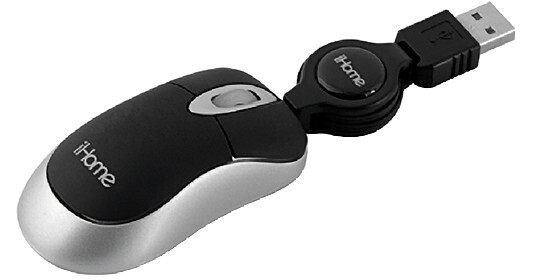
iHome IH-M152OB Optical Netbook Mouse - Black

BH #IHIHM152OB • MFR #IH-M152OB
Print
iHome IH-M152OB Optical Netbook Mouse - Black
Key Features
  • Optical Mouse Ideal for Netbooks
  • Compatible With Windows XP, Vista, 7
  • Connects to USB Type A Port
  • Automatic Driver Load When Plugged In
How much can you say about a mouse? Not a lot. But we can say that the iHome Optical Netbook Mouse - Black is a good-looking, practical and durable (it's got a limited lifetime warranty) mouse that should give you years of trouble-free service.

The Optical Netbook Mouse uses an LED, not a ball or laser to determine its position. So it's small and lightweight and ideal for use with a notebook or netbook.

The Netbook Mouse connects to your Windows machine via a USB Type A port and automatically loads its drivers the first time you plug it in. It's got the usual left and right mouse buttons and the scroll wheel is also a button. Click it to go into automatic scrolling mode and then move the mouse up and down to change the scroll speed.

Perhaps its most useful and interesting feature is its spring-loaded USB cord reel. When you detach it from the mouse, pulling the USB cord on both ends reels it out to its maximum length. Another tug will send it back into the reel. Or pull it out just a little bit and you can use your mouse without having an excess of cord to get tangled up on your desktop.

More Details
No Longer Available
No Store Display
Ask an Expert
800-606-6969

iHome IH-M152OB Overview

How much can you say about a mouse? Not a lot. But we can say that the iHome Optical Netbook Mouse - Black is a good-looking, practical and durable (it's got a limited lifetime warranty) mouse that should give you years of trouble-free service.

The Optical Netbook Mouse uses an LED, not a ball or laser to determine its position. So it's small and lightweight and ideal for use with a notebook or netbook.

The Netbook Mouse connects to your Windows machine via a USB Type A port and automatically loads its drivers the first time you plug it in. It's got the usual left and right mouse buttons and the scroll wheel is also a button. Click it to go into automatic scrolling mode and then move the mouse up and down to change the scroll speed.

Perhaps its most useful and interesting feature is its spring-loaded USB cord reel. When you detach it from the mouse, pulling the USB cord on both ends reels it out to its maximum length. Another tug will send it back into the reel. Or pull it out just a little bit and you can use your mouse without having an excess of cord to get tangled up on your desktop.

Optical Mouse Ideal for Netbooks
Compatible With Windows 2000, XP and Vista
Connects to USB Type A Port
Drivers Load Automatically Upon First Connection
USB Cable Extends and Retracts

iHome IH-M152OB Specs

Interface
USB Type A
Wireless Support
None
Buttons
Left Mouse Button
Right Mouse Button
Scroll Wheel Button
Scroll Wheel
Press Scroll Wheel to Automatically Scroll Through Documents
Move The Mouse Up or Down to Set Automatic Scroll Speed
Power Requirements
Supplied by USB Port
Packaging Info
Package Weight
0.3 lb
Box Dimensions (LxWxH)
6 x 4.5 x 1.5"

iHome IH-M152OB Reviews

See any errors on this page?
Whatever You Need, We've Got It