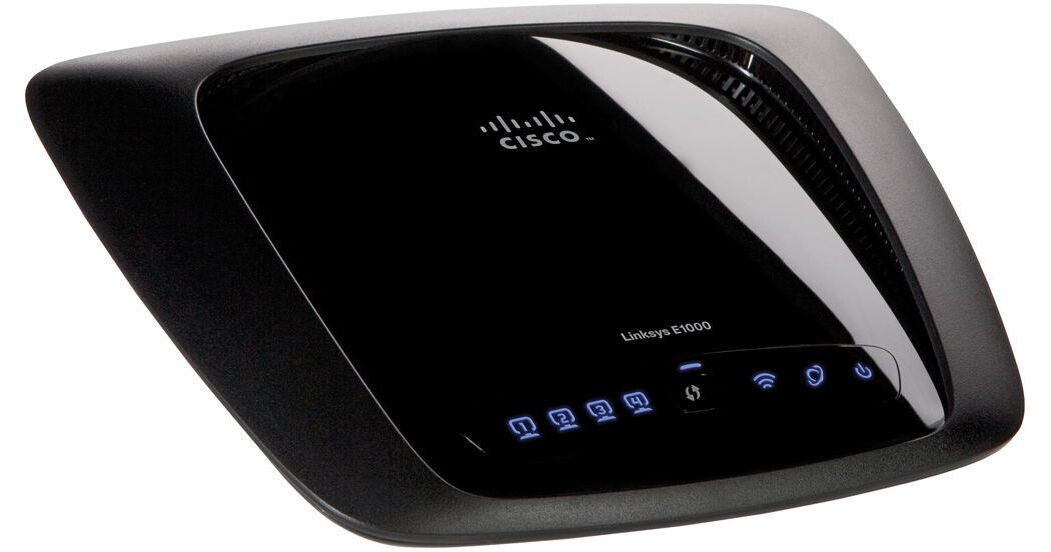
Linksys E1000 Wireless-N Router

BH #LIE1000 • MFR #E1000
Print
Linksys E1000 Wireless-N Router
Key Features
  • 802.11n, 802.11g, 802.11b, 802.3, 802.3u
  • Up to 300 Mbps of Transfer Speed
  • Connects Devices Beyond Computers
  • Utilizes the 2.4 GHz Band
The E1000 Wireless-N Router from Linksys is an easy-to-setup and easy-to use router that can provide wireless Internet access to your computers, printers, or other wireless-enabled devices. It is designed for simpler uses like connecting to the Internet wirelessly or for more complicated uses, like setting up a Network or shared-access among your wireless devices. It features four Ethernet ports, if you also want to connect manually and it is compatible with 802.11n, 802.11g, 802.11b, 802.3, 802.3u wireless protocols.
More Details
No Longer Available
No Store Display
Ask an Expert
800-606-6969

Linksys E1000 Overview

The E1000 Wireless-N Router from Linksys is an easy-to-setup and easy-to use router that can provide wireless Internet access to your computers, printers, or other wireless-enabled devices. It is designed for simpler uses like connecting to the Internet wirelessly or for more complicated uses, like setting up a Network or shared-access among your wireless devices. It features four Ethernet ports, if you also want to connect manually and it is compatible with 802.11n, 802.11g, 802.11b, 802.3, 802.3u wireless protocols.

In addition to these functions, it also features parental protection controls so that you can limit Internet access to specific times or websites, as well as a few different security modes for keeping your data private. Beyond security, it also boasts advanced network features that make it great for hosting your own website, hosting your own games, securely granting access to outside Internet users for your server, or for ensuring that applications like games or video-streaming that are demanding on your computer have more bandwidth.

Wireless-N Technology
Speed up your wireless network with a router that connects your computer, game consoles and other Wi-Fi devices at up to 300 Mbps of transfer speed
Quick to Install, Easy-to-Use
Cisco Connect software has three simple steps to get your secure wireless network up and running. A streamlined user interface allows you to choose from simple to advanced settings with no hassles
Universal Plug and Play allows the appropriate Windows operating system to automatically configure the Router for various Internet applications, such as gaming and videoconferencing
Security
Parental Controls block Internet access or restrict access to specific times and or websites
Grant computers or other devices connected to your router local access or guest access
Supported security modes are WPA/WPA 2 mixed mode, WPA personal, WEP, and RADIUS for use with RADIUS servers
Establish a Stateful Packet Inspect (SPI) firewall to help block unauthorized access or traffic to your router
When you have multiple routers connected to your network, Network Address Translation (NAT) technology enhances your protection by allowing your computers to share Internet access through a single, public Internet IP address
VPN Passthrough allows you to enable Virtual Private Network tunnels using IPsec, PPTP, or L2TP protocols to pass through the Router's firewall
Advanced Features
The Dynamic Domain Name System (DDNS) feature allows you to assign a fixed host and domain name to a dynamic Internet IP address, great for hosting your own website, FTP server or other server behind the Router
Dynamic Host Configuration Protocol allows you to establish a network with your router and easily connect new machines without having to tediously configure each new machine you add
Demilitarized Zone feature allows outside Internet users to connect to one computer on the private network for specific applications like Internet gaming and videoconferencing. While this opens all ports, you can also open specific ports that you specify
Quality of service allows you to assign priority to specific types of network traffic, such as gaming, videoconferencing, video streaming or VoIP to ensure optimal performance for these types of uses
Web based utility enables you to manage the router's functions via your browser
For Internet Service Providers who require you to register Media Access Control for additional devices, you can save time and conveniently clone your computer's already-registered MAC address
Supports Multiple Internet Connection Types
When setting up your router, it allows you to select these types of Internet connections provided by your Internet Service Provider: Automatic Configuration -DHCP, Static IP, PPPoE, PPTP, L2TP, and Telstra Cable

Linksys E1000 Specs

Base Station
Standards
802.11n, 802.11g, 802.11b, 802.3, 802.3u
Network Protocol
TCP/IP
Data Rate
Up to 300 Mbps wireless speeds
Frequency Range
2.4 GHz
Channel Support
Not Specified by Manufacturer
Security
WEP, WPA and WPA2 Personal and Enterprise, RADIUS
Antenna
2x    Internal Antennas
Operation Distance
Not Specified by Manufacturer
Transmitted Power
Not Specified by Manufacturer
Power Over Ethernet
Not Specified by Manufacturer
Ports
4x    10/100
General
System Requirements
PC: Wi-Fi enabled PC with CD or DVD drive, running Windows XP SP3, Windows Vista SP1 or later, or Windows 7
Mac: Wi-Fi enabled Mac with CD or DVD drive, running OS X Leopard 10.5 or Snow Leopard 10.6
Web Browser: Internet Explorer 7, Safari 4, or Firefox 3 or later for optional browser-based configuration
Power Requirements
12V, 0.5A
Dimensions
7.95 x 1.34 x 6.3" / 20.2 x 3.4 x 16 cm
Weight
9.81 oz / 280 g

Linksys E1000 Reviews

See any errors on this page?
Whatever You Need, We've Got It