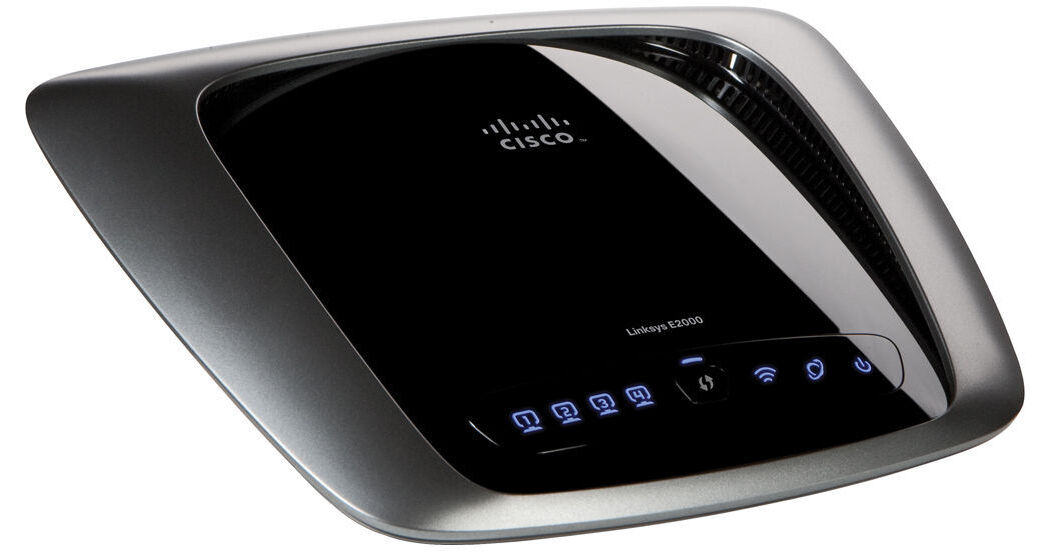
Linksys E2000 Advanced Wireless-N Router

BH #LIE2000 • MFR #E2000
Print
Linksys E2000 Advanced Wireless-N Router
Key Features
  • 802.11n
  • Selectable Dual-Band Operation
  • Compatible with 802.11a/b/g Devices
  • 4x Gigabit Ethernet LAN Ports
The E2000 Advanced Wireless-N Router from Cisco by Linksys allows you to share your broadband Internet connection among the computers in your home -- wirelessly. The router adheres to the 802.11n Wi-Fi standard, which supports data transfers of up to 300Mbps. It is also backwards compatible with 802.11a, 802.11b, and 802.11g devices, and features four wired Gigabit Ethernet ports for device connectivity.
More Details
No Longer Available
No Store Display
Ask an Expert
800-952-1815

Linksys E2000 Overview

The E2000 Advanced Wireless-N Router from Cisco by Linksys allows you to share your broadband Internet connection among the computers in your home -- wirelessly. The router adheres to the 802.11n Wi-Fi standard, which supports data transfers of up to 300Mbps. It is also backwards compatible with 802.11a, 802.11b, and 802.11g devices, and features four wired Gigabit Ethernet ports for device connectivity.

The router can operate on either the 2.4GHz or 5GHz band. You can select which frequency you want to use based on the devices you own and your environment. Almost every Wi-Fi device supports 2.4GHz networking, but it is prone to interference from neighboring networks and other devices in your home. Fewer devices support 5GHz Wi-Fi, but it can provide you a more stable Wi-Fi network that isn't prone to outside interference.

Simply plug the router into your broadband modem and it will start sharing your connection. The included Cisco Connect makes it easy to configure your network and connect other wireless devices. You can even use it to create a separate and secure network for visitors -- complete with password protection. Standard network security protocols, including WPA and WPA2, are supported by the router.

Selectable Dual-Band
Selectable 2.4GHz or 5GHz bands helps you avoid interference on your network, and achieve smoother file transfers and media streaming.
Quick to Install
Cisco Connect software has three simple steps to get you set up and your secure wireless network is ready to go. A streamlined user interface allows you to choose from simple to advanced settings with no hassle.
You're in Control
Cisco Connect software helps you customize your settings, quickly add multiple Internet devices to your network:
  • Create a separate, secure, password protected network for guests
  • Limit access time and websites with Parental Controls
  • Easily access advanced network settings
State-of-the-Art Security
Keep Wi-Fi freeloaders and Internet threats at bay with WPA/WPA2 security settings.
Benefits of Gigabit
Use the Gigabit Ethernet ports for quicker file sharing between other Gigabit-enabled devices like media servers, hard drives and computers.
Wireless-N Technology
Speed up your wireless network with a router that connects your computer, game consoles and other Wi-Fi devices at up to 300Mbps of transfer speed.

Linksys E2000 Specs

Base Station
Standards
IEEE 802.11a, IEEE 802.11b, IEEE 802.11g, IEEE 802.11n, IEEE 802.3, IEEE 802.3u, IEEE 802.3ab, UPnP
Network Protocol
TCP/IP
Data Rate
802.11n: 300Mbps
802.11a/g: 54Mbps
802.11b: 11Mbps
Frequency Range
2.4GHz, 5GHz (Selectable)
Channel Support
11
Security
WEP (64/128-bit), WPA, WPA2, WPS
Antenna
2 x 3 (Tx x Rx); 3x Internal Antennas
Gain
Main Antenna: 1.5dBi
Third Antenna: 2.2dBi
Operation Distance
Not Specified by Manufacturer
Transmitted Power
17dBm
Power Over Ethernet
None
Ports
4x 10/100/1000Mbps Gigabit Ethernet LAN (RJ-45)
1x 10/100Mbps Ethernet WAN (RJ-45)
Cable Type
CAT5e
General
System Requirements
Operating System: Windows XP SP3, Vista SP1, 7 ; Mac OS X 10.4.11, 10.5.8, 10.6.1
Hardware: Optical drive, Broadband modem, Ethernet card or Wi-Fi support for each connected computer
Software: Internet Explorer 6, Safari 3, or Firefox 2 for optional browser-based configuration
Buttons
Reset, Wi-Fi Protected Setup
Status Indicator
Ethernet (1-4), Wi-Fi Protected Setup, Wireless, Internet, Power
Agency Certifications
FCC, CE, IC-03, Wi-Fi
Environmental Requirements
Operating
Temperature: 32-104°F (0-40°C)
Humidity: 10-85%, non-condensing

Storage
Temperature: -4-140°F (-20-60°C)
Humidity: 5-90%, non-condensing
Power Requirements
DC: 12VDC
Dimensions
7.95 x 1.34 x 6.3" (20.2 x 3.4 x 16cm)
Weight
0.66 lb (0.3kg)

Linksys E2000 Reviews

See any errors on this page?
Whatever You Need, We've Got It