Video Chat with a Lighting Expert - Live

PocketWizard AC3 ZoneController for Canon DSLR

BH #POAC3ZCC • MFR #10000
Print
PocketWizard AC3 ZoneController for Canon DSLR
Key Features
  • 3 Independent Zones of Flash Control
  • 6 Stops of Flash Control in 1/3rd Stops
  • Works in PowerTracking/E-TTL II & Manual
  • Turn Zones On and Off Remotely
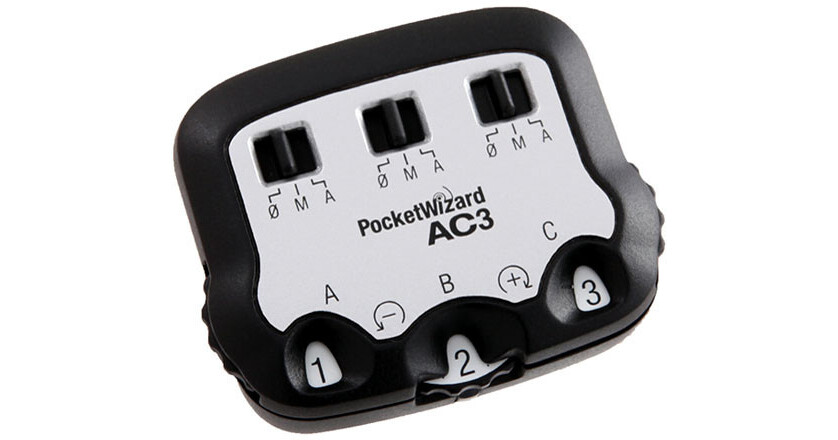
When you add the Pocket Wizard AC3 ZoneController for Canon to your on-camera MiniTT1 Transmitter or FlexTT5 Transceiver, you instantly have three zones of flash control. Whether in E-TTL II or Manual mode, you have control over all your flashes from your camera position. Put your flashes wherever you want, without worrying about having to access them during a shoot. 

Three clearly labeled dials let you increase or decrease power to three zones of flash in 1/3-stop increments--with a range of up to six stops. Three switches allow you to change zones between Manual, Auto (PowerTracking/E-TTL II) or OFF. Best of all, the design is simple to use, with an intuitive interface. When matched with the PowerST4 or AC9 AlienBees Adapter, you can now control ElinchromRX1, White Lightning2 and AlienBees2 flashes right from the camera's position.

More Details
In Stock
No Store Display
Free 2-Day Shipping
Ask an Expert
800-606-6969

PocketWizard AC3 Overview

When you add the Pocket Wizard AC3 ZoneController for Canon to your on-camera MiniTT1 Transmitter or FlexTT5 Transceiver, you instantly have three zones of flash control. Whether in E-TTL II or Manual mode, you have control over all your flashes from your camera position. Put your flashes wherever you want, without worrying about having to access them during a shoot. 

Three clearly labeled dials let you increase or decrease power to three zones of flash in 1/3-stop increments--with a range of up to six stops. Three switches allow you to change zones between Manual, Auto (PowerTracking/E-TTL II) or OFF. Best of all, the design is simple to use, with an intuitive interface. When matched with the PowerST4 or AC9 AlienBees Adapter, you can now control ElinchromRX1, White Lightning2 and AlienBees2 flashes right from the camera's position.

The AC3 requires firmware version 5.10 (or later) be installed on paired MiniTT1's and FlexTT5's.

Three independent zones of flash control
6 stops of flash control in 1/3rd stop increments
Works in PowerTracking/E-TTL II or Manual mode
Turn zones on and off remotely
Put your flashes where you want, without worrying about accessing them during a shoot
UPC: 893577001699

PocketWizard AC3 Specs

Mounting
Hot shoe
Status Indicator
LED: Green status indicator
Operating Temperature
Above 5°F (-15°C) and below 120°F (50°C)
Storage Temperature
Above 22°F (-30°C) and below 185°F (85°C)
Power
Receives power from MiniTT1 Transmitter or FlexTT5 Pocket Wizard
Dimensions
2 x 1.7 x 0.9" (5 x 4.2 x 2.1 cm)
Weight
0.82 oz (23.25 g)
Requirements
MiniTT1 Transmitter or FlexTT5 Transceiver with firmware version 5.10 (or later) needed as a host
Packaging Info
Package Weight
0.16 lb
Box Dimensions (LxWxH)
4.35 x 4.35 x 1.8"

PocketWizard AC3 Reviews

The easy way to control lights

By Edmundo
Rated 5 out of 5
Date: 2020-11-14

Just the easiest way to control your lighting. Works every time whether you are using speed lights or studio lights like Paul c Buffs Products.

Useless with older canon flash units

By Jim simi pro protrait photographer
Rated 1 out of 5
Date: 2015-06-04

Unless you have a latter 580exII don't buy this unit. It only works with the newer flash units. I guess I should have read that before buying it last year. I wish I had all the money I have spent on pocket wizard and radio poppers units, I could easily get a new set of canon flashes with the radios built right in. Oh well!

See any errors on this page?

question

will this work with the plus x pocket wizard attached to the flash?
Asked by: cindy
This controller is only for use with the Pocket Wizard Flex TT5 when used as a transmitter on the camera and when another Flex TT5 is attached to a compatible flash unit.
Answered by: Kirk R.
Date published: 2018-08-28

question

Does this work with a Canon 5D Mark 111?
Asked by: Cheri
As long as you have a MiniTT1, FlexTT5, or FlexTT6 on the camera, you can use the AC3 to adjust power to remote flashes with ControlTL receivers, like FlexTT5 or FlexTT6 radios.
Answered by: PocketWizard Expert
Date published: 2019-01-08

question

Will this work with the Canon 600EX II-RT?
Asked by: MARK
This controller can work with the Canon 600EX II RT when it is equipped with the PocketWizard FlexTT6 Transceiver for Canon B&H # WIFLEXTT6C and when the another TT6 unit is on the camera.
Answered by: Kirk R.
Date published: 2018-08-28

question

Does this product work with Profoto D1 1000 strobes? Thank you!
Asked by: Anonymous
No the Zone Controller is not compatible with Profoto lights. At this time they are only compatible with Canon and Nikon flashes, and select Elinchrom and Paul Buff lights.
Answered by: Yos O.
Date published: 2018-08-28

question

Will this work with PocketWizard Flex TT6?
Asked by: Nick
Yes, it is fully compatible.
Answered by: PocketWizard Expert
Date published: 2019-01-08

question

Will this work with the PocketWizard PlusX alone or when used with PocketWizard MiniTT1 Radio Slave Transmitter for Canon?
Asked by: Kelly Ann
Kurt L is correct. But keep in mind if you want to adjust power to your flash, you need to use a ControlTL receiver, like a FlexTT5, FlexTT6, PowerST4, or PowerMC2. The transmitting radio can trigger a PlusX connected to a strobe as well as the remote FlexTT5s. You cannot use the AC3 to turn the a PlusX's flash on or off, as the PlusX does not have Zones, it will always fire. With a Plus III, you can use the AC3 to turn the flash on or off.
Answered by: PocketWizard Expert
Date published: 2019-01-09

question

Will this work with Canon 580EX (not EXII)?
Asked by: Anonymous
Yes.
Answered by: Vi L.
Date published: 2018-08-28
  • y_2026, m_6, d_2, h_13CST
  • bvseo_bulk, prod_bvqa, vn_bulk_3.0.46
  • cp_1, bvpage1
  • co_hasquestionsanswers, tq_7
  • loc_en_US, sid_724310, prod, sort_[SortEntry(order=HAS_STAFF_ANSWERS, direction=DESCENDING)]
  • clientName_bhphotovideo
Whatever You Need, We've Got It