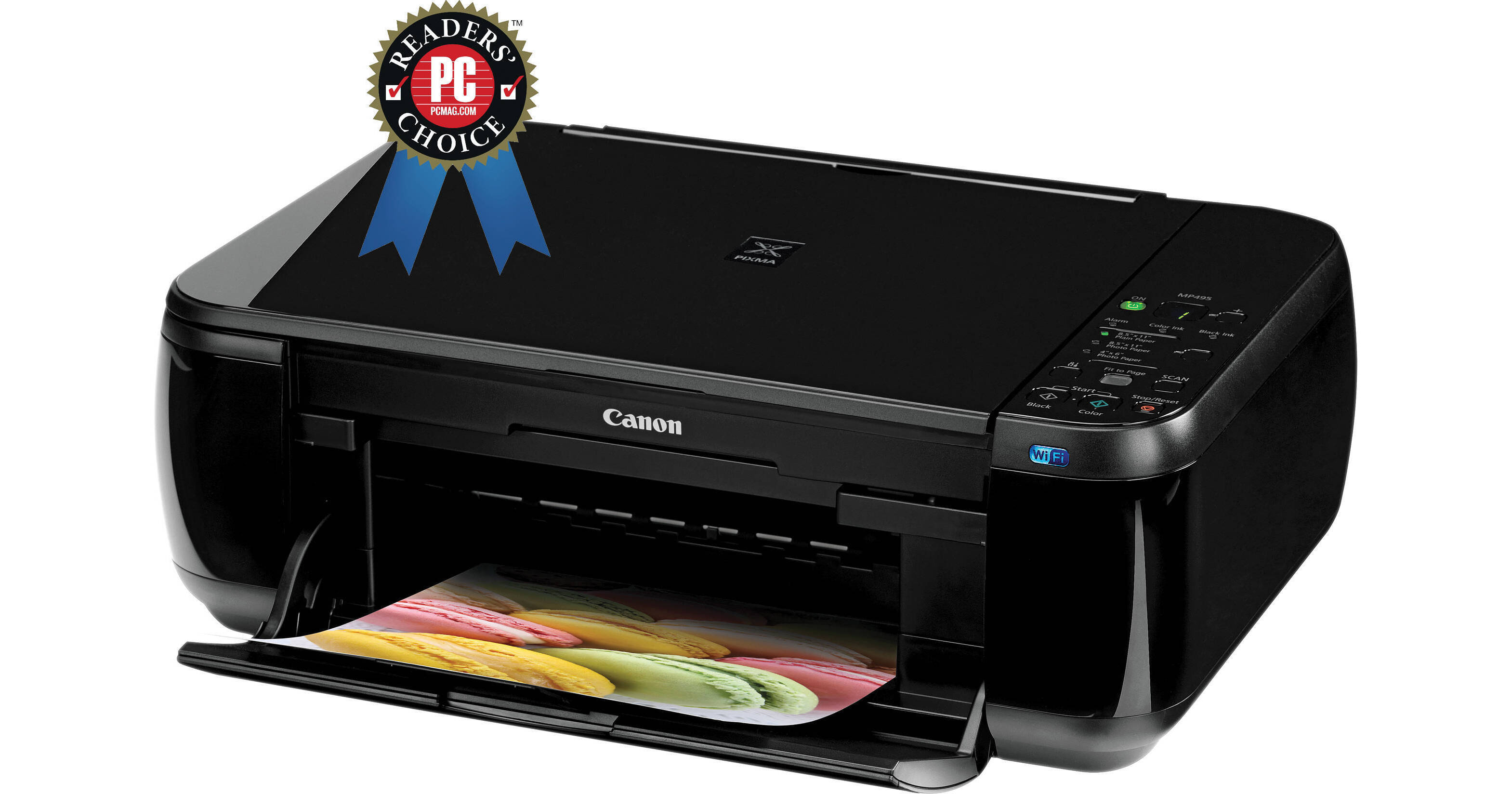
Canon PIXMA MP495 Wireless Photo All-in-One Inkjet Printer

BH #CAMP495 • MFR #4499B026
Print
Canon PIXMA MP495 Wireless Photo All-in-One Inkjet Printer
Key Features
  • Wireless Printing & Scanning
  • 4 x 6" Photo in Approx. 41 Seconds
  • Photo Resolutions -up to 4800 x 1200 dpi
  • Print Photos from HD Movie Clips
Canon's PIXMA MP495 Wireless Photo All-in-One Inkjet Printer is an affordable solution for meeting everyday wireless printing and scanning from anywhere in the house. You will also be able to enjoy the convenience of Wi-Fi photo printing with ease from compatible iPhones, iPod Touch and Android devices.

This printer outputs a 4 x 6" borderless photo in about 41 seconds and boasts color print resolutions up to 4800 x 1200 maximum dpi. Canon's patented Hybrid Ink System consists of a pigment black ink cartridge for crisp text and a tri-color dye ink cartridge for beautiful photos up to 8.5 x 11".

Whether you are sending important documents to your lawyer or your favorite photos of the kids for grandma, your job gets easier with the MP495. Originals can be scanned into your computer for quick and easy e-mail attachments. Copies of documents often look different from the original, but with the built-in Auto Document Fix your page is automatically corrected for clear, sharp text. With Auto Photo Fix II your images are automatically evaluated and then image color corrections, red-eye removal, and exposure corrections are applied for images that zing.

Many Canon EOS DSLRs and PowerShot point & shoot cameras are equipped to record HD movies. The problem that may arise is that you can miss capturing a once-in-a-lifetime still image while concentrating on the movie. The MP495 solves the problem with Canon's Full HD Movie Print software that converts .MOV movie clips into the still photos you normally would have otherwise missed. Now when you make a movie of hat tossing of your son or daughter at college graduation, you can also have a borderless photo for your album or your picture frame.

More Details
No Longer Available
No Store Display
Ask an Expert
800-606-6969

Canon MP495 Overview

Canon's PIXMA MP495 Wireless Photo All-in-One Inkjet Printer is an affordable solution for meeting everyday wireless printing and scanning from anywhere in the house. You will also be able to enjoy the convenience of Wi-Fi photo printing with ease from compatible iPhones, iPod Touch and Android devices.

This printer outputs a 4 x 6" borderless photo in about 41 seconds and boasts color print resolutions up to 4800 x 1200 maximum dpi. Canon's patented Hybrid Ink System consists of a pigment black ink cartridge for crisp text and a tri-color dye ink cartridge for beautiful photos up to 8.5 x 11".

Whether you are sending important documents to your lawyer or your favorite photos of the kids for grandma, your job gets easier with the MP495. Originals can be scanned into your computer for quick and easy e-mail attachments. Copies of documents often look different from the original, but with the built-in Auto Document Fix your page is automatically corrected for clear, sharp text. With Auto Photo Fix II your images are automatically evaluated and then image color corrections, red-eye removal, and exposure corrections are applied for images that zing.

Many Canon EOS DSLRs and PowerShot point & shoot cameras are equipped to record HD movies. The problem that may arise is that you can miss capturing a once-in-a-lifetime still image while concentrating on the movie. The MP495 solves the problem with Canon's Full HD Movie Print software that converts .MOV movie clips into the still photos you normally would have otherwise missed. Now when you make a movie of hat tossing of your son or daughter at college graduation, you can also have a borderless photo for your album or your picture frame.

Built-In Wireless Connectivity
Print or scan wirelessly from any Wi-Fi enabled computer almost anywhere around the house.
Note:
Wireless printing requires a working network with wireless 802.11b/g or n capability. Wireless performance may vary based on terrain and distance between the printer and wireless network clients.
Smartphone Printing
Take full advantage of Canon's fantastic Wi-Fi printing technology to unlock, print and share your stored images right on the spot. Print the Canon Easy-PhotoPrint for iPhone application, available for free on the App Store, or the Canon Easy-PhotoPrint for Android application available for free in the Android Market.
Note:
Compatible with iPhone 3G, 3GS, 4, iPod touch and Android devices running Android OS 1.6 or later.
Full HD Movie Print
Canon's Full HD Movie Print software turns your favorite HD movie moments captured with select Canon EOS or PowerShot cameras into beautiful, borderless photo prints.
Note:
Full HD Movie Print is available from .MOV movie files created by Canon digital cameras. From PC, or Mac with Intel processor. Requires Canon ZoomBrowser EX 6.5 or later, or Canon ImageBrowser 6.5 or later.
Great Resolution
The MP495 delivers high quality photos achieved by 4800 x 1200 maximum color dpi thanks to Canon Full-photolithography Inkjet Nozzle Engineering (FINE) with a patented print head firing ink droplets as small as 2 picoliters. This delivers superb quality and detail in both your business documents and photos.
Note:
Resolution may vary based on printer driver setting. Color ink droplets can be placed with a horizontal pitch of 1/4800 inch at minimum.
High Performance Ink Cartridges
This printer utilizes two genuine Canon ink cartridges containing specially formulated inks for great document and photo quality. One is a black cartridge for laser-quality text and one is a multi-color cartridge for beautiful photos. Both are easy to use and replace.
Print Archival Life up to 300 Years
The ChromaLife 100+ ink system combines FINE print head technology with select Canon photo papers for beautiful borderless photos that will last up to 300 years when stored in an archival-quality photo album.
Note:
Canon cannot guarantee the longevity of prints; results may vary depending on printed image, drying time, display/storage conditions, and environmental factors.
Fast Photo Output
The MG495 delivers a 4 x 6" (101.6 x 152.4mm) borderless photo in approximately 43 seconds.
Note:
Print speed is measured as soon as first page begins to feed into printer and will vary depending on system configuration, interface, software, document complexity, print mode, the types of paper used and page coverage.
USB 2.0
Plug the cable (included) into your PC for a super-fast connection for your data transfers via its USB 2.0 Hi-Speed interface.
Auto Photo Fix II
The built-in Auto Photo Fix II technology automatically categorizes your images into one of five types - Portrait, Scenery, Night Scenery, Snapshot with Scenery, and Snapshot with Night Scenery - then applies optimal image and multi-zone exposure correction. So, unexposed areas of the photo will be optimized, area by area and faces that are backlit and under-exposed will automatically be brightened with correct color cast to help ensure more accurate skin tones for gorgeous images.
Auto Document Fix
Auto Document Fix delivers beautiful, easy-to-view scans by advanced image analysis and area-by-area data correction, automatically. So, your document text can be darkened with pronounced edges for clear, sharp text that's easy to read, and pictures will maintain color tone and contrast.
Seven Segment LED
The control panel features a seven segment LED to easily set number of copies and view printer job status.
Auto Scan Mode:
While in the Auto Scan mode the MP280 automatically recognizes the type of original, then scans and saves the suitable settings.
Note:
For network users, Auto Scan mode is only available when scanning at a computer using MP Navigator EX software and selecting the 1-click feature then "save to PC".
Easy-WebPrint EX
The Easy-WebPrint EX software enables you to print what you want off the web, easily. Easy-WebPrint EX software allows you to clip, collect and combine different web pages so you can create your own layout. Take different sections of different websites and put them all on one page. Move, resize and trim your clips, insert notes and text, make it a portrait or landscape, print up to 3 columns on a page and even save the layout as a PDF file.
Note:
Compatible with Microsoft Internet Explorer 7 in Windows 7, Windows Vista or Windows XP only. It is not included on installation CD and requires an Internet connection during installation.
Quick Start
Powering up your printer is faster than ever. After pressing the power button you can begin inputting commands in mere seconds. So, full operation is possible in a much shorter time.
Software Bundle
The included software bundle allows you to print amazing images and copies - Setup Software and User's Guide, MP495 Printer Driver, Easy-PhotoPrint EX, Full HD Movie Print, MP Navigator EX, Solutions Menu, and Easy-WebPrint EX (Windows only, requires internet download).
Note:
Full HD Movie Print is available from .MOV movie files created by Canon digital cameras. From PC, or Mac with Intel processor. Requires Canon ZoomBrowser EX 6.5 or later, or Canon ImageBrowser 6.5 or later.
Copier Features
  • 4 of the same images on 1 page
  • 2 of the same images on 1 page
  • Auto Exposure / Intensity
  • Borderless / Continuous
  • Face Brightener / Fading Correction
  • Fit-to-Page
  • Gutter Shadow Correction
  • Intensity
  • Image Repeat
  • Manual Color Adjustment
  • Masking
  • Multiple: 1-9 copies, 20 pages
  • Photo Reprint
  • Trimming
Scanner Features
  • Auto Scan Mode
  • Gutter Shadow Correction
  • Push Scan
Note:
For network users, Auto Scan mode is only available when scanning at a computer using MP Navigator EX software and selecting the 1-click feature then "save to PC".

Canon MP495 Specs

Printing Technology
Color inkjet
Maximum Resolution
Color: up to 4800 x 1200 dpi
Black: up to 600 x 600 dpi
Print Speed
4 x 6" (101.6 x 154.4mm) borderless photo: approx. 41 sec
Black: approx. 8.8 ipm
Color: Approx. 5.0 ipm
Ink Droplet Size
2 and 5 pl
Ink Type
Dye and pigment
Ink Palette
CMYK
Ink Cartridge Configuration
1 x PG-210 Black Ink Cartridge (pigment)
1 x CL-211 Tri-color Ink Cartridge (dye)
Number of Nozzles
Color: 1152
Black: 320
Total: 1472
Input Buffer
Not Specified by Manufacturer
Printer Duty Cycle
Not Specified by Manufacturer
Print Archival Life
Up to 300 years

Note: Canon cannot guarantee the longevity of prints; results may vary depending on printed image, drying time, display/storage conditions, and environmental factors.

Printer Language
Not Specified by Manufacturer
Scanner
Scanner Type
Flatbed
Image Sensor
Contact Image Sensor (CIS)
Maximum Document Size
8.5 x 11.7" (215.9 x 297.2mm)
Optical Resolution
1200 x 2400 dpi
Interpolated Resolution
19,200 x 19,200 dpi
Color Depth
48-bit internal
24-bit external
Scan Speed
Not Specified by Manufacturer
Dynamic Range
Not Specified by Manufacturer
Light Source
Not Specified by Manufacturer
Copier
Copy Speed
FCOT color: approx. 37 sec
Copy Resolution
Not Specified by Manufacturer
Reduction/Enlargement
25-400%
Paper Handling
Maximum Paper Width
8.5" (215.9mm)
Maximum Printable Area
Legal (8.5 x 14", 215.9 x 355.6mm)
Paper Sizes
4 x 6" (101.6 x 152.4mm)
5 x 7" (127 x 177.8mm)
8 x 10" (203.2 x 254mm)
Letter (8.5 x 11", 215.9 x 279.4mm)
Legal (8.5 x 14", 215.9 x 355.6mm)
U.S. #10 Envelopes
Borderless Photo Sizes
4 x 6" (101.6 x 152.4mm)-8.5 x 11" (215.9 x 279.4mm)
Paper Types
Plain: Plain paper, high resolution paper
Super High Gloss: Photo Paper Pro Platinum
Glossy: Photo Paper Plus Glossy II, Photo Paper Glossy
Semi-Gloss: Photo Paper Plus Semi-Gloss
Matte: Canon Matte Photo Paper
Envelopes: U.S.# 10 envelopes
Borderless Photo Printing:
Canon Photo Paper Pro Platinum, Canon Photo Paper Plus Glossy II, Canon Photo Paper Plus Semi-Gloss, Canon Photo Paper Glossy and Canon Matte Photo Paper
Maximum Paper Thickness
11.8 mil
Maximum Paper Basis Weight
80 lb (218 gsm)
Paper Capacity
Output tray: 100 sheets
Special Media Support
Not Specified by Manufacturer
Connectivity
Computer Interface
Wireless LAN (IEEE 802.11b/g/n)
USB 2.0 Hi-Speed
Compatible Memory Cards
N/A
Direct Print Capable
No
Network Capable
Wireless
PostScript Support
Not Specified by Manufacturer
Compatible Operating Systems
Windows 7
Windows Vista
Windows XP
Mac OS X v 10.4.11 to 10.6.x
Physical
Status Display
7 segment LED
Image Preview Display
No
Front Panel Controls
Yes
Power Requirements
110-120VAC 60 Hz
210-240VAC 50 Hz
Power Consumption
Working: 11W
Standby: 1.2W
Off: 0.3W
Dimensions
17.8 x 13.2 x 6.0" (152.1 x 355.3 x 152.4mm)
Weight
12.2 (5.5 kg)

Canon MP495 Reviews

See any errors on this page?
Whatever You Need, We've Got It