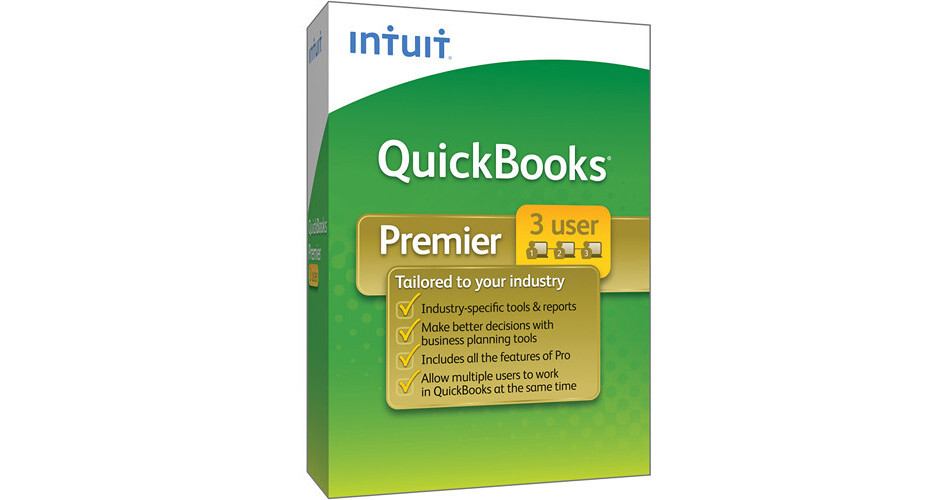
Intuit QuickBooks Premier Industry 2011 Software (3-User License)

BH #INQBPI32011 • MFR #414027
Print
Intuit QuickBooks Premier Industry 2011 Software (3-User License)
Key Features
  • Tailored to Your Industry
  • Choose Industry Upon Installation
  • Track Sales, Expenses, & Customers
  • Create Invoices
The QuickBooks Premier Industry 2011 Software from Intuit is a bookkeeping application for Windows. The software features tools geared towards specific industries. You'll be able to choose the one that best suits you during installation. The versions you can choose from are: Contractor, Manufacturing & Wholesale, Nonprofit, Professional Services, Retail, and General Business. The software features a license that allows you to install it on three computers.
More Details
No Longer Available
No Store Display
Ask an Expert
800-606-6969

Intuit 414027 Overview

The QuickBooks Premier Industry 2011 Software from Intuit is a bookkeeping application for Windows. The software features tools geared towards specific industries. You'll be able to choose the one that best suits you during installation. The versions you can choose from are: Contractor, Manufacturing & Wholesale, Nonprofit, Professional Services, Retail, and General Business. The software features a license that allows you to install it on three computers.

QuickBooks gives you the tools necessary to organize your finances from a central location. You'll be able to manage customer, vendor, and employee data, allowing you to organize your contacts with ease. You can track money coming in and going out, ensuring that your books are accurate. You'll be able to use it to create invoices, pay bills, and scan checks. It allows you to organize your finances in one place, making it easy to prepare for tax time.

Note:
The Intuit software sold at B&H is intended for use in the US only. It is not aware of tax regulations in other countries.
Features and Charts Specific to Contractor Version
Create 'Jobs by Vendor' Report
Organize your job costs by vendor, and see which vendors still need to be paid.
Run 'Cost to Complete Job' Report
Keep tabs on how much it will cost you to complete each job, and how your actual costs are comparing to your estimated costs.
Analyze Job Profitability
Customized job cost reports allow you to see a job's profitability on a detailed, task-by-task level.
Create Job Estimates and Track Change Orders
As a job changes simply enter change orders into the estimate to keep track of the changes and their impact on your bottom line. Change orders are included on documents you print for your customer so that there are no surprises at the end of the job.
Bill Clients Progressively by Job Phase
Track and bill clients by time and material, job phase, or percentage completion, whatever works best for your unique business.
Track Expenses That Are Not Assigned to Jobs
Identify expenses that haven't been categorized and easily assign them to jobs.
Features and Charts Specific to Manufacturing & Wholesale Version
Track Inventory Reorder Point by Vendor
Track inventory and set optimal inventory levels. Run a report showing items that need reordering.
Create Bill of Materials
Create Bill of Materials to track material costs, overhead costs, and labor. During manufacturing, mark assembly items as pending to see work in progress.
Track Profitability by Product
Keep track of your biggest moneymakers so you'll know which products to promote and keep in stock, and which to drop from your line.
Track Sales by Product
See which products generate the best sales each month, quarter, year, or any time period you designate.
Track Open Sales Order by Customer
Follow open orders by customer to ensure that your most important customers get the products they need.
Buy and Sell the Same Item in Different Units
Set multiple units of measure for each inventory item to track the amounts used and available. With a click you can instantly convert from cases to pallets or other units you define. Correct units are printed on invoices, purchase and sales orders, pick lists, and packing slips.
Adjust Price Levels by Item
Set custom prices for individual items for different customers or jobs.
Features and Charts Specific to Nonprofit Version
Track Your Balance Sheet by Class
Whether your company has several programs or locations, you can now track the data separately within a single, easy to access report.
Create End-of-Year Donation Statements
See who your biggest donors are and track their contributions.
Create Form 990 (Statement of Functional Expenses)
Identify your expenses for presentation to your board, major donors, and the IRS.
Create Statement of Financial Income and Expense
Easily show your board of directors how much money came in, and how it was spent.
Run Donor Contribution Summary Reports
Track each donor's contribution totals as needed.
Import a Nonprofit Chart of Accounts
Easily create a unified chart of accounts based on the filing requirements of Form 990.
Track Budgets and Finances by Program
Follow contributions versus budgeted amount for each program.
Features and Charts Specific to Professional Services Version
Track Your Balance Sheet by Class
Whether your company has several programs or locations, you can now track the data separately within a single, easy to access report.
Track Time and Expenses by Employee, Project, Client, or Service
Decide who to bill by seeing all clients with unbilled time and expenses on a single screen. No need to create an invoice from scratch -- just open the Invoice for Time & Expenses screen and select the client and job combination.
Transfer Unbilled Time and Expenses to Customized Invoices
Make sure you get paid by applying outstanding time and expenses to customized invoices.
Set Different Billing Rates by Employee, Client, and Service
Pay and get paid the right amount by quickly and easily setting individual different billing rates.
Analyze Profitability by Project and Client
Reports like Billed vs. Proposal by Project, Cost-to-Complete by Job, and Job Costs by Job and Vendor help you stay on top of which projects are most profitable.
Track Unbilled Expenses by Project
Stay on top of unbilled expenses for each project to ensure you get paid.
Features and Charts Specific to Retail Version
Run Profit and Loss Monthly Comparison Report
Easily compare one month's profit and loss against another.
Track Which Sales Orders Are Ready to Ship
Review pending sales orders and quickly see which ones are fulfillable with the Sales Order Fulfillment Worksheet.
Easily Track Sales Results
Track sales accurately and flexibly with the Sales Summary Form. Enter total payments and taxable/non-taxable sales for the day, week, or any time period you choose.
Analyze Sales Trends and Profitability
Easily customized reports show you how your business stands, and help you make important decisions about what to sell to increase your bottom line.
Turn Work Orders into Purchase Orders with One Click
No need to retype line items or vendor information -- just edit quantities, if needed, and print, or e-mail your Purchase Order directly from QuickBooks.
Track Returns by Vendor
Keep tabs on what goods are most commonly returned to each vendor.
Track Purchase Volume by Vendor
Keep track of purchase volumes from your most important vendors.
Review Gross Margin by Inventory Item
Keep track of your biggest moneymakers so you'll know which products to promote and keep in stock, and which to drop from your line.
Features and Charts Specific to General Business Version
View Customized Sales and Profitability Reports
Keep track of your biggest moneymakers so you'll know which products to promote and keep in stock, and which to drop from your line.
Track Your Balance Sheet by Class
Now you can now track data separately by location, department, or profit center with a single, easy to access report.
Run 'Cost to Complete Job' Report
Keep tabs on how much it will cost you to complete each job, and how your actual costs are comparing to your estimated costs.
Document and Track Change Orders
As a job changes, simply enter change orders into the estimate to keep track of the changes and their impact on your bottom line. Change orders are included on documents you print for your customer so that there are no surprises at the end of the job.
Bill Clients Progressively by Job Phase
Track and bill clients by time and material, job phase, or percentage completion, whatever works best for your unique business.
Track Time and Expenses by Employee, Project, Client, or Service and Create an Invoice
Decide who to bill by seeing all clients with unbilled time and expenses on a single screen. No need to create an invoice from scratch -- just open the Invoice for Time & Expenses screen and select the client and job combination. Outstanding billable time and expenses are transferred directly to the invoice.
Features Common to All Versions
Faster Access to the Information You Need, When You Need It
One-Click Financial, Tax, and Sales Reports
Get pre-designed, customizable business reports to gain insights into your business. See all available reports in one screen to easily choose the right one. Drill down with one click to see the detail behind the numbers. Export any report to Excel -- your QuickBooks formatting and formulas go with it. Access industry-specific reports in QuickBooks Premier and Enterprise Solutions.
Track Your Balance Sheet by Class
Whether your company has several funds, departments, or locations, you can now track the data separately within a single, easy to access report.
Create Industry-Specific Reports and Install Industry Features
Access over 150 industry-specific reports in QuickBooks Premier and Enterprise Solutions such as: Profitability by Product for manufacturing and wholesale businesses, Job/Project Costs for professional services firms & contracting businesses, Donor Contribution Summary for nonprofit organizations, Sales Tax Liability for retail businesses.
Allow Multiple Users to Work in QuickBooks at the Same Time
Multiple-user functionality enables more than one person to work on a company file at the same time, increasing collaboration and productivity. It ensures that all users are working on the most up-to-date data.
See All Your Key Customer Information at a Glance with the Customer Snapshot
Customer Snapshot gives you a consolidated view so you can assess at a glance your customer's purchase history, average days to pay, and outstanding balance and make timely decisions on customer requests. You can also identify your top customers by revenue and payment consistency, and prioritize them accordingly.
Stay on Top of Your Receivables with the Collections Center
Quickly identify overdue and almost due invoices, and e-mail all collection notices from your Outlook, Yahoo, Gmail or Hotmail account in a few steps.
Stay on Top of Your Business by Customizing Your Company Snapshot
See at a glance year-over-year income and expense trends, income and expenses details, and top customers.
Download Your Bank and Credit Transactions into QuickBooks
Save time and avoid data entry errors. Instead of typing in your bank and credit card transactions, download them securely from over 3000 participating financial institutions and easily import them into QuickBooks.
Track Inventory, Set Reorder Points and Create Purchase Orders
Easily track your inventory to avoid overbuying and backorders. Indicate re-order points for each inventory good and turn on reminders to automatically let you know when its time to reorder.
Quickly Locate Any Account, Report, or Invoice with Just a Keyword in QuickBooks Search
Your QuickBooks file is the repository of record for your business, but finding the exact information you need is not always easy. With QuickBooks Search, all you need to do is enter the keyword, and it will pull up all the related reports, invoices, contacts and transaction details.
Import Data from Excel, Quicken, Microsoft Office Accounting and Prior QuickBooks Versions
Get up and running fast by importing data from the tool you use to track your finances now. However little or much data you currently have, you won't have to start over from scratch.
Access Customer and Vendor Balance and Transaction History
See at a glance important details such as your customer's payment history, estimates, and past orders with vendors right at your fingertips on the same screen, so that you can complete the transaction at one time instead of switching back and forth between screens.
Everyday Tasks Made More Efficient
Manage Your Bills
Keep close track of what you owe and set simple due-date reminders.
Track Sales, Sales Taxes, and Customer Payments
Get rid of piles of paperwork. Easily enter customer payments. Since QuickBooks organizes everything in one place, you'll be able to access all past payments for each customer with just a few clicks.
Manage Payroll and Payroll Taxes, and Offer Direct Deposit
Intuit QuickBooks Payroll Services, QuickBooks Payroll for Mac powered by PayCycle, and Payroll for QuickBooks Online save you time by eliminating steps and giving you the tools to get your payroll done right.
Note:
Sold Separately
Send Invoices and Estimates Right from Your Business Yahoo, Gmail, or Hotmail Account
The new webmail integration allows you to easily e-mail right from QuickBooks. You can also e-mail using Microsoft Outlook or Outlook Express.
Save Time with Batch Invoicing
Automatically create a full set of invoices for customers with the same service. Just create the invoice once and select the customers you want to send it to.
Accept Credit and Debit Cards Right in QuickBooks
Process credit card approvals right in your QuickBooks software. If you use Intuit QuickBooks Merchant Services, the data is automatically recorded in QuickBooks when you make a sale. And, it has no teaser rates, no hidden fees, no cancellation fees, and no long-term contracts.
Scan and Deposit Your Checks with Intuit Check Solution for QuickBooks
Easily scan and deposit your checks into QuickBooks with Intuit Check Solution for QuickBooks.
Note:
Subscription Required; Scanner Sold Separately
Track Time, Mileage, and Expenses to Bill Clients
Record time and expenses by client job so you can easily stay on top of your projects. From there, it's easy to invoice clients in a few clicks so you won't miss any billable time and expenses.
Free 1 Hour Phone Session with an Intuit QuickBooks Expert
Let Intuit help you get started with confidence, and answer all of your QuickBooks questions. Simply call them after registering your product.
New in 2011
Track Your Balance Sheet by Class
Whether your company has several funds, departments, or locations, you can now track the data separately within a single, easy to access report.
See All Your Key Customer Information at a Glance with the Customer Snapshot
Customer Snapshot gives you a consolidated view so you can assess at a glance your customer's purchase history, average days to pay, and outstanding balance and make timely decisions on customer requests. You can also identify your top customers by revenue and payment consistency, and prioritize them accordingly.
Invoice Multiple Customers at Once with Batch Invoicing
Automatically create a full set of invoices for customers with the same service. Just create the invoice once and select the customers you want to send it to.
Quickly Locate any Account, Report, or Invoice with QuickBooks Search
Your QuickBooks file is the repository of record for your business, but finding the exact information you need is not always easy. With QuickBooks Search, all you need to do is enter the keyword, and it will pull up all the related reports, invoices, contacts and transaction details.
Stay on Top of Your Receivables with the Collections Center
Quickly identify overdue and almost due invoices, and e-mail all collection notices from your Outlook, Yahoo, Gmail or Hotmail account in a few steps.
Access Customer and Vendor Balance and Transaction History
See at a glance important details such as your customer's payment history, estimates, and past orders with vendors right at your fingertips on the same screen, so that you can complete the transaction at one time instead of switching back and forth between screens.
Send Invoices and Estimates Right from Your Business Yahoo, Gmail or Hotmail Account
Webmail integration allows you to easily e-mail right from QuickBooks without going through the steps of setting up Outlook.
Keep Track of Your Vendors' Remittance Address
Keep track of your vendor's remittance with a convenient new field.
Mark Which Invoices Have Been Paid with the Paid Date Stamp
You can now quickly go through your stack of invoices without having to take time to look for individual payment dates.
Free 1 Hour Phone Session with an Intuit QuickBooks Expert
Let Intuit help you get started with confidence, and answer all of your QuickBooks questions. Simply call them after registering your product.

Intuit 414027 Specs

Packaging Info
Package Weight
0.65 lb
Box Dimensions (LxWxH)
10.9 x 7.8 x 2.2"

Intuit 414027 Reviews

See any errors on this page?
Whatever You Need, We've Got It