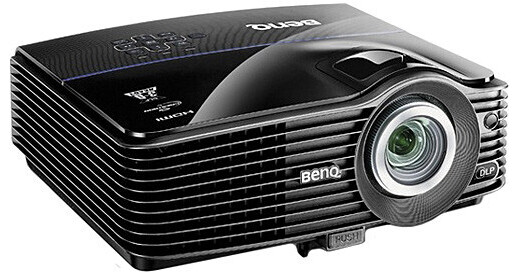
BenQ MX760 Projector

BH #BEMX760 • MFR #MX760
Print
BenQ MX760 Projector
Key Features
  • Multiple Display Options
  • LAN Control / LAN Display
  • 3D-Ready
  • Lens Shift + 1.6x Big Zoom
The BenQ MX760 Projector is a problem solver. Think up an instillation or presentation dilemma and it's likely that the MX760 has been equipped with the solution. Combining quality features and high controllability has made the MX760 successful where most other projectors would fail. In a room with fans, lights and other ceiling clutter near the projection screen; it becomes difficult to ceiling mount a projector. The MX760 can work around ceiling clutter due to its 1.6x zoom, which affords a wider range of instillation up to nearly nine feet away.

After instillation is complete, the MX760 can make vertical lens shift adjustments and auto / manual keystone corrections to ensure a perfectly square image display. The Wall Color Correction will adjust the color or the image in the event the wall or screen being projected on is not totally white. Even in high altitude, the MX760 has a feature that optimizes the projector for more extreme climates and elevations. The MX760 is equipped to work anywhere.

More Details
No Longer Available
No Store Display
Ask an Expert
800-606-6969

BenQ MX760 Overview

The BenQ MX760 Projector is a problem solver. Think up an instillation or presentation dilemma and it's likely that the MX760 has been equipped with the solution. Combining quality features and high controllability has made the MX760 successful where most other projectors would fail. In a room with fans, lights and other ceiling clutter near the projection screen; it becomes difficult to ceiling mount a projector. The MX760 can work around ceiling clutter due to its 1.6x zoom, which affords a wider range of instillation up to nearly nine feet away.

After instillation is complete, the MX760 can make vertical lens shift adjustments and auto / manual keystone corrections to ensure a perfectly square image display. The Wall Color Correction will adjust the color or the image in the event the wall or screen being projected on is not totally white. Even in high altitude, the MX760 has a feature that optimizes the projector for more extreme climates and elevations. The MX760 is equipped to work anywhere.

Once installed, the adaptability of the MX760 really shows. With multiple display options, it's easy to create high-quality, effective presentations. The MX760 has HDMI connectivity, ensuring that the highest-quality, future-proof technology is available on this projector. The dual PC inputs let you connect two computers to one projector simultaneously, for better options and faster presentations.

The USB ports offer several conveniences. They allow you to give PC-less presentations through a USB flash drive. They also offer plug-and-play possibilities and extension support for simultaneous multi-projection display. With an optional BenQ wireless adapter you can also use the USB port to display presentations from your computer wirelessly and execute centralized network control via WLAN connectivity.

The display is enhanced by several features including BrilliantColor technology, which uses a five-segment color wheel to reproduce a rich and accurate palate of crisp colors. The MX760 is also prepared for presentations and entertainment that require 3D technology. With 3D capabilities, it can project images in life-like 3D and make your entertainment more exciting and your presentations more interactive.

When considering a projector that will run on a network, the MX760 makes a strong argument. It supports Crestron, PJ-Link and SNMP. It also lets IT managers easily take care of day-to-day maintenance and repair. All projectors on the network can be accessed remotely through a central workstation and the seamless network support the MX760 offers, will ensure smooth operation through LAN.

For teachers, BenQ has instituted a teaching template function. Aiding educators with four pre-programmed line pattern designs, the template eliminates the need to waste class-time drawing lines for charts, tables, music, etc. The four different designs are projected on your whiteboard and students can easily write music or do work along the lines supplied by the teaching template. Also great for teachers, the built-in closed caption decoder converts words into subtitles. The subtitles are projected onto the screen, addressing the needs of language students and hearing-impaired viewers.

If your voice is soft and your class is loud, then the 20W speaker system built-in to the MX760 will be an asset. Hook up microphones and deliver bright and defined audio to match the visual quality of the projector. Even on standby mode, the MX760 can be used as an audio system. It's this kind of forward thinking that makes the BenQ MX760 a presentation problem solver.

Impressive 1.6x Zoom
In an effort to make more flexible projectors, BenQ has given the MX760 a 1.6x zoom that can project a 60" image on the wall from nearly nine feet away. For rooms with ceiling fans, multiple lights or limited ceiling space; this offers a solution
Vertical Lens Shift Instillation Flexibility
Make minor projection adjustments to the image by shifting the display up by 20°. This gives your projector added adaptability to overcome small miscalculations that arise during installation
Auto / Manual Keystone Correction
Automatically or manually, the MX760 gets rid of misshaped images, graphics and charts instantaneously via its ± 40° vertical keystone adjustment function. With the MX760, you can achieve a perfect square display every time
LAN Control Centralized Projector Management
LAN Control is designed to help IT managers perform day-to-day projector maintenance and repair tasks efficiently and effectively. They'll have access and control over every projector directly from their workstations. The MX760 offers seamless support for your original LAN Control setting - whether it's Crestron, PJ-Link or SNMP. It also comes with a built-in projector network control system uniquely designed by BenQ for your convenience. All it takes is a LAN cable to set things up
20W Microphone Audio Power
The MX760 is built with 20W industry-leading audio power and a microphone input to empower your presentations. Two 10W speakers are sealed and secured within each side of the projector. They'll deliver crisp-clear audio quality, while the microphone input connects you to conventional and wireless microphones and microphone headsets. The MX760 can also be used as an audio system even when it's on standby mode
BrilliantColor Technology
Delivering rich all-digital clarity with life-like color, sharp graphics and outstanding video. The impressive 5-segment color (RGBWY) wheel affords greater color accuracy and detail
VIDI Color
The VIDI technology features offer additional design freedom by enabling more effective trade-offs at lower cost in the color wheel and sequence design. This results in cheaper systems with better image quality. The drivers can be programmed with 12 wave shapes, so that for each display mode, the most optimal wave shape can be used
3D-Ready Technology
Allows for 3D signals to pass through and be projected on the viewing screen. Perfect for higher education applications, images are rendered in stunning 3D, adding a new dimension to viewing scientific, architectural and engineering imagery. The 3D video content must be in field sequential format, a high end graphic card and special electronic shutter glasses are required
Wall Color Correction
Projecting on surfaces with multiple shades of white, beige, yellow, etc. is necessary sometimes. This feature adjusts the display to optimize projection on surfaces of several predefined colors
USB Display
Enjoy the plug-and-play convenience of USB connection. The automatic resolution detection makes adjustments to ensure you get the best image presentation and extension support makes possible simultaneous multi-projection display
PC-Less Presentations
The USB Reader function enables a JPEG presentation through the USB flash drive. It provides a simple alternative to computer connection and wire congestion during presentations. The USB Reader is quick and clean. Plug, play and present
HDMI Connectivity
The MX760 supports HDMI signal transfer which provides the highest-quality A / V experience. HDMI (High-Definition Multimedia Interface) is an uncompressed, all-digital audio/video interface via a single cable. It also dramatically simplifies cabling
Dual PC Inputs
The MX760 can facilitate two computer connections at once. Pulling data from multiple sources simultaneously will only avail your efforts to give effective presentations
Thoughtful Teaching Template Design
To make your teaching job easier, BenQ has added the teaching template function. With four different line pattern designs to choose from, you can easily write or draw on whiteboards as well as blackboards without the need of drawing lines or charts. Letter Formation, Musical Staff, Worksheet and Coordinate Chart are the four pattern designs
High Altitude Mode
The MX760 has an option for operating under more extreme conditions. To prevent shut-off in harsher environment and at elevation, switch to high altitude mode
Closed Captioning
You can display subtitles in video content without the need for an external closed-captioning device. It's perfect for viewing in educational settings such as language classes where a transcript of onscreen dialog is desirable
On-Screen Display Languages
Bulgarian/ Croatian/ Czech/ Danish/ Dutch/ English/ Finnish/ French/ German/ Greek/ Hungarian/ Italian/ Indonesian/ Japanese/ Korean/ Norwegian/ Polish/ Portuguese/ Romanian/ Russian/ Simplified Chinese/ Spanish/ Swedish/ Turkish/ Thai/ Traditional Chinese (26 Languages)
Quick Cooling
This function can be turned on to make the projector cool in a shorter amount of time
Security Password
For security purposes and to help prevent unauthorized use, the projector includes an option for setting up password security. The password can be set through the On-Screen Display menu

BenQ MX760 Specs

Image Display
Projector Display System
DLPTM technology by Texas Instruments
Native Resolution
XGA 1024 x 768
Number of Pixels
786,432
Brightness
3700 ANSI Lumens
Contrast Ratio
5300:1
Aspect Ratio
4:3 Native (5 aspect ratio selectable)
System
NTSC, PAL, SECAM
HDTV Compatibility
480i, 480p, 576i, 576p, 720p, 1080i, 1080p
Lens System
Lens
F: 2.45 - 3.07
Color
Full 1.07 billion color palette
Focus/Zoom Adjusting
Zoom: manual, 1.6:1
Lens Shift
Vertical Lens Shift 20%
Recommended Projection Size
Capable of 18 - 300" diagonal image size
Throw Ratio
1.4 - 2.24 (70" @ 78.7")
Features
Keystone Correction
Auto keystone / manual vertical ± 40°
Ceiling Mountable
Yes
Rear Screen Projection
Yes
Projection Tilt Option
Yes
Built-In Speaker
Stereo - 10W x 2
Input/Output Connectors
Input Terminals
Analog RGB: D-sub 15 pin x 2
USB Type A x 1
HDMI V 1.3 x 1
S-video: mini din 4 pin x 1
Composite video: RCA x 1
microphone: stereo mini jack x1
Audio L/R: RCA x 2
stereo mini jack x 1
Output Terminals
Monitor out: D-sub 15 pin x 1
Variable audio out: stereo mini jack x 1
DC 12 V trigger x 1
Control Protocol
RS232 9 pin x 1
RJ45 x 1
USB type mini-B x 1
General
Lamp (Bulb)
Normal: 300W / 2000 hours
Eco: 300W / 3000 hours
Fan Noise
Normal: 35 dB
Eco: 30 dB
Remote Control
Yes
Power Requirements
AC 100 - 240 V, 50 - 60 Hz
Power Consumption
Typical: 419W
Standby: <1W
Horizontal Frequency
31 - 99 kHz
Scan Rate
Vertical: 48 - 120 Hz
Dimensions
11.4 x 5.03 x 9.9" (29 x 12.8 x 25.2 cm)
Weight
7.26 lb (3.3 kg)

BenQ MX760 Reviews

See any errors on this page?
Whatever You Need, We've Got It