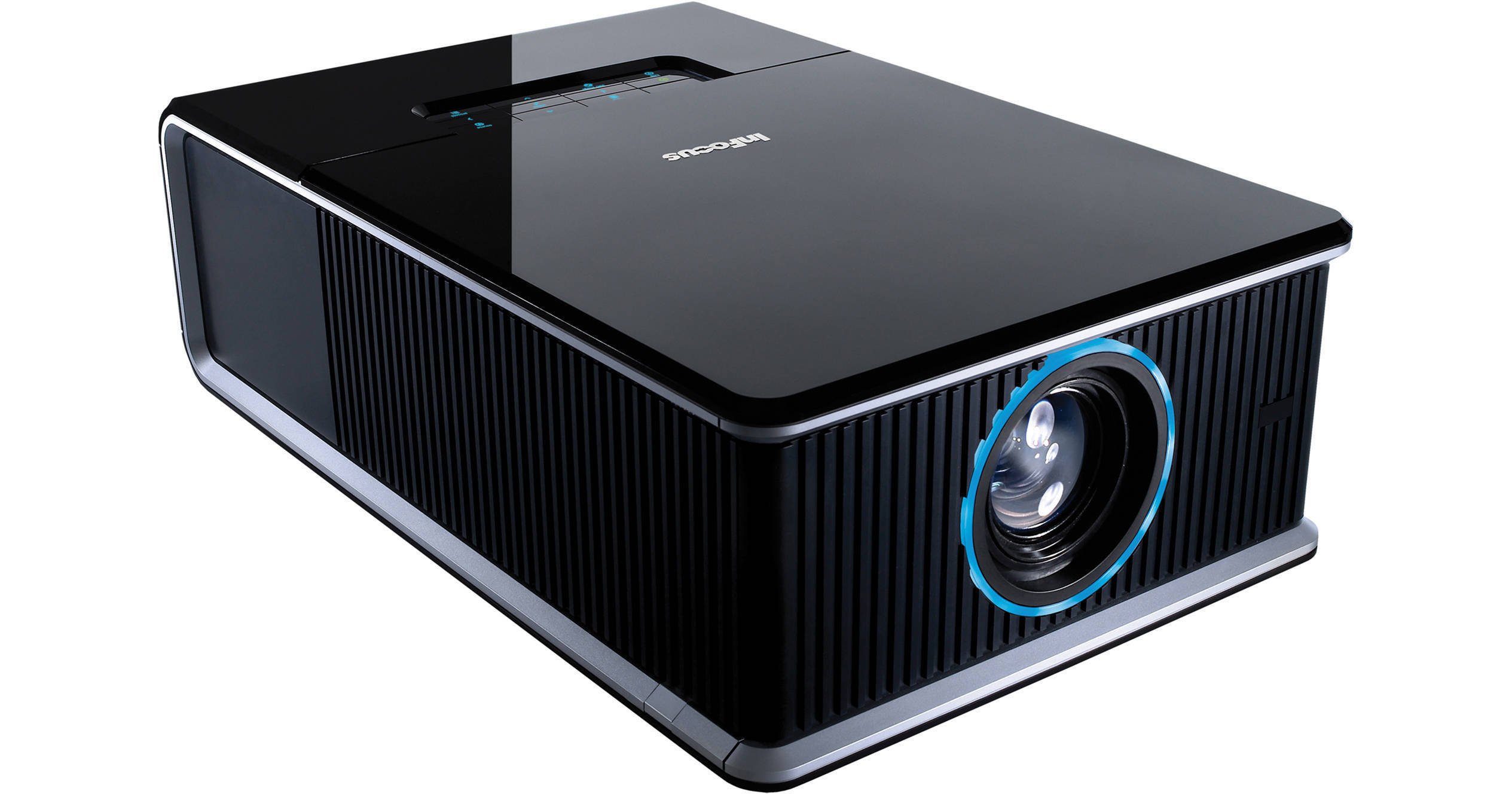
InFocus IN5533 WXGA DLP Projector With Standard Lens

BH #IN5533 • MFR #IN5533
Print
InFocus IN5533 WXGA DLP Projector With Standard Lens
Key Features
  • Dual Lamp Brightness: 6000 Lumens
  • Contrast Ratio: 2000:1
  • WXGA 1280 x 800 Resolution
  • Six-Segment Color Wheel
A seriously feature-packed installation projector, the InFocus IN5533 WXGA DLP Projector With Standard Lens offers exceptional color performance, brightness and ease of operation. The six-segment color wheel and BrilliantColor technology display a rich palette and produce smooth color gradations. The dual lamps create 6000 Lumens of brightness; even in rooms with high ambient light, the IN5533 generates crisp, vivid images. It also has a native widescreen aspect ratio, making it ideal for presentations on whiteboards and other wide surfaces.

Installation of the IN5533 is aided by several image correcting features. The motorized lens shift lets you make minor projection adjustments to the image, giving you an added adaptability to overcome small miscalculations that arise during installation. The keystone correction automatically gives you a perfectly square display every time and automatic sensors detect the ceiling for increased image squareness. When dealing with imperfect surfaces, the pincushion and barrel correction give you perfect images by correcting increased and decreased magnification.

More Details
No Longer Available
No Store Display
Ask an Expert
866-264-7509

InFocus IN5533 Overview

A seriously feature-packed installation projector, the InFocus IN5533 WXGA DLP Projector With Standard Lens offers exceptional color performance, brightness and ease of operation. The six-segment color wheel and BrilliantColor technology display a rich palette and produce smooth color gradations. The dual lamps create 6000 Lumens of brightness; even in rooms with high ambient light, the IN5533 generates crisp, vivid images. It also has a native widescreen aspect ratio, making it ideal for presentations on whiteboards and other wide surfaces.

Installation of the IN5533 is aided by several image correcting features. The motorized lens shift lets you make minor projection adjustments to the image, giving you an added adaptability to overcome small miscalculations that arise during installation. The keystone correction automatically gives you a perfectly square display every time and automatic sensors detect the ceiling for increased image squareness. When dealing with imperfect surfaces, the pincushion and barrel correction give you perfect images by correcting increased and decreased magnification.

InFocus also has a line of accessories (all sold separately) that include optional lenses and skin covers for personalization. The optional lenses give you even more flexibility when installing the IN5533. You can choose from short-throw, all the way up to an ultra long-throw lens. For aesthetics and personalization, you can use the skin covers for customizing your projector. Choose from matte black or white, glossy black and wood grain. InFocus also offers a primed skin that can be painted to match your company colors or logo (all sold separately).

If you intend to link your projector to a network, the IN5533 is well-equipped for wired and wireless connection. It is SNMP capable and includes embedded networking for full remote projector control and management. Administrators can send messages via the DMS, which is great for announcements, schedule changes and emergency notifications. The wireless adapter (sold separately) can facilitate wireless connection to a network. There's an RS232 and RJ45 port for wired network connectivity.

The IN5533 can do PC-less presentations as well. The DisplayLink allows users to give presentations, run from a USB flash drive. Without worrying about VGA cables and computers, the DisplayLink affords lighting fast-projection. The IN5533 also benefits from dual PC inputs and two HDMI inputs. Having dual PC inputs is great for utilizing multiple computers for presentations, but InFocus takes this a step further and offers SplitScreen technology. This allows you to project images from two different sources simultaneously. It's great for viewing more than one presentation, videoconferencing and distance learning. The dual HDMI inputs allow you to connect two devices, using uncompressed, HD signal transfer.

The features don't stop with the IN5533. Educators can take advantage of the freeze frame and magnifying function, which allows each frame of a presentation to be paused and magnified. The LiteTouch Touchsense Keypad is a keypad without buttons that is back-lit and is host to a full array of functionality. When not using the keypad, the light fades and it can easily blend into any room. When ceiling mounting is used, the keypad is aware and will automatically dim its lights. Language teachers will appreciate the closed caption capabilities of the IN5533 and every user will be thankful for the unique cable management system, which will hide and organize wires coming and going from your projector. With so many features, options and image improving technology; it's hard to find a flaw with the IN5533.

Auto Keystone
Automatically, the IN5533 gets rid of misshaped images, graphics and charts instantaneously via its keystone adjustment function. With the IN5533 you can achieve a perfect square display every time
BrilliantColor
Delivering rich all-digital clarity with life-like color, sharp graphics and outstanding video. The impressive 6-segment color wheel affords greater color accuracy and detail
Cable Management System
The integrated cable management system provides easy access to the connector panel, while aligning each cable to the cable router. The result is totally hidden cables that look as good as the rest of your room
Closed Captioning
You can display subtitles in video content without the need for an external closed-captioning device. It's perfect for viewing in educational settings such as language classes where a transcript of onscreen dialog is desirable
DisplayLink Plug & Play (DDC2B)
Hassle-free, lightning fast-projection. DisplayLink uses USB flash-drives, eliminates the need for bulky VGA cables and allows for computer and image set up in seconds without toggling or cumbersome function key combinations. DisplayLink makes projecting simple
DMS Dynamic Messaging System
Send dynamic messages for instant display to InFocus projectors using the Dynamic Messaging System (DMS) - perfect for announcements such as schedule changes, weather warnings, breaking news, and emergency notifications
Freeze Frame with Magnifying Function
With the IN5533, you can pause and go frame by frame. You can also magnify each frame individually to improve presentations
LitePort USB JPEG Player
The USB player function enables a JPEG presentation through the USB flash drive. It provides a simple alternative to computer connection and wire congestion during presentations
LiteShow Wireless Ready
The optional InFocus LiteShow wireless adapter (sold separately) connects personal computers to InFocus projectors wirelessly. The latest 802.11n connection supports simultaneous transmission of audio, video, and data content and is compatible with PC, Mac, iPhone/iPad, and Windows Mobile operating systems
LiteTouch Touchsense Keypad
The top surface of the IN5533 features the LiteTouch Touchsense Keypad. Devoid of buttons, this sleek glossy case is back-lit to reveal a full array of functionality. When not in use, the keypad subtly blends in to any conference table and automatically dims when ceiling mounted
HDMI Connectivity
The IN5533 supports HDMI signal transfer which provides the highest-quality A / V experience. HDMI (High-Definition Multimedia Interface) is an uncompressed, all-digital audio/video interface via a single cable. It also dramatically simplifies cabling
Motorized Lens Shift
Make minor projection adjustments to the image by shifting the display. This gives your projector added adaptability to overcome small miscalculations that arise during installation
Pincushion / Barrel Distortion Correction
The IN5533 fixes barrel distortion and pincushion distortion, which allows for projection of perfect images on imperfect surfaces through the correction of increased and decreased magnification
ProjectorNet Web Browser Control
The built-in web control panel allows network administrators to remotely access and control the projector over standard LAN/WAN. The series is also compatible with ProjectorNet 3.0, the InFocus free asset management software that enables you to conserve projector lamp life by scheduling on/off times and presetting maintenance events and anti-theft security alerts
SNMP Capable
In typical SNMP use, one or more administrative computers called managers have the task of monitoring or managing a group of projectors on a computer network. Each managed system executes, at all times, a software component called an agent which reports information via SNMP to the manager
SplitScreen Dual Images
Project images from two sources simultaneously and in a variety of configurations with InFocus SplitScreen technology - perfect for viewing multiple presentations, videoconferencing and distance learning
Top Lamp Access
The lamp is easy to replace through the top loading access door. If mounted on the ceiling, the lamp can be changed without uninstalling the projector
Optional Accessories (Sold Separately)
The IN5500 series provides the design flexibility you need for the perfect installation. With options (sold separately) in matte black, matte white, glossy black, pre-primed and wood grain; you can choose the appropriate skin or create your own custom design. Add your company logo, express your individuality, or blend it in with the surroundings. The wireless adapter (sold separately) lets you connect to a network without needing to use the LAN terminal and the optional lenses (sold separately) include a long throw-zoom lens, short throw-fixed, short throw-zoom and an ultra long throw-zoom lens

InFocus IN5533 Specs

Key Specs
Display System
-Chip 0.65" DLP
Maximum Brightness
6000 Lumens
3150 Lumens
Image Display
Display System
-Chip 0.65" DLP
Maximum Brightness
6000 Lumens
3150 Lumens
Aspect Ratio
Native:: 16:10
Supported:: 16:9
Supported:: 4:3
Supported:: 5:4
Scan
Horizontal: 15 to 100 kHz
Vertical: 50 to 85 Hz
Features
Ceiling Mountable
Yes
General
Expected Lamp Life
Medium Brightness: 2000 Hours
Low Brightness: 25,000 Hours
Fan Noise
Medium Brightness: 30 dB
Low Brightness: 29 dB
Power Consumption
Medium Brightness: 800 W
Full Brightness: 850 W
Dimensions (W x H x D)
17.0 x 9.5 x 26.4" / 43.2 x 24.1 x 67.1 cm

InFocus IN5533 Reviews

See any errors on this page?
Whatever You Need, We've Got It