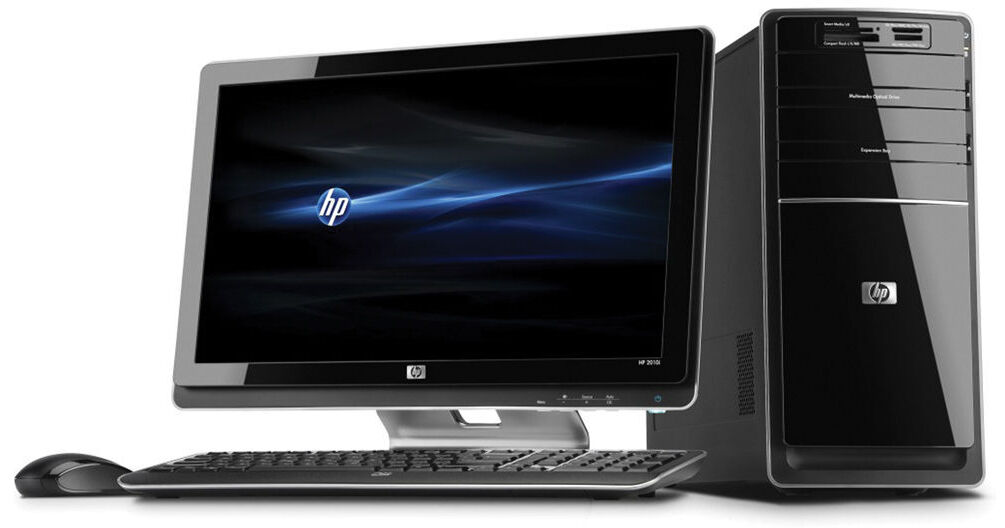
The Pavilion p6730f Desktop Computer from Hewlett-Packard is a powerful desktop computer, capable of tackling most computing challenges. The system is housed in a standard tower form factor, allowing you to place it underneath a desk if desired. The system's power button and card reader are located at the top of the tower for easy access. A sliding door conceals ports, giving the system a clean look, which is accented by lighting and chrome trim.
The system features a 15-in-1 memory card reader, allowing you to import pictures and files from virtually any type of digital camera memory card. Its DVD burner supports LightScribe printing, which allows it to burn labels directly onto compatible media.
The computer is loaded with the HP MediaSmart software suite. MediaSmart is an all-in-one application for multimedia and entertainment. It lets you browse through photos and share them using HP's Snapfish service. You can also create photo slideshows with custom music and burn them to DVD to watch on your TV.
The system is powered by a dual-core 3.2GHz Intel Core i3-550 CPU. It boasts 6GB of RAM, a 1.5TB 5400rpm SATA hard drive, 802.11n Wi-Fi, and Intel GMA HD integrated graphics. Windows 7 Home Premium (64-bit) is the installed operating system.
- Power button and card reader on top
- Marquee signature design with lighting and chrome
- Sliding door concealing ports for a clean look
- The front-panel 15-in-1 memory card reader makes it easy to transfer photos, music, and other files to and from your digital camera and other peripheral devices
- The SuperMulti DVD burner with LightScribe technology lets you print custom, silkscreen-quality labels and artwork directly onto LightScribe-enabled CD and DVD discs
- The Pavilion PC also features built-in 802.11n Wi-Fi connectivity
- Large hard drive provides ample space for data storage
- One stop for all your multimedia and entertainment
- Discover and enjoy your digital world
- Share and browse your personal memories via Snapfish by HP
- Burn your music, slideshows and playlists to DVDs for sharing or saving
- Add your favorite music as background to your photo slideshows
- HP Setup Manager: Learn about your new PC and explore key activities that can help you transition smoothly and easily from your old PC
- HP Support Assistant: Helps you maintain the performance of your PC and resolve problems with automated updates and tune-ups, built-in diagnostics, and guided assistance