Video Chat with a Pro Video Expert - Live

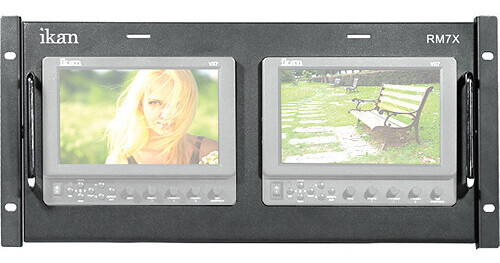
ikan RM7X Dual VX7 7" Rack Mount Unit

BH #IKRM7X • MFR #RM7X
Print
ikan RM7X Dual VX7 7" Rack Mount Unit
Key Features
  • (2) 1024 x 600
  • (2) HD-SDI, HDMI, Component, Composite
  • NTSC/PAL
  • Full BNC Loop-through
The ikan RM7X Dual VX7 7" Rack Mount Unit is a compact rack mount unit comprised of two VX7 monitors fully enclosed in a dedicated metal rack. Along with the well-regarded specifications of the standalone VX7, this unit includes locking power and HD15 tally connections. The VX7 is known as a high-quality HD/SD production monitor that combines light weight and affordability with a range of professional inputs and features. It provides intuitive control with 1024 x 600 image quality to keep your images sharp, perfectly framed, and always in focus. With its dual configuration and compact 4RU size, the RM7X is ideal for both studio applications and on-location live switching events.
More Details
No Longer Available
No Store Display
Ask an Expert
800-606-6969

ikan RM7X Overview

The ikan RM7X Dual VX7 7" Rack Mount Unit is a compact rack mount unit comprised of two VX7 monitors fully enclosed in a dedicated metal rack. Along with the well-regarded specifications of the standalone VX7, this unit includes locking power and HD15 tally connections. The VX7 is known as a high-quality HD/SD production monitor that combines light weight and affordability with a range of professional inputs and features. It provides intuitive control with 1024 x 600 image quality to keep your images sharp, perfectly framed, and always in focus. With its dual configuration and compact 4RU size, the RM7X is ideal for both studio applications and on-location live switching events.

The Interface
Although it's loaded with features and options, the RM7X was made with intuitive and easy control in mind. The first thing you'll notice about these monitors is that all of the controls are front and center and clearly labeled.
It's All About Connections
Each monitor sports HD-SDI (which also transcodes to component out), HDMI, HD/SD component, and composite, giving you ability to use the RM7X with any video device in the industry. All of the inputs use professional-grade BNC connectors to ensure you stay connected.
Moveable Pixel to Pixel
The pixel view of other monitors limits you to viewing only stationary pixels. If you want to move the image, you are limited to moving within predetermined quadrants; if you want to move out of this quadrant, then you must physically move the camera. With the VX series monitors, you can actually toggle the image left, right, up and down using the controls as you see fit instead of having to move your camera, so you can easily ensure you're getting the shot you want.
Don't Stop, Keep Going
Your monitor may not be your signal's final destination. So ikan has created a way to convert your HD-SDI signal into analog component in the VX monitor without having to purchase an additional convertor box. This gives you the freedom to output your signal where you want. Your digital SDI signal can be converted in the monitor to analog composite.
Backlighting
With LCDs, it's all about the backlighting. This defines contrast, brightness and other performance metrics.

Regular LCDs
Regular LCD monitors are backlit using a cathode fluorescent lamp. They emit a blanket of light across the screen. An LCD is just a massive screen of tiny doors that open and close to create an image. When trying to show black, these doors close, but the fluorescent backlight is so strong it will inevitably leak through the closed doors, resulting in more of a glowy charcoal instead of true black.

Enter the LED
Instead of having one big fluorescent light shining up through all of the LCD pixels, you have arrays of LEDs that shine through smaller portions of the LCD screen, leaving other portions in the dark. The result is a crisp, clear image with true blacks and better contrast--which is why LED backlighting is standard on all of the VX monitors.

Overscan / Underscan
Overscan is defined as the central part of the image that you can see on a standard TV. This option will show you only what you would see when your production is broadcast or played on DVD. When you must ensure everything essential will be in the scene, the overscan feature is a must have.

Underscan is the full frame with no part of the image marginalized.
Freeze Frame
This function displays a side-by-side comparison of the incoming video signal. Each time the F1/2 button is pushed it will freeze the current frame on the right-hand side of the display while the left continues to display the live signal.
Get the Right Image with Blue Only Screen
Blue Gun allows you to quickly calibrate your monitor to ensure the image you're seeing on the monitor is exactly the same color that your camera is shooting. It does this by isolating the blue color signal and when displaying a set of standard NTSC color bars, a set pattern will emerge allowing for precise calibration.

ikan RM7X Specs

Application
Studio, On-location Live Switching
LCD Size
(2) 7"
Video System
NTSC/PAL
Resolution
(2) 1024 x 600
Brightness
350cd/m²
Contrast Ratio
400:1
Viewing Angle
140°(H), 110°(V)
Input and Output Connectors
HD-SDI: BNC (x1 Input)
HDMI: BNC (x1 Input)
Component: BNC (x1 Input, x1 Output)
Composite: BNC (x1 Input)
Picture Controls
Bright, Contrast, Chroma, Tint/Sharpness, Aspect Ratio
Remote Control
No
Power Requirements
12-20VDC
Power Consumption
8W
Dimensions
19 x 8.75 x 2.4" (48.3 x 22.2 x 6.1 cm)
Weight
8.4 lbs (3.8kg)
Packaging Info
Box Dimensions (LxWxH)
21.8 x 10 x 3.2"

ikan RM7X Reviews

See any errors on this page?
Whatever You Need, We've Got It