Video Chat with a Pro Video Expert - Live

Deyan Automation Systems FlexiRoute Universal Routing Panel Software

BH #DEFR • MFR #FLEXIROUTE
Print
Deyan Automation Systems FlexiRoute Universal Routing Panel Software
Key Features
  • Broadcast Automation Software
  • User-Defined Favorite Buttons
  • Macros for Oft-Repeated Routing Tasks
  • Timer Function for Router Control
Deyan Automation Systems FlexiRoute is a universal routing panel that's a highly customizable software interface for broadcast routers. Pictures can be assigned to any source or destination. The background is skinnable, so you can design your own look.

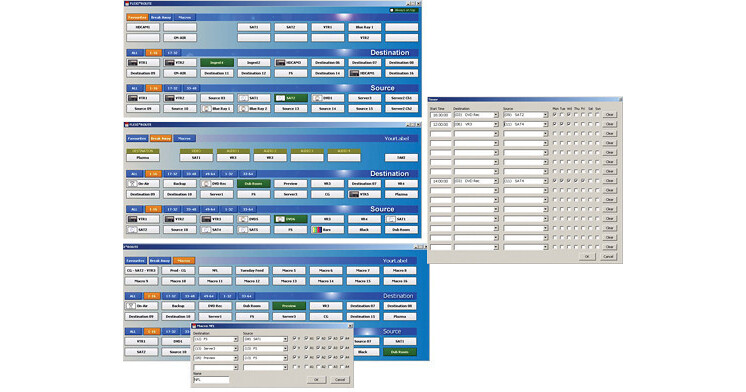
Users can define their favorite buttons for sources and destinations. Macros enable users to group together routing functions to quickly execute repeated tasks that require multiple routing operations. Creating a macro within FlexiRoute is a simple matter of selecting a series of destinations and their associated sources from a drop-down menu, checking boxes for the video and audio channels to be included, and giving the group of operations a name.

Buttons can be locked or highlighted for managing access to routing functions and for easing the user's operation of the software routing panel.

A timer function allows users to set a router to execute a series of tasks at specific times. FlexiRoute also has a break-away function.

More Details
Digital
Electronic Download
No Store Display
This item cannot be returned.
Emailed within 1-3 Business Days
Protect Your Gear
Add a protection plan from $28.00
Ask an Expert
800-606-6969

Deyan Automation Systems FlexiRoute Overview

Deyan Automation Systems FlexiRoute is a universal routing panel that's a highly customizable software interface for broadcast routers. Pictures can be assigned to any source or destination. The background is skinnable, so you can design your own look.

Users can define their favorite buttons for sources and destinations. Macros enable users to group together routing functions to quickly execute repeated tasks that require multiple routing operations. Creating a macro within FlexiRoute is a simple matter of selecting a series of destinations and their associated sources from a drop-down menu, checking boxes for the video and audio channels to be included, and giving the group of operations a name.

Buttons can be locked or highlighted for managing access to routing functions and for easing the user's operation of the software routing panel.

A timer function allows users to set a router to execute a series of tasks at specific times. FlexiRoute also has a break-away function.

Deyan Automation Systems FlexiRoute Reviews

See any errors on this page?
Whatever You Need, We've Got It