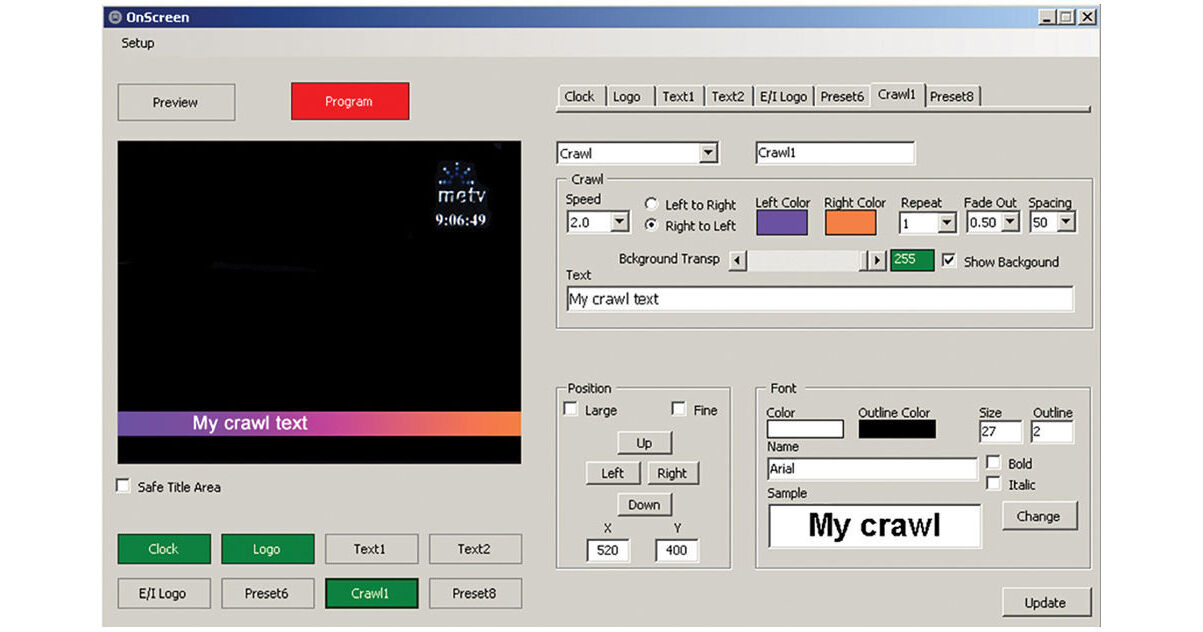
Deyan Automation OnScreen is a simple, Windows-based application for HD or SD (NTSC or PAL) broadcast character and logo generation. The CG program requires the use of a Blackmagic Design DeckLink card for I/O purposes.
OnScreen allows you to key images, logos, animated GIFs (with alpha channels), clocks, text, and crawls. Set a background for crawls, and transparency for screen items. There's support for Unicode and the Modbus protocol, and GPI control via COM ports. (GPI control enables, for instance, broadcast automation software to control the software via a relay.) A preview window allows you to arrange and vet items before they go live to air.
Images
Supported image file formats are BMP (with alpha), JPG, TGA (with alpha), GIF (animated, with alpha), TIFF, WMF, EXIF, and PNG (with alpha). Multiple images can be shown simultaneously. Set size, screen position, transparency, layer, and fade-in/out speed.
Clock
Your PC's clock is used as a reference for the on-air display of the current time. Multiple clocks can be shown at once, in 12- or 24-hour display modes. Set size, font, color, screen position, transparency, layer, and fade-in/out speed.
Text
Still text can be shown on screen, and there's support for multiple text areas. Set font, font size, color, outline color, screen position, transparency, layer, and fade-in/out speed.
Crawl
Multiple crawls can be displayed on screen. Set position, speed, direction, left and right background color, background transparency, background on or off, loop or number of repetitions, fade-out time, and spacing (the time between two instances of a crawl). For the text of the crawl, set the font, font size, color, and outline color.
Remote Control
The simple remote control application allows you to activate and deactivate each one of eight presets remotely by employing the OnScreen host PC's IP address.