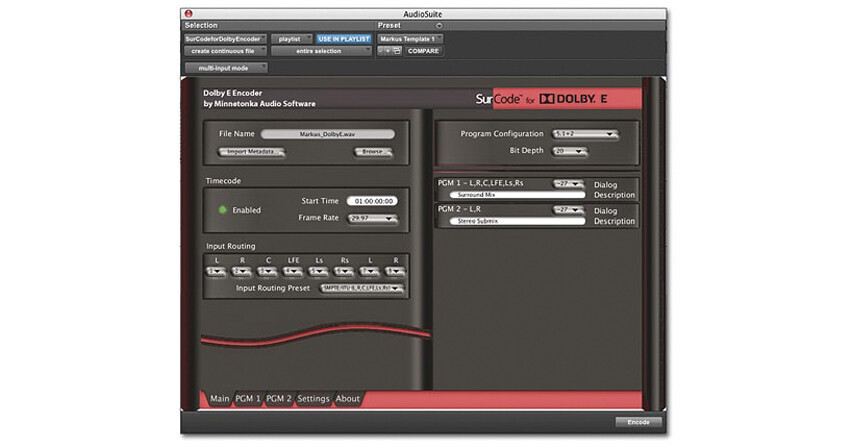
SurCode for Dolby E Encoder from Minnetonka is a fully licensed and certified file-based software plug-in encoder for Dolby E, for use with Pro Tools and VST compliant applications. The plug-in encodes Dolby E files from discrete PCM files, and is the perfect way to integrate Dolby E into existing workflows on different audio workstations, in different studios, and in various formats.
The Dolby E Encoder provides encoding of up to 8 channels of audio, with a variety of user selectable program configurations. These range from 5.1 and stereo, to 4 independent stereo or 8 mono channels. It also includes full input of Dolby E and program metadata, all via a simple user interface.
When used with Pro Tools, the plug-in appears in the AudioSuite menu and will encode audio in sync with the Pro Tools timeline. Encoding is as simple as selecting a file or part of a file, going to the AudioSuite menu and selecting the encoder, entering the required metadata, and hitting encode.
This discounted item is for current SoundCode customers who want to add a single SurCode for Dolby E Encoder.
- Pro Tools AudioSuite plug-in for both Mac and Windows based systems
- VST plug-in for Mac and Windows based systems
- Faster than real-time encoding
- Writes Dolby E WAV (two-mono or stereo) files and supports all Dolby metadata
- Full Metadata management
- Input frame rates - 23.976, 24, 25, 29.97 and 30 fps
- Supports all Dolby E encoder program configurations including 5.1 + 2
- Dolby E bit depth 20- or 16-bit
- Flexible channel routing, per-program configuration
- Display and update Dolby E and per-program metadata
- Uses plug-in templates as presets
- DBMD import - browse or drag and drop DBMD WAV
- XML import - browse or drag and drop XML file
- Added Frame Offset control - no offset, +/-1 frame, +/-2 frames
- Fixed VST Windows keystroke support (for entering Program Description Text)
- Added option to allow the host selection start sample (and/or the session start in AudioSuite) to be the Dolby E Timecode start time
- VST pre-roll negative sample number fix
- Frame Offset is recorded in the Coding History section of the BWF bext chunk in accordance with EBU technical recommendation R98-1999
- AudioSuite encode with region button text changed
- Serial port metadata input now supported
- Timecode Enable setting now correctly stored in saved sessions or settings files