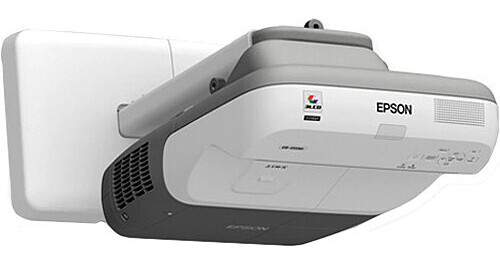
The Epson BrightLink 455Wi Interactive Projector is such an unusually powerful communications tool it's hard to decide where to start first. But we'll give it a shot.
First let's go over the usual stuff. It's got 2500 lumens of brightness and a 2000:1 contrast ratio. So, it's got plenty of projection power to show a big bright picture in a normally lit room.
The 455Wi can handle input in the NTSC, PAL and SECAM TV standards and it can project in 720p and 1080i high definition formats. Its 100 - 240 V AC power supply rounds out its international capabilities.
This projector mounts at the top of the same wall it's projecting onto. It can do so only because it's an ultra-short throw projector. An ultra-short throw projector, simply put, can project a larger picture at a shorter distance from the screen than a conventional projector can. In the case of the 455Wi that means it can project a 96" (2438.4mm) image measured diagonally from just two feet away from the screen.
Imagine the advantages of that kind of setup. You can practically stand right under the 455Wi and not cast a shadow on the screen. Nor will you have to wince from the projector's beam shining in your eyes.
But we're just getting started. This projector comes with a bunch of programs (both PC and Macintosh versions). Once you've installed the software on your computer you can actually write on your presentations as you give them using special inkless interactive pens (Two pens are included.). You don't need any special kind of electronic white board. Use a standard white board, blackboard, a wall-even wood paneling in a pinch.
In education, in business, in any situation where you need to capture and hold your audience's attention in a way that's both practical and imaginative you can't do better than the Epson BrightLink 455Wi Interactive Projector.
Designed to be recycled
Epson America, Inc. is a SmartWay Transport Partner
Transform virtually any standard projected image into an interactive one. BrightLink is software agnostic and Web 2.0 friendly. The BrightLink pen works just like a mouse on your PC/Mac. Use it to tap and double tap, to open, close and navigate.
The practical way to maximize classroom space - works with your new or existing projector, plus any plain wall or standard whiteboard
Maximize your interactive area - set the size, as needed, without being limited by the budget; up to 96" (2438.4mm) or 102" (2590.8mm)
Easy installation - mounts on a flat wall with just a few simple steps (wall mounting plates included)
Everything you need to get started - includes two interactive pens with rechargeable batteries and charger, a pen tray, and easy-to-use interactive annotation software
Easy integration - cross-compatible with most instructional software applications; optional RM EasiTeach solution also available
Get an interactive area up to 96" (2438.4mm) diagonal (WXGA)
Interactive image size can be set anywhere from 59" (1498.6mm) up to 96" (2438.4mm) diagonal (native WXGA)
Project on preinstalled standard whiteboards or use a plain wall
Transform a table into an interactive table
Wall mount included for easier installation and classrooms with limited space
Energy efficient E-TORL lamp delivers more lumens per watt
RS-232 and RJ-45 connectivity, plus built-in 12W speaker
Content over IP capabilities, message broadcasting and easy remote monitor/control
Cross-compatible with most instructional software applications
Advanced connectivity features to service all your growing needs
Onsite and free online tutorials and courses available
Compare costs and see why BrightLink is the product to know about before buying interactive whiteboard systems
New 12W speaker, 18% louder than the 450Wi
New electrostatic filter designed to extend the life of the filter up to 5000 hours
Minimize downtime and increase productivity by utilizing e-mail notifications to receive information on projector error conditions, allowing IT directors to promptly schedule maintenance and parts replacement
Use EasyMP Network Projection to conduct presentations and meetings over the web, reducing the need for and cost of travel
Secure confidential data transmissions by utilizing advanced network security protocols, including WEP and WPA2
Use BrightLink with Internet meeting applications to turn dull presentations into interactive, collaborative working sessions
Use message broadcasting to communicate important organizational announcements over the network
Present the whole story by sending four independent images from one PC to multiple networked projectors
Pen technology: Infrared, 940 nanometer
Input: Single user
Required Software: Easy Interactive Driver
Driver compatibility: Windows 2000 SP4 or later, XP SP2 or later, XP Tablet, Vista, 74, Macintosh 10.3.X or later
Optional software: Easy Interactive Tools