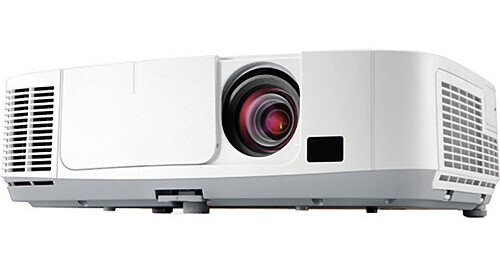
The NEC NP-P350X XGA Entry Level Projector works equally well in the media room, classroom or meeting room. Its 3500 lumens and 2,000:1 contrast ratio provide a rich, vivid picture in a variety of projection environments.
Its native resolution is XGA (1024 x 768) but it can also scale images in the VGA, SVGA, XGA, SXGA, SXGA+ and UXGA resolutions. It can also project video images in the NTSC, NTSC4.43, PAL, PAL-60, PAL-M, PAL-N and SECAM television standards. In addition it can handle both 720p and 1080i high definition programming. And its 100 - 240 VAC, 50 / 60 Hz power supply makes it useable just about anywhere in the world.
The NP-P350X has lots of features you can appreciate while you're in the same room with it too. Setup is easy thanks to Keystone Correction which automatically squares up your image while Autosense detects and syncs the projector with most computers. The Virtual Remote Tool software that comes with the projector allows you to control it from your laptop when you connect them with the VGA cable that's included. No other cabling is required. And if you want to leave your laptop behind, the USB Viewer feature allows you to screen program material accessed from a USB drive. You can even project images onto objects like spheres or cylinders or into corners via the Geometric Correction function. The Active Lens Cover acts like a pause shutter in case you want to halt video and audio briefly to illustrate a point. While there's a powerful 10W built-in speaker, there's also a variable audio output for an external speaker in case you need to reach a larger crowd. The NP-P350X's wide connectivity also includes HDMI, a monitor output and USB.
You can also monitor and control the NP-P350X from just about anywhere in the world there's a connection to the Internet. That's because this projector is network ready. Plug it into your LAN via its RJ-45 jack and you can remotely monitor and control it from anywhere on your local network or across the Internet. You can even have it email you when it detects a fault or the projector lamp is nearing the end of its life. Closed Captioning, from program sources that provide it, is ideal for the hearing-impaired or for any noisy environment like gyms, trade shows or conventions. One of the NP-P350X's most important features is its energy efficiency. In Eco-Mode lamp life shoots up to 5000 hours while fan noise drops from 35dB to a minimal 29dB.
The NP-P350X actually has a carbon savings meter that can optionally project session and total CO2 emissions saved due to Eco-Mode use at the beginning and end of each presentation when Eco-Mode is used. You can turn Eco-Mode off and on with one button on the remote. Other energy saving features include quick start (three to four seconds) and quick shutdown (which requires no additional cool-down time after the projector is turned off). In addition the projector can turn on automatically when it detects a computer signal and turn off automatically when it detects no signal from any input.
Power, professional features and functionality at a very reasonable price make the NEC NP-P350X hard to beat.
Remarkable contrast ratio (2000:1) enhances your image
Powerful 10W speaker provides volume needed for large rooms
Vertical lens shift provides for flexible installation
Terminal cover easily hides cables to create a clean environment while deterring unintentional access
Versatile, color-coded connections to computer, video sources and external monitor
Remote diagnostics enable the user to monitor and make adjustments to the projector remotely
PC CTL 4.0 controls the power switching input selection and other functions while managing lamp usage and a variety of other vital information over the network. Email notification and projector scheduling for better asset management is included with the software
Image Express Utility dedicated projector software (IEU 2.0; compatible with Windows or Mac operating systems) provides wired and wireless data transmission via peer-to-peer or over the network
Broadcast Mode allows you to send information from one computer to several projectors
Image Express Lite dedicated projector software provides wired and wireless data transmission via peer-to-peer or over the network
Windows Network Projector function within Windows Vista connects directly to networked projectors without the need for additional proprietary software
Windows Remote Desktop function allows you to control a networked computer by connecting a USB mouse and keyboard directly to the projector's USB input
Windows Media Connection and Network Drive functions display multimedia files (.jpeg, .bmp, .png, .mpeg2 or .wmv9) stored on the Windows Media Connect server, in the Windows shared folder, or on a local network using the Viewer function-all without bringing your PC into the conference room
Crestron Roomview
Power management enables projector to automatically turn off when an incoming signal is not detected from any of the inputs
Auto Power On via the RGB (15-pin) input connector when a signal is detected from a computer
Carbon savings meter calculates the positive effects of operating the projector in Eco-Mode, which is encouraged by an optional message at startup. A green Eco-Mode button on the remote control makes the switch easy
Quick start (3 to 4 seconds) lets you begin presenting in seconds while quick shutdown (immediate power off with no cooling required after shutdown) ensures efficient energy usage
Sleep timer can be set to automatically turn off the projector at set countdown times
Low power consumption (0.2W in standby mode) minimizes energy costs
Direct power off provides instantaneous shutdown of the projector
Four audio inputs (two mini stereo [Comp1 & Comp2], R/L [RCA - shared by video sources] and HDMI) make it easy to add sound to enhance your presentations
Auto power on
Closed captioning
Carbon savings meter
Virtual Remote
Advanced AccuBlend
AutoSense