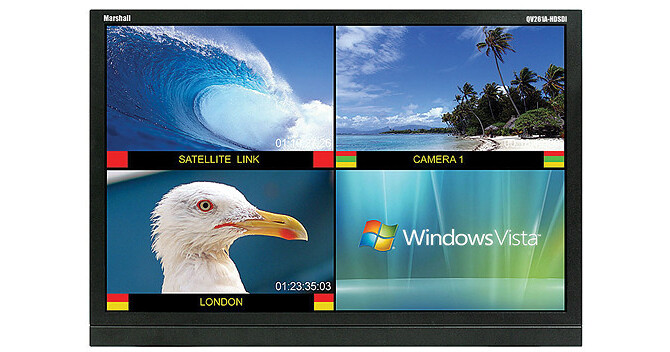
The Marshall Electronics QV261A-HDSDI Desktop Quad Viewer Monitor (26"), with 8-bit color depth, delivers high quality images at a resolution of up to 1920 x 1200. It offers a contrast ratio of 800:1, a brightness rating of 500 cd/m², and a wide viewing angle of 178 x 178° (H x V) that allows you to view the images clearly even from room corners or when the display is mounted at a height.
Equipped with pixel-to-pixel mode, the QV261A-HDSDI LCD monitor displays images in their native resolution by avoiding the internal scaling function. It has an aspect ratio of 16:10, and can automatically adapt to the input resolution of the incoming video signal. The distance between the dots of the same color inside the display screen is described with the help of 0.286 x 0.286 mm pixel pitch. The monitor incorporates RotoMenu feature for quick, direct, and easy menu navigation.
In-monitor display enables on-screen text and tally indication, which can be controlled locally or remotely via support for protocols like TSL, NVISION, Image Video, and MEI (Marshall Electronics) tally control systems. With time code mode, you can view time code on the screen and LTC (linear time code) or VITC (vertical interval time code) types of time codes are supported. The Blue only mode switches off red and green scan guns to produce image made only from a blue scan gun, and the monochrome mode displays a grayscale picture by disabling all colors. Featured Quad Viewer allows you to view 4 different inputs on the screen instantly. In addition, it also enables viewing of all 4 inputs by scaling and positioning each input in real-time and allows you to replace input 4 with a DVI-I input.
With aspect ratio settings, you can precisely monitor different aspect ratios in 16:9 and 4:3 modes. The QV261A-HDSDI monitor features 3-color on-screen soft tally indicators and 3 LED color tally indicators (Red / Green / Amber). With the audio monitor feature, you can enable or disable the audio presence indicator icon. The enabled state indicates the presence of an embedded audio, and the disable state is indicated by the red circle and cross. In addition, the monitor can enable/disable Closed Captioning icon using CC menu option. In enable state, the icon displays a green dot to indicate the presence of EIA 608/708 embedded Closed Captioning data in the video signal, while a red dot indicates no captioning information.
The multi-configurable OSD (on-screen display) allows you to display the embedded video time code and an embedded audio presence indicator on the screen. 2 User-programmable buttons provide fast access to various settings and functions such as IMD, Time Code, OSD Tally, Audio Monitor, Aspect Ratio, Pixel to Pixel, Ctemp/Gamma, Blue Only, and Monochrome. The QV261A-HDSDI monitor features 4 HD-SDI inputs, 1 DVI-I input, and RS-422/485 port for all-round connectivity.