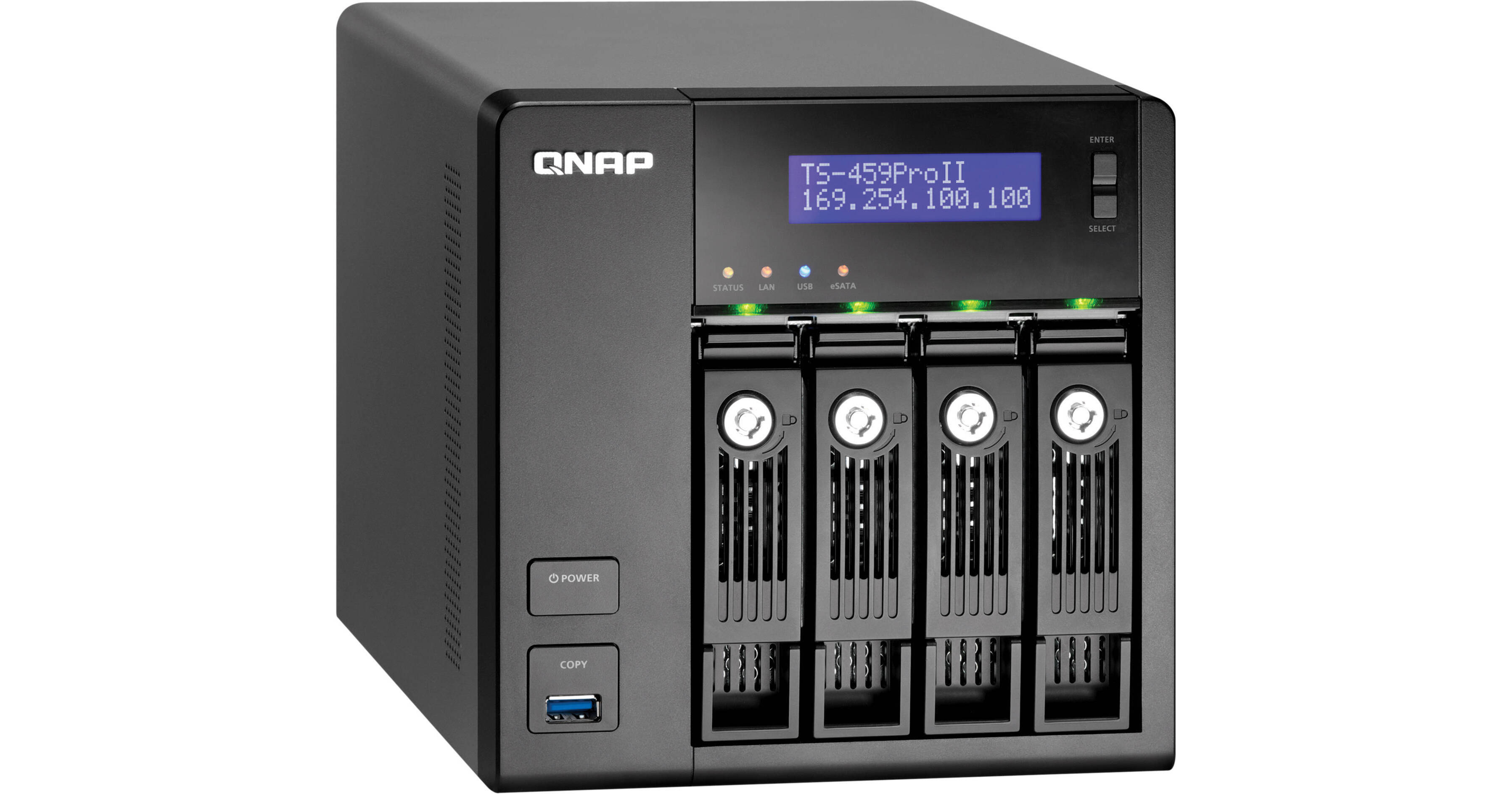
QNAP TS-459 Pro II Turbo NAS Hard Drive Enclosure

BH #QNTS459PRO2 • MFR #TS-459-PROII-US
Print
QNAP TS-459 Pro II Turbo NAS Hard Drive Enclosure
Key Features
  • High-Performance NAS Server
  • 4x 2.5"/3.5" SATA I/II/III Bays
  • 1.8GHz Dual-Core Intel Atom Processor
  • 1GB DDR3 RAM
The TS-459 Pro II Turbo NAS Hard Drive Enclosure from QNAP is a NAS server. Four SATA HDD bays accommodate both 2.5" and 3.5" hard drives, allowing you to store your media and other files in a centralized location and access it from any computer or other device on your network. The fast dual-core Intel Atom CPU and 1GB of DDR3 RAM ensure that data retrieval is fast and efficient. The server supports a variety of RAID configurations, allowing you to customize your system based on whether you'd prefer more storage or security.
More Details
No Longer Available
No Store Display
Ask an Expert
866-842-7675

QNAP TS-459 Pro II Overview

The TS-459 Pro II Turbo NAS Hard Drive Enclosure from QNAP is a NAS server. Four SATA HDD bays accommodate both 2.5" and 3.5" hard drives, allowing you to store your media and other files in a centralized location and access it from any computer or other device on your network. The fast dual-core Intel Atom CPU and 1GB of DDR3 RAM ensure that data retrieval is fast and efficient. The server supports a variety of RAID configurations, allowing you to customize your system based on whether you'd prefer more storage or security.

The TS-459 Pro II can function as a web, file, FTP, or print server. You can also connect it to a printer for network printer sharing. A one-touch copy feature makes backing up your data simple and straightforward. A wide variety of management tools let you get the most out of your NAS, including scheduled events, event tracking, UPS support and SMS support.

Affordable and Flexible Virtualization Solution
The TS-459 Pro II Turbo NAS is certified as compatible with VMware vSphere4 (ESX 4.0 and above) and Citrix XenServer virtualization platforms, and is also compliant with Windows 2008 Failover Cluster. The TS-459 Pro II supports NAS and iSCSI applications to provide a low-cost, highly flexible, and efficient IP SAN solution for business.
Feature-Rich and Integrated Applications for Business
The NAS supports file sharing across Windows, Mac, Linux, and UNIX platforms. Versatile business applications such as file server, FTP server, printer server, web server, and Windows AD (Active Directory) support are provided. The dominant features, such as WebDAV, Share Folder Aggregation (also known as DFS), IPv6 and IPv4 dual-stack, Wake on LAN, schedule power on/off, HDD S.M.A.R.T, comprehensive log systems, and policy-based unauthorized IP blocking are all included.
iSCSI for Virtualization Deployments
NAS + iSCSI Storage Solution
The Turbo NAS can serve as a NAS for file sharing and iSCSI storage concurrently.
Flexible Multiple LUNs Management
The NAS supports multiple LUNs (Logical Unit Numbers) and iSCSI targets. The LUNs can be flexibly mapped to, unmapped from, and switched among different iSCSI targets.
Secure IP SAN Environment Deployment
Designed with CHAP authentication and LUN masking, the advanced ACL (Access Control List) offers you the capability to block the access from unauthorized initiators.
Designed for Virtualized and Clustered Environments
With VMware, Citrix, and Microsoft Windows Failover Cluster support, the Turbo NAS is an affordable storage center for virtualized and clustered server environments.
Virtual Disk Drive
The NAS supports flexible storage expansion by stacking other iSCSI targets on the network via its built-in iSCSI initiator. The connected iSCSI targets are turned into "virtual disk drives" of the NAS to provide more storage capacity.
Efficient Power Management
Superior Performance and Energy-Saving Design
The NAS delivers superior performance and high reliability for critical business applications. It is optimized to achieve low noise and low power consumption for environment protection.
SAMBA/FTP Access
You'll be able to access data on the array via SAMBA or FTP -- at speeds in upwards of 100MB/sec!
Wake on LAN
Enable this option to power on Turbo NAS remotely by Wake on LAN.
Hard Disk Standby
The hard disks can be configured to enter standby mode if there is no disk access within the specified period.
Scheduled Power On/Off
You can create schedules to automatically turn on, turn off, or restart the NAS. Up to 15 schedules can bet set.
Abundant Business Features
FTP Server
You can establish your own FTP server by the Turbo NAS and share the files conveniently with your friends or customers.
Encrypted Remote Replication
The data on the Turbo NAS can be backed up to or from other Turbo NAS or Rsync servers over the network.
File Server
The Turbo NAS allows file sharing across Windows, Mac, Linux, and UNIX platforms. It also supports WebDAV for you to access the share folders via HTTP/HTTPS protocol remotely.
Printer Server
The NAS offers cross-platform printer sharing over the network and remote printing over Internet for up to three USB printers. It supports IPP (Internet Printing Protocol), Samba, print job management, and Bonjour printing for Mac OS X.
Backup Server
The Turbo NAS offers you the most complete backup solution with Apple Time Machine support, remote replication to an Rsync server, Windows client backup software NetBak Replicator, and third party backup software support, and so on.
Virtual Host Supported Web Server
You can host multiple websites on Turbo NAS with the built-in web server and virtual host feature. The NAS supports PHP, MySQL, HTTPS connection, and SSL authentication. It is the ideal solution for you to create your own websites, e-shops, blogs, content management system (CMS), wiki, and so on.
Surveillance Station
You can connect to maximum 4 IP cameras via Turbo NAS and set up a video surveillance system with comprehensive monitoring, recording, and playback features.
IPv6
The Turbo NAS supports IPv6 (Internet Protocol Version 6) which makes your NAS a dual-stack IP host running IPv4 and IPv6 at the same time.
Advanced RAID Management
Advanced RAID Management with Hot-Swap Design
The Turbo NAS offers RAID 0, 1, 10, 5, 6, 10+Hot Spare, 5+Hot Spare, 6+Hot Spare, single, and JBOD disk configurations. It also supports hot-swap design that a failed member drive of a RAID configuration (RAID 1, 5, 6 only) can be replaced by hot swapping without turning off the server.
Online RAID Capacity Expansion
The storage capacity of a RAID configuration can be expanded by replacing the larger hard drives. All the data will be kept and seamlessly moved to the newly installed hard drives without turning off the server.
Online RAID Level Migration
You can upgrade the disk configuration to higher RAID level with the data retained without turning off the server.
Complete Backup Solution
The NAS offers complete backup solution for data protection, including cloud-based storage backup (Amazon S3), Apple Time Machine support, encrypted remote replication, third party software backup, one-touch-copy backup and QNAP exclusive Windows-based utility NetBak Replicator.
Cloud Storage Backup
The Turbo NAS supports Amazon S3 and ElephantDrive online backup and storage services. You can perform scheduled and real-time backup, access your data easily on the Internet, and restore the NAS data from the cloud storage.
Windows Client Backup Software -- NetBak Replicator
QNAP NetBak Replicator is a utility provided for you to back up the files and folders from Windows PCs to Turbo NAS and restore the data. This software supports instant data backup and recovery, file filter, scheduled backup, and more.
Third-Party Backup Software
The NAS is compatible with popular third-party backup software, for example, Acronis True Image, CA BrightStor ARCserve Backup, EMC Retrospect, and Symantec Backup Exec.
Remote Replication by Rsync
The data stored on the NAS can be remotely backed up to another QNAP Turbo NAS or to Rsync servers by Rsync over the network.
Real-Time Remote Replication (RTRR)
Real-time Remote Replication (RTRR) is a feature used for real-time or scheduled data replication between the local NAS and a remote NAS, an FTP server, or an external drive. With real-time replication, the NAS will monitor the file changes and synchronize the data to the remote backup server.
Apple Time Machine Backup and Management
Mac users can back up data from MacBooks to the NAS via Time Machine. This feature largely saves the storage space of your MacBooks. You can also specify the storage space dedicated to Time Machine backup on the NAS and manage the backup data easily via the web-based administration interface.
Blazing Fast Data Backup via USB 3.0
The Turbo NAS features USB 3.0 ports to offer blazing fast transfer speeds for data backup. You can configure the one-touch-copy button on the front of the NAS to copy the data from the NAS to an external storage device or vice versa.
File Systems Supported
The NAS supports EXT3, EXT4, NTFS, and HFS+ file systems for high speed data transfer and enhanced compatibility between the NAS and Windows PC or Mac OS X.
Network Deployment
IPv6 & IPv4 Dual Stack
The Turbo NAS supports IPv6 (Internet Protocol Version 6) which makes your NAS a dual-stack IP host running IPv4 and IPv6 at the same time.
Benefits of Dual LAN Deployment
The Turbo NAS supports multiple bonding modes: Balance-rr (Round-Robin), Active Backup, Balance XOR, Broadcast, IEEE 802.3ad, Balance-tlb (Adaptive Transmit Load Balancing), and Balance-alb (Adaptive Load Balancing).
Virtual LAN
You can integrate the NAS to an existing VLAN on a virtualization environment and configure the NAS as the storage system of other VLAN devices. By enabling VLAN on the NAS, only the devices with the same VLAN ID can access the NAS.
Wireless LAN
Connect the Turbo NAS to the wireless network through a USB Wi-Fi dongle for convenient access. The NAS is compatible with fast 802.11n and 802.11g dongles for Wi-Fi connection.
Practical System and Authority Control Management Tools
Instant SMS and E-Mail Alert
You can configure the SMTP server and SMSC server settings on the NAS in order to receive instant system warning or error messages by e-mail and/or SMS.
SNMP (Simple Network Management Protocol)
You can collect the information, warning or error of the NAS and send to maximum 3 SNMP servers for centralized management and real-time monitoring.
Comprehensive Event Log System
Detailed logs of file-level data access to the NAS via SAMBA, iSCSI, FTP, AFP, HTTP, HTTPS, Telnet, and SSH, and networking services accessed by online users are all recorded.
S.M.A.R.T. & Advanced HDD Health Scanning (HHS)
S.M.A.R.T. (Self-Monitoring Analysis and Reporting Technology) helps you to monitor the HDD status. Moreover, the Turbo NAS is embedded with HHS (HDD Health Scan) which supports disk checking and bad blocks scanning.
Smart Fan
The fan rotation speed is automatically adjusted according to the server's temperature. You can also define the system temperatures to trigger high speed or low speed fan rotation. By manually setting the fan rotation speed, the fan will rotate at the defined speed continuously.
Policy-Based Automatic IP Blocking
To prevent the NAS from malicious attacks, you can create an IP filter policy to allow, deny, or auto-block the IP address or network domain which attempts to connect to the NAS via SSH/Telnet/HTTP(S)/FTP/Samba/AFP.
Import/ Export User
The user accounts can be imported and exported in batch (BIN file) between different QNAP NAS servers.
Syslog Settings
All the system event logs and connection logs can be saved to a remote Syslog server.
Detailed System Information
You can view the system status, such as CPU usage, total memory, free memory, packets received, packets sent, error packets, system up time, CPU temperature, system temperature, hard disk drive temperature, and system fan speed.
AES 256-bit Volume-Based Data Encryption
The disk volume with AES 256-bit encryption can only be accessed by an authorized encryption password or key. This prevents the NAS data from unauthorized access and data breach even if the hard disk drives were stolen.
Note:
The data encryption functions may not available in accordance to the legislative restrictions of some countries.
DOM Architecture and Fail-Safe Dual OS
Two operating systems are built on the DOM of Turbo NAS for system booting alternatively upon every system startup. When one fails, the other one will be used to boot up the NAS, and the failed OS is recoverable from the other healthy OS.
Touch-N-Go PC-Less Installation
You can use the front panel LCD display to complete the first time installation in a few simple steps. Turbo NAS will automatically complete the hard disk formatting and RAID building.
Windows Active Directory (AD) Authentication
You can import the user accounts from a Windows AD domain to the NAS to let the domain users access the domain and the NAS with the same login settings. The NAS also supports setup of large amount of users and user groups.
Note:
200,000 domain users and user groups can be imported according to QNAP's lab test.
Shared Folder Aggregation
You can easily access the share folders of other servers on Microsoft Networking through the "portal folder" on Turbo NAS. This saves your time and effort to login different servers one by one.
Host Access Control
The host-based permission control of the Turbo NAS prevents unauthorized hosts (computers or servers) access to the NAS shared folders via Microsoft Networking. You can specify the allowed access by host name, IP address, or network.
Advanced Folder Permission
Advanced folder permissions allow you to configure access control to the folders and subfolders of QNAP NAS. With this feature enabled, you can manage folder permissions from Microsoft Windows or the web-based management interface of the NAS without complicated procedure.
Network UPS
This feature allows multiple Turbo NAS servers on the same physical network to be protected by a single UPS via receiving UPS notification about abnormal power supply.
Expandable RAM Memory
The Turbo NAS provides an extra RAM memory module slot for users to expand the RAM memory of the NAS.
Note:
The RAM module is available as an optional purchase.
MyCloudNAS Service
MyCloudNAS is a service which allows you to connect to your NAS remotely from anywhere. The easy-to-use wizard helps you assign a unique name to your NAS without going through the complicated process of registering DDNS service. Various NAS services can be easily published and accessed on the Internet.
Web File Manager
Turbo NAS provides a web-based management interface Web File Manager for you to access and manage the server data anytime, anywhere by a web browser. Web File Manager supports intelligent data search, batch files upload and download, file extraction, and so on. With the support for encrypted data transfer and access control management on the NAS, you can access and share the data by Web File Manager securely.
ISO CD/DVD Archiving and Sharing
Turbo NAS supports mounting ISO images of CD and DVD discs as network shares for data archiving, storage, and sharing. This feature saves the space for storing the physical discs, reduces the risk of data loss caused by disc wearing and tearing, and enhances the performance of data sharing on a business network.
Multimedia Station
Multimedia Station is a web-based application which lets you watch your photos and videos, and play music on the NAS by a web browser. You can also share the multimedia files with your friends and publish photos to popular social networking sites such as Facebook, Plurk, Twitter, Blogger, and so on.
Data Access by iPhone and Android Mobile Devices
QNAP offers a free multimedia application QMobile for users of iPhone and Android handsets to carry all the multimedia files on the NAS in their pocket. You can stream videos, watch and upload digital pictures, play music that are stored on the NAS over the network and share your music playlists with other iPhone or Android phones users.
Download Station & QGet
QNAP NAS features Download Station for high-speed BitTorrent, HTTP (including RapidShare support), and FTP download without PC. RSS download (broadcatching) is also supported for automatic BitTorrent download.

QGet is a powerful utility which can be installed on any Windows or Mac computers to manage the download tasks of multiple Turbo NAS servers remotely (LAN/WAN).
Software Expansion via QPKG
You can maximize the usage of Turbo NAS by installing additional QPKG software packages developed by the users and community worldwide.

QNAP TS-459 Pro II Specs

Hardware
Processor
1.8GHz Dual-Core Intel Atom
RAM
1GB DDR3
Memory
512MB Flash Memory (DOM)
Storage
4x 2.5" or 3.5" SATA I/II/III Storage Bay
LAN Port
2x RJ-45 10/100/1000 Gigabit Ethernet Ports
LED Indicators
Status, LAN, USB, eSATA, HDD 1, HDD 2, HDD 3, HDD 4
Ports
2x USB 3.0 (1x Front, 1x Rear)
4x USB 2.0 (4x Rear)
2x eSATA
1x VGA (Reserved for Maintenance)
Buttons
Power, USB, One-Touch Backup, Reset, Enter, Select
Audible Alarm
System Warning
Display
Mono LCD with backlight
Form Factor
Tower
Fan
1x 9cm/12VDC Quiet Cooling Fan
Software
Operating System
Embedded Linux
Server Virtualization & Clustering
  • Supports VMware vSphere (ESX/ESXi 4.0 and above)
  • Supports Citrix XenServer (5.0/ 5.5)
  • Supports Windows Server 2008 Hyper-V & Failover Clustering
Power Management
  • Wake on LAN
  • Scheduled Power on/off (Max 15 settings)
  • Automatic Power on after Power Recovery
Access Rights Management
  • Max User Accounts: 4096
  • Max Groups: 512
  • Max. Share Folder: 512
  • Batch Creating Users
  • Import/Export Users
  • User Quota Management
  • Subfolder Permissions Support
Windows AD Support
  • Domain Users Login via CIFS/SMB, AFP, FTP and Web File Manager
  • Supports NTLMv2 Authentication
Utilities
  • Internal HDD: EXT3, EXT4
  • External HDD: EXT3, EXT4, NTFS, FAT32, HFS+
Networking
  • TCP/IP (IPv4 & IPv6: Dual Stack)
  • Dual Gigabit LAN with Jumbo Frame
  • Multi-IP Setting, Port Trunking/NIC Teaming (Modes: Balance-rr, Active Backup, Balance XOR, Broadcast, IEEE 802.3ad/Link Aggregation, Balance-tld and Balance-alb)
  • DHCP Client, DHCP Server
  • Protocols: CIFS/SMB, AFP (3.1), NFS (v3), FTP, HTTP, HTTPS, Telnet, SSH, iSCSI and SNMP
  • Network Service Discovery (UPnP, Bonjour)
  • Virtual LAN Support
  • USB Wi-Fi 802.11n Adapter Support (Optional Purchase)
Web Administration
  • AJAX-based User Interface
  • HTTP/HTTPS Connections
  • Alert Notification (E-mail & SMS)
  • Smart Fan Control
  • DDNS & My CloudNAS Remote Access
  • SNMP (v2 & v3)
  • UPS Support with SNMP Management (USB)
  • Supports Network UPS
  • Resource Monitor
  • Network Recycle Bin for CIFS/SMB and AFP
  • Comprehensive Logs (Events & Connection)
  • Real-time Online User List
  • Syslog Client
  • Firmware Update
  • Backup and Restore System Settings
  • Restore to Factory Default
Network File Sharing
  • CIFS/SMB (Plus DFS Support)
  • AFP
  • NFS
  • FTP
  • WebDAV
Applications
  • Web File Manager
  • Multimedia Station
  • Download Station
  • Surveillance Station
  • iTunes Server
  • UPnP Media Server
  • Apache Web Server
  • MySQL Server
Backup Solution
  • Real-time Remote Replication (RTRR)
    • Works as both RTRR Server and Client
    • Supports Real-time and Scheduled Backup
    • Supports Encryption, Compression, and File Filter
  • USB One Touch Backup (Import/Export)
  • Apple Time Machine Support with Backup Management
  • Block-level Remote Replication
    • Work as Both Rsync Server & Client
    • Supports Encrypted Replication between QNAP NAS Servers
  • Back up to External Storage Device
  • Back up to Cloud Storage (Amazon S3)
QMobile App
  • QMobile for iPhone, iPad, iPod touch, and Android devices
  • 3rd Party UPnP Media Player
Security
  • IP Filter and Policy-based Automatic IP Blocking
  • Network Access Protection with Auto-blocking
  • Entrypted Access: HTTPS, FTP with SSL/TLS (Explicit), SSH/SFTP (Admin only), Encrypted Remote Replication (Rsync over SSH)
  • CIFS Host Access Control for Shared Folders
  • AES 256-bit Volume-based Encryption
  • Importable SSL Certificate
  • Instant Alert via E-mail, SMS, and LCD
QPKG
  • Web Applications
    • Joomla!
    • phpMyAdmin
    • WordPress
    • AjaXplorer
    • vtigerCRM
    • GLPI
    • Magento
  • P2P Applications
    • MLDonkey (eMule)
    • SABnzbd+
    • NZBGet
    • Transmission
  • Server Applications
    • SSOTS (Squeezebox Server)
    • Tomcat
    • Asterisk
    • XDove (Mail Server)
    • OpenLDAP
    • eyeOS
  • Media Server
    • PS3 Media Server
    • IceStation
  • Misc
    • Optware IPKG
    • Python
    • Java Runtime Environment
    • Mono
    • iStat
Disk Management
  • Single Disk, JBOD, RAID 0 / 1 / 5 / 10 / 5+Hot Spare / 6 / 6+Hot Spare
  • Online RAID Capacity Expansion
  • Online RAID Level Migration
  • HDD S.M.A.R.T
  • Bad Block Scan
  • Global Spare Drive
  • AES 256-bit Volume-based Encryption
  • RAID Recovery
  • Bitmap Support
  • Supports ISO Mount via Web File Manager
iSCSI
iSCSI Target
  • Multi-LUNs per Target
  • Up to 256 LUNs
  • Supports LUN Mapping
  • Supports LUN Masking
  • Supports SPC-3 Persistent Reservation
  • Supports MPIO & MC/S
Virtual Disk Drive (via iSCSI Initiator)
  • Stack Chaining Master
  • Max. Virtual Disk Drives: 8
File Server
  • File Sharing Across Windows, Mac OS and Linux/ Unix Platforms
  • Protocols: CIFS/SMB, AFP(3.2), NFS, FTP, HTTP, HTTPS
  • QNAP Web File Manager
    • Supports ISO Mounting
    • Direct File Viewing via Google Docs
FTP Server
  • FTP over SSL/TLS (Explicit)
  • Max Concurrent Connections: 256
  • FXP Supported
  • Passive FTP Port Range Control
  • FTP Bandwidth & Connection Control
  • Unicode Support
Web Server
  • HTTP/HTTPS Connections
  • Supports WebDAV Connection
  • Support Virtual Host
  • Importable SSL Certificate
Database Server
  • Built-in MySQL Server
  • Web-based Management via phpMyAdmin (QPKG)
Backup Server
  • Remote Replication Server (over Rsync)
  • Real-time Remote Replication Server
  • Apple Time Machine Support
  • QNAP Client Backup Application-NetBak Replicator
  • 3rd Party Backup Software Support: Acronis True Image, CA Brightstor, ARCserve Backup, EMC Retrospect, Symantec Backup Exec, LaCie Silverkeeper
iTunes Server
  • Audio and Video Sharing
  • Smart Playlist for iTunes Client (Windows & Mac OS)
UPnP Media Server
  • Built-in TwonkyMedia Server
  • Real-time & Background Photo Transcoding
  • Supports UPnP/DLNA Media Player
    • Game Console: PlayStation 3, PSP and Xbox 360
    • Digital Media Adapter/Player
    • Mobile Device (e.g. iPhone/iPod touch with UPnP/DLNA Applications)
  • Supported Formats:
    • ASF - Windows Media Video (Codecs: WMV video and WMA audio)
    • BMP - Bitmap Image
    • FLV, F1V, F4V - Standard Quality YouTube Video (Codec: Flash, Video: Sorenson Spark H.263 Video Codec & MP3 Audio Codec)
    • GIF - Graphics Interchange Format
    • JPG, JPEG, JPE - Joint Photographic Experts Group Image
    • MP3 - MPEG Audio Layer 3 (Codec: MPEG Audio)
    • MP4 - High Quality YouTube Video (Codecs: MP4: H.264 Video & HE-AAC audio)
    • MP4 - MPEG-4 Video (Codecs: Microsoft MPEG-4 v1, Microsoft MPEG-4 v2, Microsoft MPEG-4 v3 & ISO MPEG-4 v1)
    • MPEG, .MPG, .MLV - MPEG-1 (Codecs: MPEG-1 Video & MP2 Audio)
    • PNG - Portable Network Graphics
    • WAV - Linear Audio (Codecs: Uncompressed PCM-encoded & ADPCM-encoded)
Print Server
  • Network Printer Sharing (USB)
  • Max Printers: 3
  • Supports Internet Printing Protocol
  • Supports Apple Bonjour Printing
  • Advanced Printer Management
    • Print Jobs Display and Management
    • Access Right Control (IP & Domain Names)
Multimedia Station
  • Supports Photo, Audio and Video
  • Image Slide Show and Rotation
  • Automatic & Schedule Thumbnail Generation for Easy Browsing
  • Display Photo Details from EXIF: Date, Exposure Time, Aperture, etc.
  • Display Audio Details from ID3 Tag: Album Cover, Title, Artist, Album, etc.
  • Access Authority Management
  • Multimedia (Video & Audio) Streaming
  • Supports Cooliris
  • Supports Web Publishing (Facebook, MySpace, MSN Live, Twitter, Plurk, Blogger)
  • Share Photos by E-mail
  • Supported Formats
    • Photo - JPG/JPEG, GIF, PNG
    • Audio - MP3
    • Video
      • Playback: FLV, MPEG-4 Video (H.264 + AAC)
      • Transcode: AVI, M4V, MPG/MPEG, RM/RMVB, WMV
  • QNAP Exclusive iOS and Android App - QMobile
Download Station
  • PC-less BitTorrent/FTP/HTTP Download (up to 500 tasks)
  • BitTorrent Download
    • Supports TCP/UDP Tracker Protocol
    • Schedule Download
    • Configurable Port Range
    • Bandwidth Control
    • UPnP NAT Port Forwarding
    • Subscribe to RSS Feeds
    • RSS Download
    • Selectable Download Files
  • HTTP/FTP Download
    • Configurable Saving Directory
    • Bulk Download with Wildcard Setting
    • RapidShare Download Support
  • QNAP Download Management Software: QGet
    • For Both Windows & Mac OS
    • Manage the Download Tasks of Multiple QNAP NAS Remotely over LAN or WAN
Surveillance Station
Supports 4 IP Cameras (Optional Purchase) for Network Surveillance
Languages
Traditional Chinese, Simplified Chinese, Czech, Danish, Dutch, English, Finnish, French, German, Italian, Japanese, Korean, Norwegian, Polish, Russian, Spanish, Swedish, Turkish
General
System Requirements
Operating System: Windows 2000, XP, Vista (32/64-bit), 7 (32/64-bit); Windows Server 2003, 2008; Mac OS X; Linux; UNIX
Web Browser: Internet Explorer 7/8, Firefox 3, Safari 3/4, or Google Chrome
Environmental Requirements
Operating
Temperature: 32-104°F (0-40°C)
Humidity: 0-95%
Acoustics
36.8dB (Operating), 34.1dB (Standby)
Security
Kensington Lock Slot
Power Requirements
AC: 100-240VAC, 50/60Hz, 2A
Consumption: 250W (Maximum), 35W (Operating), 19W (Sleep), 1W (Off - Wake on LAN mode)
Dimensions
7.1 x 7 x 9.25" (18 x 17.7 x 23.5cm)
Weight
8 lb (3.7kg)

QNAP TS-459 Pro II Reviews

See any errors on this page?
Whatever You Need, We've Got It