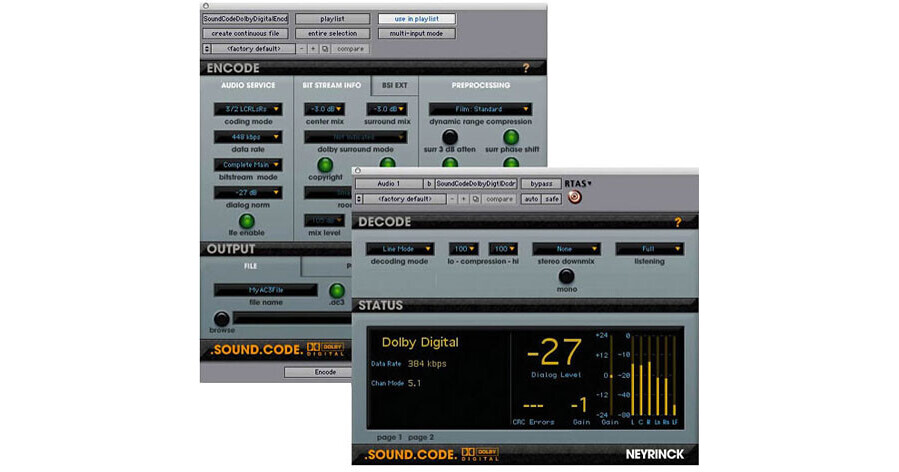
Neyrinck SoundCode for Dolby Digital from Avid is a plug-in suite that allows for encoding and decoding Dolby Digital (AC-3) audio directly within Pro Tools software, without the need for dedicated Dolby hardware. Tightly integrated within the Pro Tools software, the plug-in provides for mixing in surround, delivering surround audio for DVD video, decoding audio from a DVD video within Pro Tools, creating a DVD reference disk, or producing a surround-compatible audio CD.
Because the encoder operates as an AudioSuite plug-in, it offers faster than real time encoding (CPU dependent). It encodes to all AC-3 file types including AC-3 with time code, and also encodes to 16- or 24-bit stereo interleaved WAV files that can be laid back to digital tape, or used for creating an audio disc for playback on consumer stereo systems that have a Dolby Digital decoder. Preprocessing settings can be adjusted and extensive metadata added to ensure greater playback consistency on a variety of systems.
It also possible to import the encoded audio back into the Pro Tools timeline, where it can be decoded and monitored using the real-time decoder. A time-saving punch in/out feature enables punching in fixes to an already encoded AC-3 file. If audio for a two-hour program needs a single line of dialog replaced, just that line can encoded without having to re-encode the entire soundtrack. The decoder delivers extensive metering for output level, dynamic range compression, dialog normalization, and CRC error detection.
The decoder functions as either a real time RTAS or HTDM plug-in, or a non-real-time AudioSuite plug-in. When used real-time, the decoder allows for decoding and monitoring audio during Pro Tools session playback. Combined with Pro Tools video playback capabilities, the real-time decoder can be used as part of a mastering-quality confidence monitoring system. Using the decoder as an AudioSuite plug-in, all or a portion of an audio file can be decoded, or the AC-3 file's metadata viewed.
The decoder offers four decoder modes - line (standard consumer decoder mode), custom (which allows for adjusting the dynamic range compression), RF (for RF television feeds), and data stream (which passes the Dolby Digital data stream and formats it as stereo PCM digital audio). It also provides a wide variety of down mix options and listening modes that simulate various consumer listening setups, including mono, stereo, Dolby Surround-compatible stereo, front only, and stereo in which the center channel is mixed to the left and right.
- Tight integration within the Pro Tools environment
- Faster-than-real-time encoding (encoding time will vary based on CPU speed)
- Punch In/Out feature to save time when fixing an existing AC-3 file
- Support for AC-3 time code file format
- Simultaneous import for confidence monitoring
- Support for Bitstream Extensions Metadata
- Real-time decoding
- AudioSuite faster-than-real-time decoding
- Confidence monitoring
- Extensive metadata display
- Decoding synchronized to Pro Tools video playback system
- Downmix and listening modes to simulate consumer listening environments
- Output level metering
- CRC error detection