Video Chat with a Pro Video Expert - Live

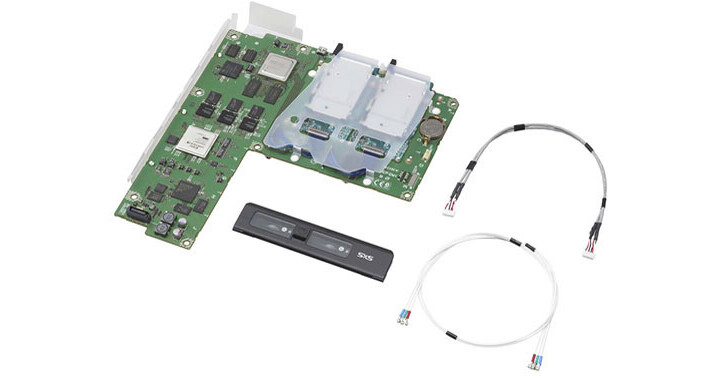
Sony SxS Card Slot Option Board for PDW-HR1

BH #SOPDBKMK1 • MFR #PDBKMK1
Print
Sony SxS Card Slot Option Board for PDW-HR1
Key Features
  • Addition of 2 SxS Card Slots to PDW-HR1
  • Direct Browsing of Files on SxS Cards
  • Clip Copy / Transcode Functionality
  • XDCAM EX Card BPAV Folder Structure
The Sony SxS Card Slot Option Board for PDW-HR1 is an SxS Memory Card Adaptor that can be used as an option for adding 2 SxS card slots to the PDW-HR1 Professional Disc Field Station. You can use play content on SxS memory cards and copy content between professional discs and SxS memory cards via the optional board.
More Details
Special Order
Expected availability: 2-4 Weeks
No Store Display
This item cannot be canceled or returned.
Free Standard Shipping

Business Financing Options

Ask an Expert
866-264-7509

Sony PDBKMK1 Overview

The Sony SxS Card Slot Option Board for PDW-HR1 is an SxS Memory Card Adaptor that can be used as an option for adding 2 SxS card slots to the PDW-HR1 Professional Disc Field Station. You can use play content on SxS memory cards and copy content between professional discs and SxS memory cards via the optional board.

You can directly browse files on SxS cards via the PDW-HR1 and also perform various clip transcoding and copy functions. You can copy data to and from the \UserData folder of the PDW-HR1 and thus maintain the original XDCAM EX card BPAV folder structure whenever required.

Rewrapping or transcoding of XDCAM EX MP4 files to optical XDCAM MXF files during copy process is also possible using the SxS Card Slot Option Board for PDW-HR1. Consolidation of all footage on a disc using the MXF file format is also possible which is useful for XDCAM EX and optical XDCAM photographers.

You can easily transcode and upconvert SD clips to HD as well as cross convert 720p material to 1080i material using the SxS Card Slot Option Board for PDW-HR1.

SxS Memory Card Adaptor that can be used as an option for adding 2 SxS card slots to the PDW-HR1 Professional Disc Field Station
Allow you to play content on SxS memory cards and copy content between professional discs and SxS memory cards via the optional board
Allows you to directly browse files on SxS cards via the PDW-HR1 and also perform various clip transcoding and copy functions
Allows copying data to and from the \UserData folder of the PDW-HR1 and thus maintaining the original XDCAM EX card BPAV folder structure whenever required
Enables rewrapping or transcoding of XDCAM EX MP4 files to optical XDCAM MXF files during copy process
Consolidates all footage on a disc using the MXF file format
Transcodes and upconverts SD clips to HD as well as cross converts 720p material to 1080i material

Sony PDBKMK1 Specs

Power / Consumption
+12VDC, 1A (Power is supplied from PDW-HR1)
Mass
Approx. 0.62 lb (290g) (Total Mass of the DPR-321 Board, EC-67 Board, and the Slot Cover)
Recording & playback rate
SBP-16
 

  • HQ mode 50 min.
  • SP mode 70 min.
  • DVCAM mode 65 min.
  • HD422 50/IMX50 30 min.
  • HD420 HQ 45 min.
  • DVCAM 55 min.


SBP-32 / SBS-32G1A

  • HQ mode 100 min.
  • SP mode 140 min.
  • DVCAM mode 130 min.
  • HD422 50/IMX50 60 min.
  • HD420 HQ 90 min.
  • DVCAM 110 min.


SBS-64G1A

  • HQ mode 200 min.
  • SP mode 280 min.
  • DVCAM mode 260 min.
  • HD422 50/IMX50 120 min.
  • HD420 HQ 180 min.
  • DVCAM 220 min.
Dimensions
8.6 × 9.37" (216.2 × 235.5 mm)

Sony PDBKMK1 Reviews

See any errors on this page?

question

Does this interface enable the recording from the SDI input directly to the SxS card (no XDCAM disc)?Thanks
Asked by: Lucas
This updates the older version of the PDW-HR1 so that it can record FROM the SxS cards, However, it does not allow it to record TO the SxS cards.
Answered by: Dennis A L.
Date published: 2018-08-28
  • y_2026, m_6, d_6, h_12CST
  • bvseo_bulk, prod_bvqa, vn_bulk_3.0.46
  • cp_1, bvpage1
  • co_hasquestionsanswers, tq_1
  • loc_en_US, sid_794218, prod, sort_[SortEntry(order=HAS_STAFF_ANSWERS, direction=DESCENDING)]
  • clientName_bhphotovideo
Whatever You Need, We've Got It