IOGEAR 2-Port DualView Dual-Link DVI KVMP Switch with Audio

BH #IOGCS1642 • MFR #GCS1642
Print
IOGEAR 2-Port DualView Dual-Link DVI KVMP Switch with Audio
Key Features
  • Dual-Monitor Support
  • Manage 2 Computers
  • 4 x DVI-I Outputs, 2 x DVI-I Inputs
  • Resolutions up to 2500 x 1600
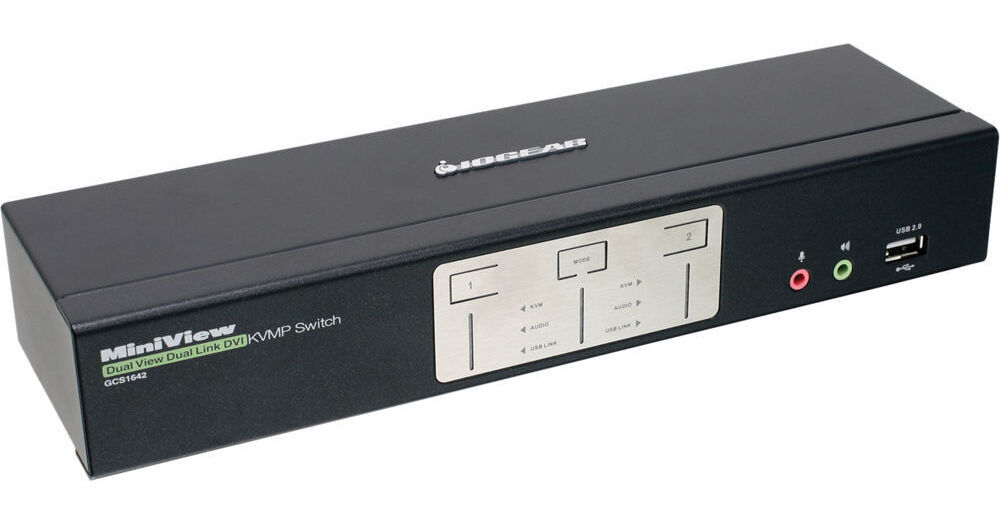
The IOGEAR 2-Port DualView Dual-Link DVI KVMP Switch with Audio comes with four DVI-I outputs, two DVI-I inputs, and a pair of USB ports, so you can control 2 computers using two monitors and a single keyboard and mouse. For multimedia applications, the switch delivers 2-channel sounds by featuring standard audio jacks for your speakers, headsets, and microphones. In addition, a 2-port USB hub allows you to connect printers, external storage drives, scanners, and more to your two systems.
More Details
In Stock
No Store Display
Free 2-Day Shipping
Protect Your Gear
Add a protection plan from $17.00
Ask an Expert
800-606-6969

IOGEAR GCS1642 Overview

The IOGEAR 2-Port DualView Dual-Link DVI KVMP Switch with Audio comes with four DVI-I outputs, two DVI-I inputs, and a pair of USB ports, so you can control 2 computers using two monitors and a single keyboard and mouse. For multimedia applications, the switch delivers 2-channel sounds by featuring standard audio jacks for your speakers, headsets, and microphones. In addition, a 2-port USB hub allows you to connect printers, external storage drives, scanners, and more to your two systems.

The six dual-link DVI-I ports offer a resolution of up to 2500 x 1600, which is suitable for 3D graphics and gaming. You can quickly switch between the two systems with asynchronous hotkey software switching or the three buttons located on the front panel. The switch supports Dynasync so that Windows 7 can read and remember the monitor's video resolution when switching between or booting computers. IOGEAR has designed this switch to work with various operating systems, including Windows, Mac OS X, Sun Solaris, and Linux. Being HDCP compliant, the switch is firmware upgradeable. Furthermore, two sets of KVM cables and two DVI-D cables are included to complete your switching needs.
Allows you to control 2 computers using a single keyboard and mouse
Supports dual monitor configurations, an integrated 2-port USB 2.0 hub, and audio switching
Offers a high resolution up to 2500 x 1600
Supports 3D graphics and gaming
Asynchronous hotkey switching between KVM focus, USB peripheral, and audio ports
2.1 stereo sound with the audio enabled - microphone support and full bass response
Dynasync feature with EDID support for Windows 7 - reads and remembers the monitor's parameters so that there is no delay or change of video resolution when switching between, or booting computers
Complete keyboard and mouse emulation for error free booting and real-time switching
Front panel pushbuttons / hotkeys for switching between computers
Compatible with MAC / Sun keyboard and special keys
Supports a multi-platform OS including Windows XP, Windows Vista, Windows 7, Mac OS X, Sun Solaris, and Linux
HDCP compliant
Firmware upgradeable
Plug-n-Play installation - allows you to install without any need for software
Ideal for CAD (Computer Aided Design) and CAM (Computer Aided Manufacturing), desktop publishing / graphic design / video editing, medical / surgical / diagnostic displays, and high-end gaming
UPC: 881317502834

IOGEAR GCS1642 Specs

Key Specs
# of Systems Supported
2
Console I/O
1x 1/8" / 3.5 mm
1x 1/8" / 3.5 mm Audio Female
1x 1/8" / 3.5 mm Microphone Female
1x USB-A (Keyboard) Female
1x USB-A (Mouse) Female
2x DVI-I DL Female
2x USB-A Female
KVM I/O
2x 1/8" / 3.5 mm Female
2x 1/8" / 3.5 mm Microphone Female
2x USB-B (Keyboard) Female
2x USB-B (Mouse) Female
4x DVI-I Female
Supported Resolutions
1920 x 1200
2650 x 1600
# of Systems Supported
2
Console I/O
1x 1/8" / 3.5 mm
1x 1/8" / 3.5 mm Audio Female
1x 1/8" / 3.5 mm Microphone Female
1x USB-A (Keyboard) Female
1x USB-A (Mouse) Female
2x DVI-I DL Female
2x USB-A Female
KVM I/O
2x 1/8" / 3.5 mm Female
2x 1/8" / 3.5 mm Microphone Female
2x USB-B (Keyboard) Female
2x USB-B (Mouse) Female
4x DVI-I Female
OS Compatibility
Windows
Supported Resolutions
1920 x 1200
2650 x 1600
USB Keyboard/Mouse Emulation
Yes
Power Source
AC Adapter
Operating Conditions
32 to 122°F / 0 to 50°C up to 80% Humidity
Storage Conditions
-4 to 140°F / -20 to 60°C
Rack Mountable
No
Dimensions
10.2 x 1.7 x 2.9" / 26.0 x 4.4 x 7.5 cm
Weight
2.0 lb / 0.9 kg
Packaging Info
Package Weight
5.34 lb
Box Dimensions (LxWxH)
13.3 x 8.55 x 4"

IOGEAR GCS1642 Reviews

Worth every penny!

By Paul
Rated 5 out of 5
Date: 2017-09-11

I purchased this KVM switch to switch between my two mac pros. Originally I was switching between the computers by hand every time I wanted to switch between my video/audio rigs. Removing desktops became too much to deal with and affected my productivity. Now I can run both mac pros (2 monitors-two computers-one mouse and keyboard) simultaneously! No more heavy lifting and rewiring every time I want to use an alternate computer. Why didn't I get this sooner! Easy and quick setup and all the wires needed were included. Worth every penny.

If you have the need, this is the answer

By Gregory
Rated 4 out of 5
Date: 2016-12-30

For my wife and I, it is unthinkable to think about only having one monitor. My wife has used this product for three years to separate her gaming computer from her home/photography computer. When we upgraded her gaming computer, I took it over so I could run my video editing software off one computer and most everything else off the other. Without hesitation, I purchased the same device because my monitors have DVI inputs. Set up with quick and easy. I have had good luck with IOGear products and trust the name. Why not a 5 star? The audio component does not work on either of our computers. Each of us gets buzz from one of the computers. We tried multiple solutions on her computer before just bypassing the KVMP using an audio splitter cable directly from each computer to her speaker. (not a perfect solution, but it works) Another lesson learned. Each of us has a computer whose video card only has ONE DVI port, but several Display Ports and an HDMI port. We could use a Display Port to DVI adapter or cable with this unit. We COULD NOT get an HDMI to DVI adapter to work.

See any errors on this page?

How is audio quality if using shielded audio ...

How is audio quality if using shielded audio cable with near field speakers?
Asked by: Jeremi
It would have little to no interference. Due to the 3.5 ports being properly grounded.
Answered by: Nachmen
Date published: 2020-06-27

question

Would I get any problem using a DVI/VGA adapter to connect to both the DVI and VGA outputs on the back of my computers ?
Asked by: Anonymous
I did this for several months using this switch with one computer with VGA w/ y adapter and the other with straight DVI, and I had no problems.
Answered by: Karen W.
Date published: 2018-08-28
  • y_2026, m_6, d_2, h_13CST
  • bvseo_bulk, prod_bvqa, vn_bulk_3.0.46
  • cp_1, bvpage1
  • co_hasquestionsanswers, tq_2
  • loc_en_US, sid_797517, prod, sort_[SortEntry(order=HAS_STAFF_ANSWERS, direction=DESCENDING)]
  • clientName_bhphotovideo
Whatever You Need, We've Got It