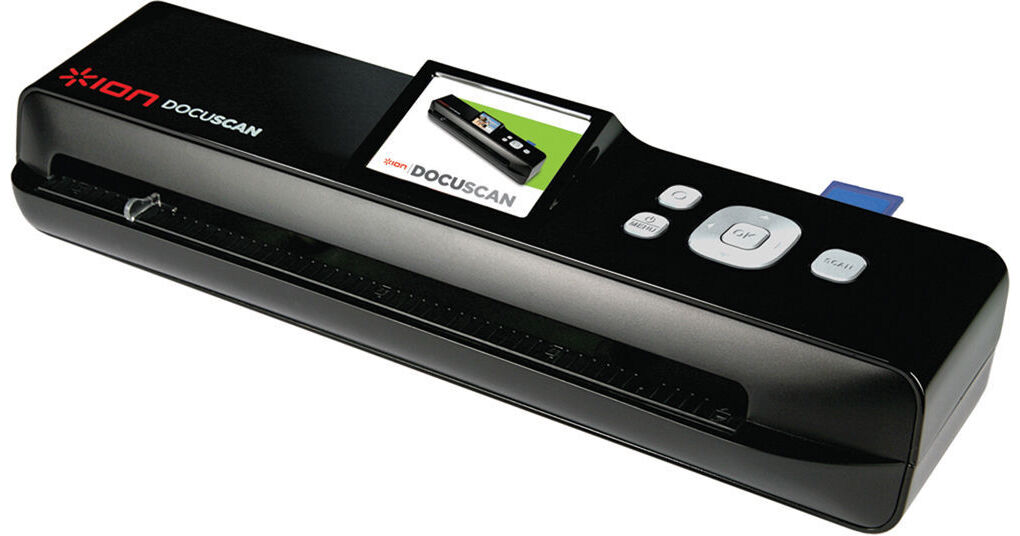
The Docuscan Standalone Document And Photo Scanner from ION provides an easy way to scan documents and photos up to 8.5 x 11" at home or on the go. The SD card-slot allows you to scan directly to an SD card so you can scan anywhere, even without a computer. Take the guesswork of scanning on the go. The built-in full color LCD screen that shows the document that was just scanned with zoom and rotate functions let you make sure the scans are correct before proceeding. The scanner can also be used for photos. The input tray is adjustable to standard photo sizes - 3 x 5, 4 x 6, and 6 x 8, ensuring the scans will be even and not distorted. Once an item is scanned, it can be stored on the included SD card or on a computer via the USB cable (also included).
Ask Our Experts800-606-6969
Hello, Log InAccount & Orders
Video Chat with a Photography Expert - Live
Key Features
- Scan To SD Card Or Computer
- 300 DPI
- Feeder Adjusts To Common Photo Sizes
- Scan Items Up To 8.5 x 11
The Docuscan Standalone Document And Photo Scanner from ION provides an easy way to scan documents and photos up to 8.5 x 11" at home or on the go. The SD card-slot allows you to scan directly to an SD card so you can scan anywhere, even without a computer. Take the guesswork of scanning on the go. The built-in full color LCD screen that shows the document that was just scanned with zoom and rotate functions let you make sure the scans are correct before proceeding. The scanner can also be used for photos. The input tray is adjustable to standard photo sizes - 3 x 5, 4 x 6, and 6 x 8, ensuring the scans will be even and not distorted. Once an item is scanned, it can be stored on the included SD card or on a computer via the USB cable (also included).
More DetailsNo Longer Available
ION Audio DocuScan Overview
Scan Everything
When you need something scanned you don't want to wait for a computer to start up, hunt for a cable and then have to figure out how to work the software. ION Docuscan solves this problem and gives you a one-touch, stand-alone solution for converting all your photos and documents to digital files directly to an SD card
Designed For Convenience
Docuscan's slim, sleek design is a perfect addition to any home, office or dorm room. Alternatively, Docuscan's SD card support and portable design gives you the flexibility to scan remotely without the need of a computer. An adjustable paper feeder gives you the convenience of setting the most commonly used photo sizes (3 x 5, 4 x 6, 6 x 8) for quick, accurate conversion. You can scan documents up to standard letter sizes of 8.5 x 11" in both color and black-and-white
Designed For Quality
Docuscan's high-resolution 300 DPI scanning ability ensures you will not lose any quality during the conversion process and the included "paper sleeve" protects your originals while scanning. With Docuscan, what you scan is preserved perfectly in digital form and will never deteriorate like paper photos and documents
Easy To Use
With Docuscan, you can monitor your scanned images and documents immediately after being scanned with Docuscan's integrated 2.4" LCD screen with zoom and rotate functions. Share your photos easily by ejecting the SD card and inserting it into any compatible reader such as a digital photo frame, mobile phone or computer
ION Audio DocuScan Specs
| Scanner Type | |
| Optical Resolution | |
| Scan Area | |
| Scan Speed | |
| Interface | |
| Menu Language | |
| System & Software Requirements | |
| LCD Display | |
| Front Panel Controls | |
| Power Consumption |
Packaging Info
| Box Dimensions (LxWxH) |
ION Audio DocuScan Reviews
See any errors on this page?