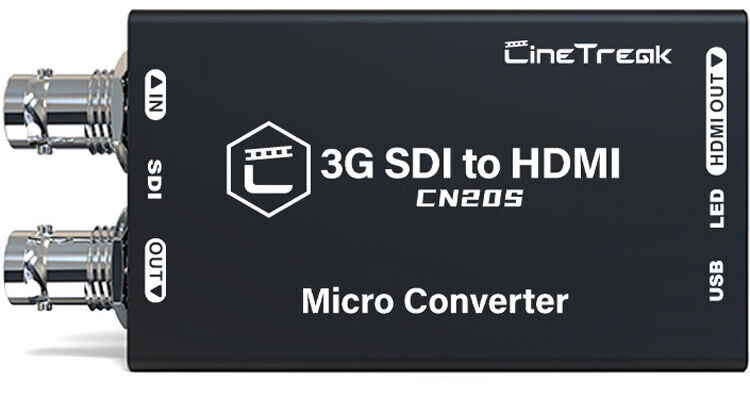
CineTreak Professional SDI to HDMI Video Converter

Used Cat #3371778 • MFR #CN20S
Print
CineTreak Professional SDI to HDMI Video Converter
This image is for illustrative purposes only
Key Features
  • 3G-SDI to HDMI Video/Audio Converter
  • Up to 1080p60 Input and Output
  • BNC SD/HD/3G-SDI Input, SDI Loop Output
  • UVC/UAC Control
Convert your SDI video content to HDMI using the Professional SDI to HDMI Video Converter from CineTreak. This capture device enables you to convert one SDI video signal along with embedded audio to an HDMI signal. It also allows you to add custom 3D LUTs, and it can store up to 16 LUTs to apply to your video output.
More Details
Used
Warranty: B&H 90 Days
In Stock
Protect Your Gear
Add a protection plan from $7.95

CineTreak CN20S Overview

Convert your SDI video content to HDMI using the Professional SDI to HDMI Video Converter from CineTreak. This capture device enables you to convert one SDI video signal along with embedded audio to an HDMI signal. It also allows you to add custom 3D LUTs, and it can store up to 16 LUTs to apply to your video output.

The device supports input of up to 1080p60 resolutions via 3G/HD/SD-SDI and ST2048, and it outputs uncompressed resolutions up to a via HDMI. There is also an SDI loop output for local monitoring. Its plug-and-play design provides compatibility with common streaming apps such as OBS, XSplit, and more without the need for additional drivers. You can power the unit via the USB-C input, enabling mobile options such as a power bank.

Converts SDI to HDMI for Broadcast
The CN20S allows you to convert SDI to HDMI video signal format for broadcast applications and switching. It supports 3G-SDI, HD-SDI, and SD-SDI formats, as well as the ST2048 cinematic format.
3D LUTs with 16 Storable Files
The CN20S comes with a 17x17x17 3D Look-Up Table (LUT) and the ability to store up to 16 LUT files, allowing for precise color grading and adjustments. This feature is essential for maintaining consistent color accuracy across multiple video sources.
Ultra Control Utility
The CN20S is equipped with the Ultra Control Utility software, which allows you to customize settings for advanced control over your video capture and streaming.
Camera Device Name Configuration
The CN20S supports camera device name configuration, allowing users to assign custom names to connected cameras. This feature is particularly useful for multi-camera setups.
Power Options
The CN20S is powered via USB-C, making it easy to power via a laptop, optional power adapter, or a power bank. LED status indicators provide clear feedback on power and operational status.

CineTreak CN20S Specs

Inputs/Outputs
Video I/O
Input
1x BNC (3G-SDI) Female
1x HDMI 2.0 Female
1x BNC (3G-SDI) Female (Loop Output)
Audio I/O
No
Format Support
Video Resolution
HDMI Input
2048 x 1080p at 23.98/24/25/29.97/30/50/59.94/60 fps
1920 x 1080p at 23.98/24/25/29.97/30/50/59.94/60 fps
1920 x 1080i at 50/60 fps
1280 x 720 at 23.98/24/25/29.97/30/50/59.94/60 fps
720 x 576p
720 x 576i
720 x 480p
720 x 480i

BNC Input (10-Bit 4:4:4/4:2:2 YCC)
1920 x 1080p up to 60 fps
Embedded Audio
HDMI/SDI: 8-Channel
Power
Power I/O
1x USB-C (5 VDC ) Input
Power Consumption
Device: 2 W
General
Operating Conditions
32 to 122°F / 0 to 50°C
Storage Conditions
-22 to 158°F / -30 to 70°C
Dimensions
3 x 1.7 x 1" / 75 x 43 x 25 mm
Weight
3.8 oz / 109 g

CineTreak CN20S Reviews

See any errors on this page?
Whatever You Need, We've Got It