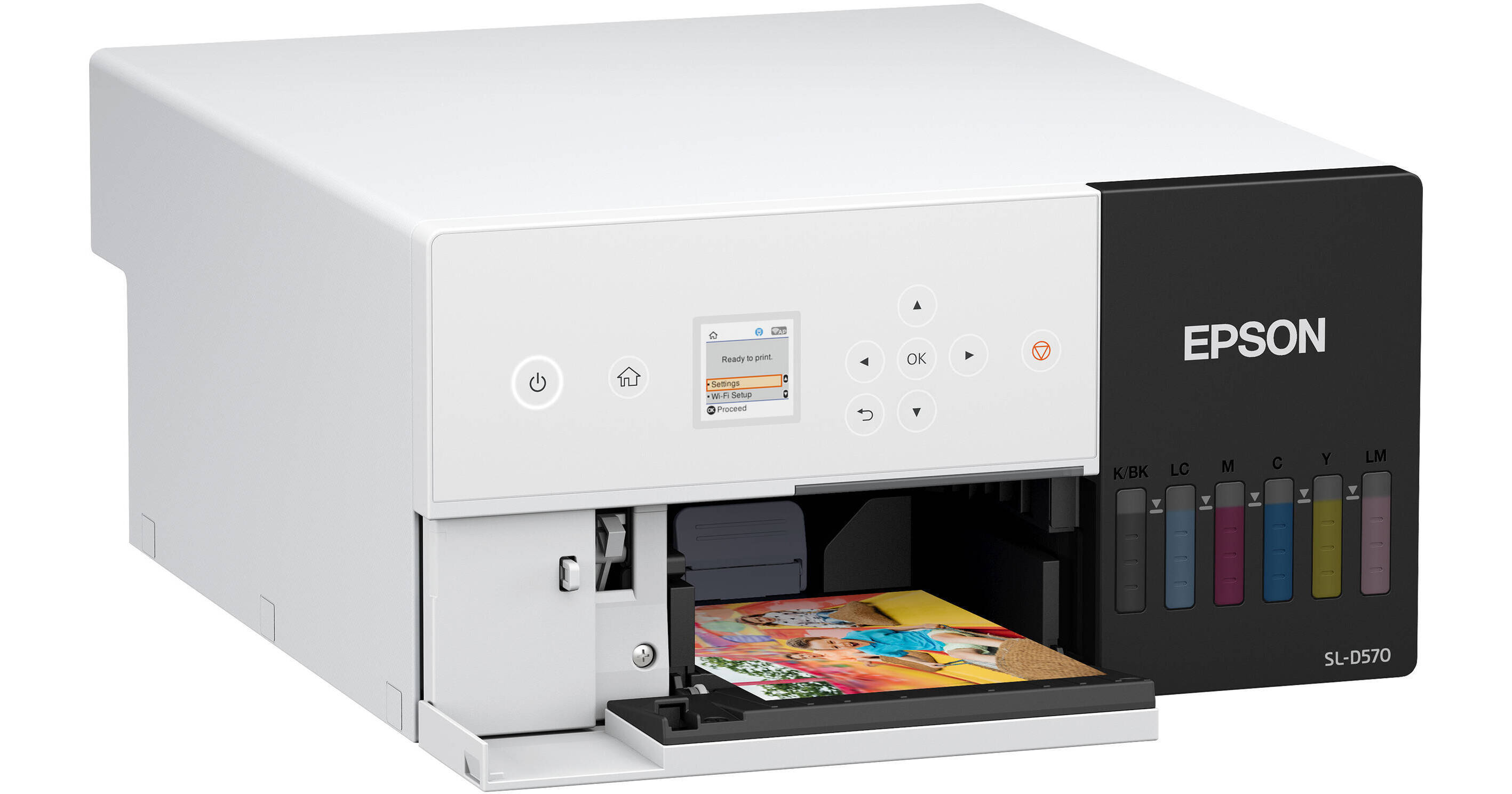
Epson SureLab D570 Professional Minilab Photo Printer

Used Cat #3521876 • MFR #SLD570SE
Print
Epson SureLab D570 Professional Minilab Photo Printer
This image is for illustrative purposes only
Key Features
  • Ultra-Compact and Stackable Design
  • Prints 4 x 6" and 3.5 x 5" Color Photos
  • Up to 1440 x 720 dpi Resolution
  • Supports Optional Portable Battery
The Epson SureLab D570 is an ultra-compact photo printer supporting 4 x 6" and 3.5 x 5" photo sheets in a glossy, luster, or matte finish. It prints on single- and double-sided glossy and luster sheets. The printer features a top resolution of 1440 x 720 dpi. The average print speed is 14 seconds for a 4 x 6" sheet when printing at 720 x 360 dpi.
More Details
Used
Warranty: B&H 90 Days
In Stock
No Store Display
Free 2-Day Shipping
Protect Your Gear
Add a protection plan from $89.95

Epson D570 Overview

The Epson SureLab D570 is an ultra-compact photo printer supporting 4 x 6" and 3.5 x 5" photo sheets in a glossy, luster, or matte finish. It prints on single- and double-sided glossy and luster sheets. The printer features a top resolution of 1440 x 720 dpi. The average print speed is 14 seconds for a 4 x 6" sheet when printing at 720 x 360 dpi.

This Minilab printer combines Epson's advanced MicroPiezo AMC inkjet printhead with support for UltraChrome D6r-S inks to produce crisp, vibrant photos. Ink bottles are sold separately. With low power consumption, this printer can be powered by an optional 3rd-party portable battery instead of the included AC power supply, so that you can print wherever you are. Epson has not specified which type of battery exactly is supported, but they have advised that it should have a minimum of 100W (to match the 18W power consumption) and that it must have an AC outlet.

In addition to being compact at just 11.7 x 15.7 x 6", the D570 also has a stackable design so that you can scale up your business and add more printers in a neat space-saving setup. For connectivity, the SureLab offers Wi-Fi, USB, and Ethernet interfaces. Over the built-in Wi-Fi, you can use the Epson Smart Panel app on your iOS or Android device to create professional prints.

Note:
Ink bottles are sold separately. This printer supports Epson T54C inks.
UPC: 010343969407

Epson D570 Specs

Key Specs
Functions
Print
Printing Technology
Inkjet
Color Type
Color
Configuration
6x Individual Cartridge
Ink Color
1x Black
1x Cyan
1x Magenta
1x Yellow
1x Light Cyan
1x Light Magenta
Print Resolution
1440 x 720 dpi
720 x 720 dpi
720 x 360 dpi
Media Sizes
Input Tray 1
Maximum: 4 x 6" / 10.2 x 15.2 cm
Input Tray 1
Maximum: 3.5 x 5" / 8.9 x 12.7 cm
Wireless
802.11b/g Wi-Fi
Power Source
AC Power (Cable Built-In/Included)
Functions
Print
Printer
Printing Technology
Inkjet
Color Type
Color
Configuration
6x Individual Cartridge
Ink Color
1x Black
1x Cyan
1x Magenta
1x Yellow
1x Light Cyan
1x Light Magenta
Compatible Cartridges
Epson T54C
Number of Nozzles
180 Nozzles (Per Channel)
Print Resolution
1440 x 720 dpi
720 x 720 dpi
720 x 360 dpi
Borderless Printing
Yes
Duplex Printing
No
Print Speed (By Size)
4 x 6" / 10 x 15 cm: 14 Seconds
Printer Media Handling
Media Handling
1 x Input Tray
Media Sizes
Input Tray 1
Maximum: 4 x 6" / 10.2 x 15.2 cm
Input Tray 1
Maximum: 3.5 x 5" / 8.9 x 12.7 cm
Media Thickness
10.24 mil / 0.26 mm
Paper Capacity
Input Tray 1: 100 x Sheet
Connectivity
Data I/O
1x USB-B 3.0 / 3.1/3.2 Gen 1 Input
1x RJ45 Input
Wireless
802.11b/g Wi-Fi
OS Compatibility
Windows 7 or Later / macOS 10.6 or Later
General
Display Size
1.44"
Display Type
LCD
Power Source
AC Power (Cable Built-In/Included)
Battery
1x Rechargeable (Not Included)
Input Power
100 to 240 VAC, 50 / 60 Hz
Power Consumption
18 W (Maximum)
Max Acoustic Noise
49 dBA (Pressure)
Operating Conditions
50 to 95°F / 10 to 35°C at 20 to 80% Humidity
Storage Conditions
-4 to 104°F / -20 to 40°C at 5 to 85% Humidity
Certifications
FCC Class B, RoHS
Dimensions (W x H x D)
11.8 x 6.1 x 15.7" / 299 x 154 x 400 mm (Maximum)
11.8 x 6.1 x 13.8" / 299 x 154 x 350 mm (Storage)
Weight
38.3 lb / 17.4 kg

Epson D570 Reviews

See any errors on this page?
Whatever You Need, We've Got It