Please update your browser to take advantage of the latest technology security enhancements to ensure your B&H Shopping experience is as safe as it is enjoyable:
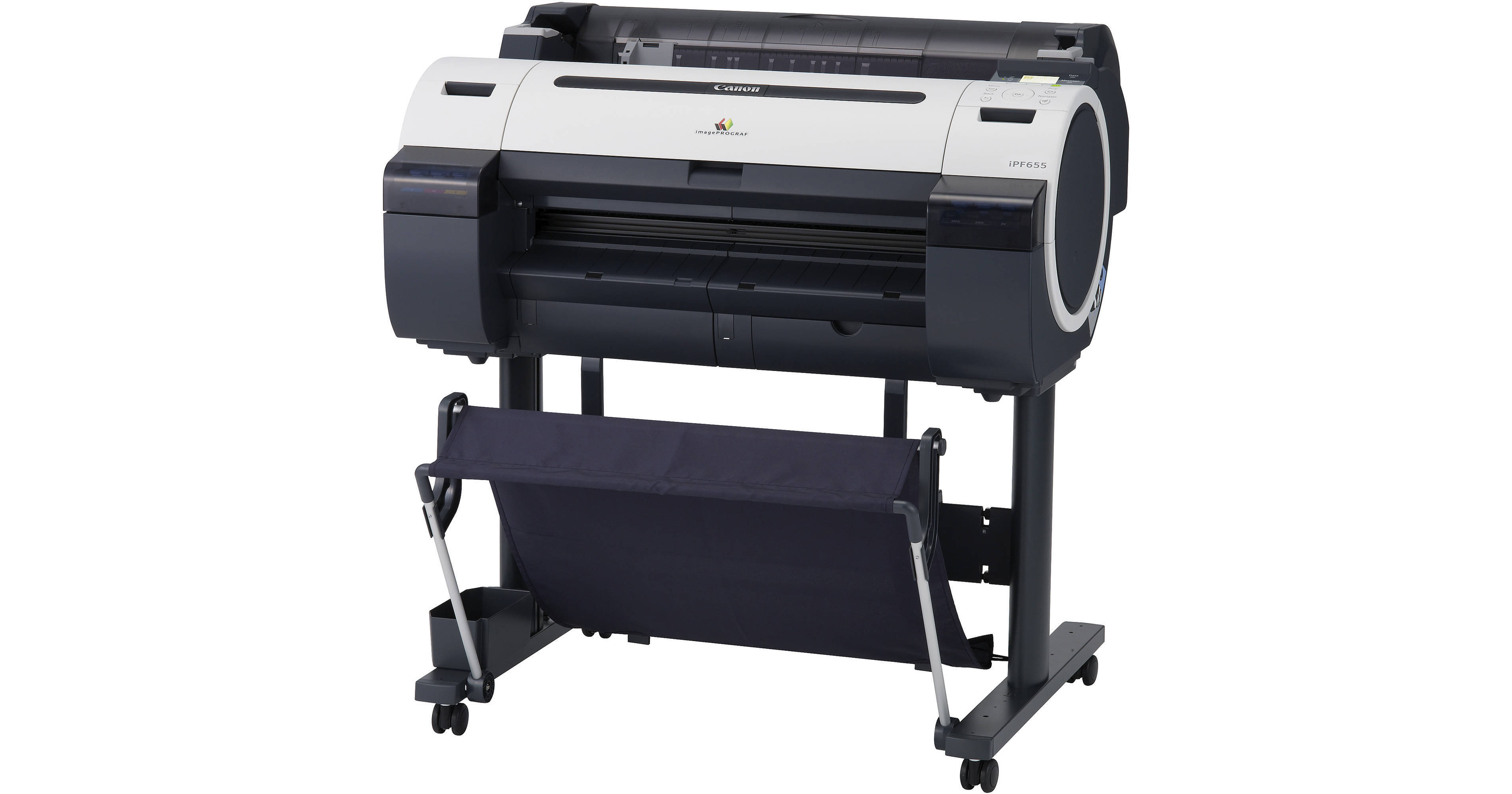
The large-format 2400 dpi imagePROGRAF iPF655 Printer from Canon can print a D/A1-sized document in as fast as 28 seconds. Canon's unique 5-color Reactive Ink set delivers durable, smudge-resistant prints. The 15,360 nozzles deliver ink in amounts as small as 4 pl while its sub-ink tank design allows you to replace ink without interrupting a print job.
Designed to handle large, complex documents in high volume, the printer's 256 MB memory allows you to continue working at your computer while the printer works in the background - it won't use any of your computer's memory. Additionally, you can speed up the process of printing commonly used files by storing them on the printer's built-in 80 GB hard drive. The hard drive's contents can be stored in one of the printer's protected mailboxes for easy access via a web browser or at the printer for quick job reprinting.
Designed with total front-side operation, the printer can be installed flush against any wall and fit in almost any area. A high-capacity media basket and a durable self-propelled dual rotary cutter let you print high volume jobs unattended.
The large-format 2400 dpi imagePROGRAF iPF655 Printer from Canon can print a D/A1-sized document in as fast as 28 seconds. Canon's unique 5-color Reactive Ink set delivers durable, smudge-resistant prints. The 15,360 nozzles deliver ink in amounts as small as 4 pl while its sub-ink tank design allows you to replace ink without interrupting a print job.
Designed to handle large, complex documents in high volume, the printer's 256 MB memory allows you to continue working at your computer while the printer works in the background - it won't use any of your computer's memory. Additionally, you can speed up the process of printing commonly used files by storing them on the printer's built-in 80 GB hard drive. The hard drive's contents can be stored in one of the printer's protected mailboxes for easy access via a web browser or at the printer for quick job reprinting.
Designed with total front-side operation, the printer can be installed flush against any wall and fit in almost any area. A high-capacity media basket and a durable self-propelled dual rotary cutter let you print high volume jobs unattended.
High-Speed Printing: L-COA Processor
Output a D-size (24 x 36") drawing in approximately 28 seconds*. When you need to keep projects moving forward and meet deadlines, this kind of speed is critical. Powering these incredible print speeds is Canon's L-COA (Large Format Printer COmmon Architecture) print controller, driving the imagePROGRAF print engine to lay down ink with exceptional speed and precision. This unique, high-speed processor enables the print system to process large volumes of data while optimizing output of complex high-color GIS images and architectural renderings for maximum readability and color accuracy
Note:
* When printing in fast mode on plain paper. Includes paper-cutting time
Space-Saving, Environmentally-Conscious Design
This printer was designed to be space-saving and environmentally conscious. This printer carries a small footprint with fully front-accessible operation for flush wall installation that fits into almost any environment. Also, loading roll media is simple with built-in loading guide rails and an automatic roll feeder. Made with less plastic, and reduced CO2 emissions, this model has earned ENERGY STAR qualification, and draws only 140 watts of power during use
Print Longer without Interruption
Canon's unique sub-ink tank system means you can replace ink on-the-fly without stopping the printer. For long print runs, a high-capacity media basket comes standard with this printer. And its highly durable self-propelled dual rotary cutter allows for even faster printing of multi-page jobs
High-Density PF-04 Print Head
Engineered for speed and advanced image production, this printer boasts Canon's latest print-head technology to lay down ink with unprecedented speed and accuracy. The new PF-04 print head incorporates a new nozzle shape to reduce satellite ink, producing cleaner lines and text, and minimizing mist. The high-precision, high-density print head, with a total of 15,360 nozzles, lays down 4 picoliter-size ink droplets that produce sharp detail and excellent image quality. The result is consistently accurate 2400 x 1200 dpi output with fine lines that are accurate to ±0.10% and as thin as 0.02 mm
Built-In 80GB Hard Drive
A built-in 80GB hard drive within the printer increases productivity by relieving workload from the host PC, while providing a large capacity for print job data storage and retrieval. This 80GB hard drive enables job data to be stored in protected mailboxes for easy access via web browser or at the printer for job re-printing. The embedded hard disk is ideal for medium to large workgroups to share a printer efficiently with multiple users, offering ample job storage space
Print Job Accounting Manager
Keep track of costs and allocate consumable expenses to projects more easily with the Print Job Accounting function. This management tool allows you to track print jobs by user to calculate ink and media costs, and the number of pages printed
Accounting features include: auto rotation, auto nesting, log recording time, job name, client job ID, client job submission time, job execution time, job completion time, job completion state, ink consumption per job*, media type, number of completed pages, media consumption area per job, extended media type
Note:
* Ink usage is estimate, and error tolerance is ±15%
Economy Print Mode
Reduce total ink consumption by utilizing the Economy Print Mode for producing draft prints on select media. This feature regulates the use of all inks to produce quick check plots while minimizing the cost per print
Reactive Ink System
Ideal for technical applications, Canon's breakthrough 5-color dye/pigment Reactive Ink technology utilizes four highly colorfast dye inks for producing bold, expressive color, plus two channels of matte black ink for printing precise lines, smooth curves, and small text on technical and office documents. Now with new magenta ink for richer, more vivid reds, this ink system is ideal for both GIS drawings and posters. These Canon inks provide superior adhesion to media, scratch and marker resistance, and ensure minimal "bleeding" between colors and text. Even small text printed on colored backgrounds or on uncoated technical papers is crisp and legible
HDI Driver
With the Canon HDI Driver for AutoCAD application, the driver creates a vector graphical representation of the printed data. Here, points are defined and a curved line is calculated mathematically in order to achieve precision. The HDI Driver creates a graphically accurate drawing of the printed data.
HDI Driver Features Include: exact page size that corresponds with the actual print size, print type setting, print quality setting, color mode setting, brightness slide bar setting, black ink print feature, advanced media settings
Canon Printer Driver
This Windows and Macintosh drivers incorporate simplified page setup options, one-touch borderless printing, expanded color settings, and much more into a printer driver that is intuitive and easy-to-operate while still giving even the most advanced users the tools needed to stay productive
The Real Preview feature ensures users that the print setting and the layout on the roll paper is correct by providing real time preview, allowing users to change the print setting even after clicking on "print." The Free Layout feature enables nesting and custom layouts of images or files of nearly any type (available for both Windows and Mac driver)
The imageRUNNER Enlargement Copy feature built-in to the printer driver lets users transfer data from their Color imageRUNNER device with Universal Send to the imagePROGRAF printer - all with the touch of a button - enabling users to easily create posters from hard copy documents
The driver features easy-to-use preset document profiles (examples are Poster, CAD, Photo), automatic print quality options dependent on print application and media, Real Preview that lets users change document and printer settings after clicking "print", page nesting feature with Free Layout for Windows and Mac, imageRUNNER Enlargement Copy feature - with a hot folder solution to print Color imageRUNNER PDFs directly without opening in a PDF viewer, Economy Print Mode, borderless printing, easy setting/Advanced setting
PosterArtist Lite
Canon's included PosterArtist Lite poster creation software gives users the ability to quickly and easily create professional large format prints. Users simply follow the program's four easy steps to create posters that can be used in applications such as Office presentation, Trade shows, Retail Signage, and much, much more. The PosterArtist QuickCopy feature provides an easy solution for a CanoScan desktop scanner to be used as a copier, making letter-size flyers and documents into full-size posters with a touch of a button
For those with more demanding poster creation needs, Canon's optional PosterArtist offers advanced features such as Auto Design, Variable Data, and in-application image editing features, as well as additional templates, royalty-free photos, and clip art. The built-in weblink feature in PosterArtist Lite links users directly to the PosterArtist website for useful hints and tips, and even more free contents for download
Print Plug-In For Microsoft Office
This utility makes it easy to print large-format documents created in Microsoft Word, Excel, or PowerPoint. The Plug-in appears in a tool bar inside the Microsoft application and has an easy-to-follow "Wizard". The Plug-in will bypass the printer driver to simplify the printing process. A few simple steps convert your 8.5" x 11" office document to poster size
Misc iPF655 Specs
Printing Method
Printing Technology
FINE (Full-Photolithography Inkjet Nozzle Engineering), Non-firing Nozzle Detection and Compensation
5 individual 130 ml cartridges; tubing system with sub-tanks for continuous ink supply
Number of Nozzles
Total: 15,360 nozzles Cyan, magenta, yellow, black: 2560 nozzles per color Matte black: 5120 nozzles
Nozzle Pitch
1200 dpi x two rows
Printhead Swath
1.07" (2.72 cm)
Print Speed
D/A1: 28 seconds
Paper Handling
Maximum Paper Width
24.0" (60.96 cm)
Maximum Printable Area
Roll Feed: 24.0" x 59.0' (60.96 cm x 17.98 m) Cut Sheet: 24.0 x 63.0" (60.96 x 160.02 cm)
Paper Sizes
Sheet Width: 8.0 to 24.0" (203 to 610 mm) Roll Width: 10.0 to 24.0" (254 to 610 mm) Maximum Sheet Length: 63.0" (1.6 m) Maximum Roll Length: 59.0' (18.0 m)
Windows 32-bit: 2000, XP, Vista, Server 2003, Server 2008 Windows 64-bit: XP, Vista, Server 2003, Server 2008 Macintosh 32-bit: OS X CUPS (10.4.9, 10.5.x) Macintosh 64-bit: OS X CUPS (10.5.x)
Certifications
Electrical Safety Regulations: UL (USA), C-UL (Canada), S mark (Argentina), CE mark (EN60950, EN55022 classB, EN61000-3-2, EN-61000-3-3, EN55024) (EU), CB certification (Others) Electromagnetic Interface Regulations: FCC Class B (USA), IC Class B (Canada) Environmental Certifications: ENERGY STAR (Worldwide), RoHS Directive, WEEE, Executive Order (USA)
Physical
Buffer/Ram
256 MB
Hard Disk Capacity
80 GB (SATA)
User-Replaceable Items
Ink Tanks, print-head, maintenance cartridge
Power Requirements
AC 100 to 240 V (50 to 60 Hz)
Power Consumption
Maximum: ≤140 W Standby: ≤5 W Off: ≤1 W
Acoustics
Operation Noise Level: ≤47 dB (A) Standby Noise Level: ≤35 dB (A) Acoustic Power: 6.4 Bel
Temperature / Humidity
Operating Temperature: 59 to 86 °F (15 to 30 °C)
Operating Humidity: 10 to 80% (no condensation)
Dimensions
Printer W/Stand & Basket: 41.8 x 39.3 x 34.3" (106.2 x 99.7 x 87.0 cm) Printer Main Package: 10.4 x 43.8 x 32.1" (26.3 x 111.3 x 81.6 cm) Stand Package: 9.4 x 55.1 x 30.7" (158.5 x 126.3 x 234.8 cm)
Weight
Printer W/Stand & Basket: 119.0 lb (54.0 kg) Printer Main Package: ~ 166 lb (75.3 kg) Stand Package: 38 lb. (17.24 kg)