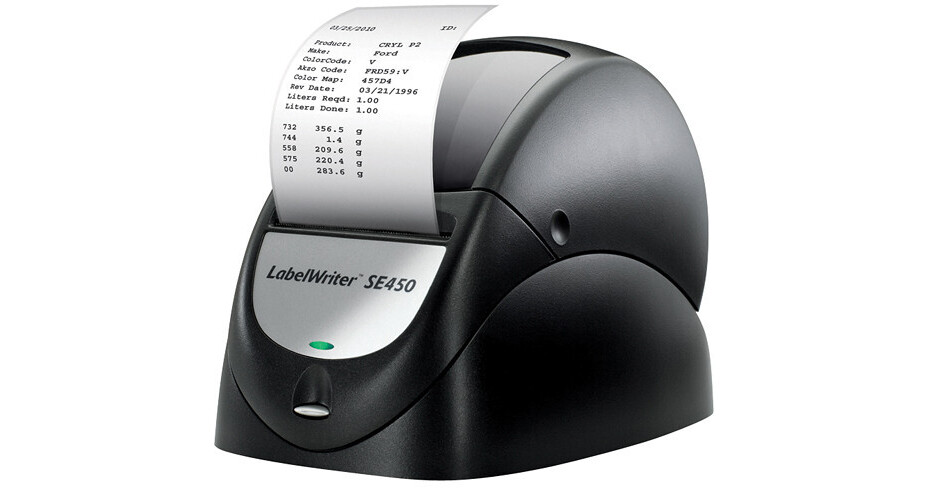
Dymo LabelWriter SE450

BH #DYLWSE450P • MFR #1761334
Print
Dymo LabelWriter SE450
Key Features
  • Thermal Printer: No Ink/Toner To Replace
  • Compatible With Mac, Windows, Linux
  • Software For Designing Labels
  • Print More Than 26 Barcode Formats
The Dymo LabelWriter SE450 prints labels right from your computer in a compact unit that doesn't require ink or toner. The included software guides you through the label creation process from design to printing with templates and instructions for getting the label you want. The included software can also create barcodes in more than 26 formats including Postal, UPC, and ISBN codes.

By using roll labels instead of sheet labels, you save time, money, and paper by printing the exact number you need. The printer's networking capabilities save time and resources, there's no need to buy a separate printer for each computer. The labels compatibility with Windows, Mac, and Linux means it will work with almost any computer.

More Details
No Longer Available
No Store Display
Ask an Expert
800-606-6969

Dymo 1761334 Overview

The Dymo LabelWriter SE450 prints labels right from your computer in a compact unit that doesn't require ink or toner. The included software guides you through the label creation process from design to printing with templates and instructions for getting the label you want. The included software can also create barcodes in more than 26 formats including Postal, UPC, and ISBN codes.

By using roll labels instead of sheet labels, you save time, money, and paper by printing the exact number you need. The printer's networking capabilities save time and resources, there's no need to buy a separate printer for each computer. The labels compatibility with Windows, Mac, and Linux means it will work with almost any computer.

Control the printer from any computer or device with or without drivers. Drivers are included for Mac, Windows and Linux systems
Has a tri-color LED, blue is USB, green is serial and red for out of paper.
Plug and Play
Includes the DYMO Software Developers Kit (SDK)
DYMO Label Software enables you to create and print more than 100 label lay-outs
Print fast crystal-clear text, graphics and barcodes with a high printing resolution (203 dpi)
Uses thermal printing technology - no expensive ink or toner needed, ever
Network easily with the DYMO LabelWriter Print Server
Includes 26 built-in barcode symbologies including 1-D and 2-D, Codabar, Code 3 of 9, Code 129-Auto, EAN-8/13, Interleaved 2 of 5, POSTNET, UPC-A/E, ITF-14 and many others
Accepts ASCII text and commands via the RS-232 serial port and the USB port
Accepts bitmap data for printing graphics
Sleep mode to conserve energy
Print one label or hundreds, without the waste and layout hassles of sheet labels
Put it anywhere - compact size, new design and colors fit in any modern workspace

Dymo 1761334 Specs

Printing Method
Direct thermal
Print Speed
Up to 48 labels/minute
Maximum Width
2.44" (6.2 cm)
Resolution
203 x 203 dpi, 136 x 20 dpi
Fonts
Fonts: 7.5 cpi, 10 cpi, 12 cpi, 16.5 cpi, and 20 cpi
Variations: Normal, Double Height, Double Width, and Double Height/Double Width
Barcoding
Bookland EAN, Codabar, Code 3 of 9, Code 128-A, Code 128-B, Code 128-C, Code 128-Auto, Data Matrix, EAN-8, EAN-13, EAN-13 + 2, EAN-13 + 5, Interleaved 2 of 5, MSI Plessey, PDF417, POSTNET, SISAC, UPC-A, UPC-A + 2, UPC-A + 5, UPC AUTO (UPC-E/UPC-A), UPC AUTO + 2, UPC AUTO + 5, UPC-E, UPC-E + 2, UPC-E + 5
Paper-Feed Method
Straight paper path
Print Head
Fixed 2.25" linear thermal head
Average Life
2 million lineal inches (over 31 miles)
Print head is replaceable
Duty Cycle
Continuous print at 10% print coverage
Connectivity
USB: Full-speed USB 2.0; USB 1.1 compatible
Serial: Bi-directional, serial RS-232 using transmit, receive, and ground
Protocol: RTS/CTS or XON/XOFF, 9600 baud, 8 data bits, no parity, 1 start bit, 1 stop bit
Speed: 1200 to 115,200 Baud
Dimensions
4.88 x 5.75 x 7.25" (12.4 x 14.6 x 18.42 cm)
Weight
1.5 lb (680.3 g)
Packaging Info
Box Dimensions (LxWxH)
9.3 x 8.8 x 5.7"

Dymo 1761334 Reviews

See any errors on this page?
Whatever You Need, We've Got It