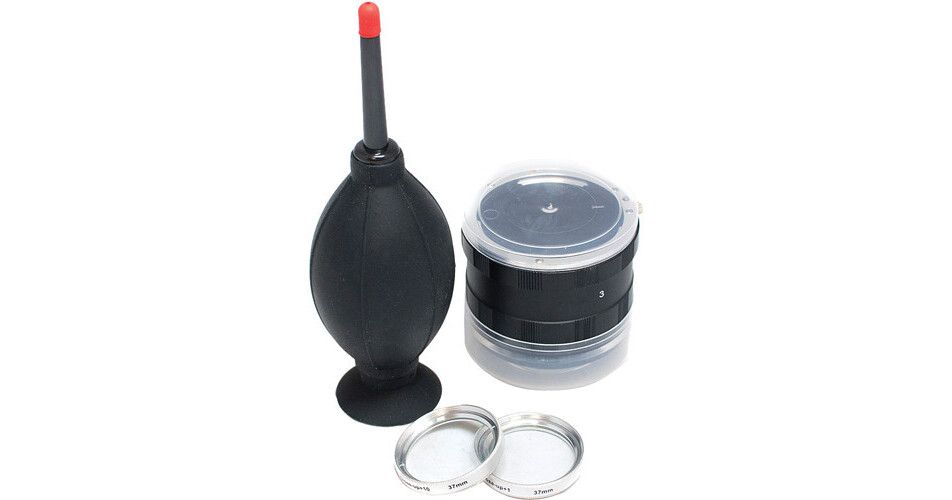
The Alm EnCinema 35mm SLR Adapter lets you add an SLR lens to the end of your iPhone 3G, iPhone 3GS, iPhone 4 or iPod touch 4G - as long as you're using the Alm Bubo. If you use an Alm Bubo with your iPhone or iPod touch, then the EnCinema 35mm SLR Adapter will allow you to connect a SLR lens to the Bubo lens. You'll see dramatic before and after differences once you add the adapter and a lens. The 35mm SLR Adapter comes with two 37mm Macro Close Up Filters and an air blower for cleaning your lenses and adapter. For added flexibility, the EnCinema 35mm SLR Adapter also allows you to mount Canon EOS lenses to your iPhone via your PHOCUS Accent. You can even mount Nikon lenses to your iPhone, but an additional adapter is required (sold separately).
Ask Our Experts800-952-1815
Hello, Log InAccount & Orders
ALM EnCinema 35mm SLR Adapter
Key Features
- Connect An SLR Lens to iPhone 3 or 4
- Connect An SLR Lens to iPod touch 4G
- Works with Alm Bubo & Bubo Lens
- Works with Canon EOS Lenses
The Alm EnCinema 35mm SLR Adapter lets you add an SLR lens to the end of your iPhone 3G, iPhone 3GS, iPhone 4 or iPod touch 4G - as long as you're using the Alm Bubo. If you use an Alm Bubo with your iPhone or iPod touch, then the EnCinema 35mm SLR Adapter will allow you to connect a SLR lens to the Bubo lens. You'll see dramatic before and after differences once you add the adapter and a lens. The 35mm SLR Adapter comes with two 37mm Macro Close Up Filters and an air blower for cleaning your lenses and adapter. For added flexibility, the EnCinema 35mm SLR Adapter also allows you to mount Canon EOS lenses to your iPhone via your PHOCUS Accent. You can even mount Nikon lenses to your iPhone, but an additional adapter is required (sold separately).
More DetailsNo Longer Available
ALM 501003 Overview
Easy Installation
ALM includes the needed 37mm Macro Close Up Filter Kit. The filters get mounted between the Bubo and the Bubo Lens
To connect the EnCinema Adapter, align the inner glass of the adapter horizontally without touching the sensitive focusing screen
Useful iPhone / iPod touch App
For Video:
Use the iPhone / iPod touch App "Almost DSLR" to flip the image back to normal - since this combo rotates your video and photo upside down
For Photography:
Use the iPhone / iPod touch App "Almost DSLR" to take photos. Taking photos with the regular iPhone camera along with the Bubo and EnCinema causes vignetting due to the different aspect ratios. Using the Almost DSLR app allows you to take better still images using this combination
Additional Lens Compatibility
The EnCinema 35mm SLR Adapter allows you to mount Canon EOS lenses to your iPhone via your PHOCUS Accent
You can also mount Nikon lenses to your iPhone via your PHOCUS Accent with the optional Nikon Adapter
ALM 501003 Specs
| Compatibility | |
| Adapter Type | |
| Filter Attachment |
Packaging Info
| Package Weight | |
| Box Dimensions (LxWxH) |
ALM 501003 Reviews
See any errors on this page?