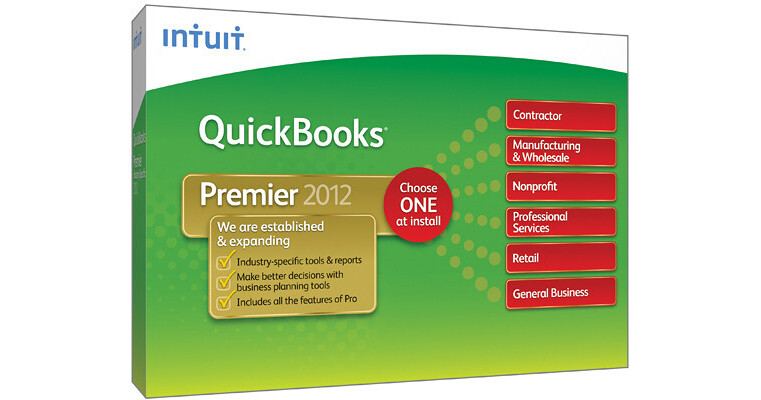
Intuit QuickBooks Premier 2012 (1-User)

BH #INQBPI12012 • MFR #431312
Print
Intuit QuickBooks Premier 2012 (1-User)
Key Features
  • Save Formatting When Exporting QB Report
  • Process / Select Memorized Transactions
  • Up To 5 Simultaneous Users
  • Document Center/ New Lead Center
The Intuit QuickBooks Premier 2012 (1-User) is accounting software tailored to your specific industry. You have a choice at the time of installation of which industry-specific version you would like. You may choose one industry and the software is good for one user.
More Details
No Longer Available
No Store Display
Ask an Expert
800-606-6969

Intuit 431312 Overview

The Intuit QuickBooks Premier 2012 (1-User) is accounting software tailored to your specific industry. You have a choice at the time of installation of which industry-specific version you would like. You may choose one industry and the software is good for one user.

You get all the standard QB Premier 2012 features, common to all industries, including the following: Save formatting when exporting QB reports to Excel; process / select when to run memorized transactions; allow multiple users to work in QuickBooks simultaneously (up to 5); attach and store documents in the Document Center; track and follow up on sales leads in the new Lead Center; batch invoicing and time sheets; access to report templates created by other QuickBooks users; an improved Calendar View; industry-specific reports; and the Inventory Center.

Plus, you get all the special features that are designed for your specific industry. If you choose Manufacturing / Wholesale, you get the following features: Track inventory reorder point by vendor; create bill of materials; track profitability and sales by product; track open sales order by customer; buy and sell the same item in different units; and adjust price levels by item.

Is yours a nonprofit business? With the Non-profit version, you get the following: Track Balance Sheet by class; create end-of-year donation statements; create Form 990 (Statement of Functional Expenses); and Show financial accountability to your Board of Directors with the Statement of Financial Income and Expense. You can also run donor contribution summary reports, import a Non-Profit Chart of Accounts, and track budgets and finances by program.

With the Retail version, run profit and loss monthly comparison report; track which sales orders are ready to ship; easily track sales results; analyze sales trends and profitability; turn work orders into purchase orders with one click; track returns and purchase volume by vendor; and review gross margin by inventory item.

If you're a contractor, you'll have access to the following features by choosing the Contractor version: Create 'Jobs by Vendor' report; run 'Cost to Complete Job' report; analyze job profitability; create job estimates and track change orders; bill clients progressively by job phase; and track expenses that are not assigned to jobs.

The General Business version provides the following specific features: View customized sales and profitability reports; access your inventory items all in one place with the Inventory Center; Track your balance sheet by class; run 'Cost to Complete Job' report; document and track change orders; bill clients progressively by job phase; and track time and expenses by employee, project, client or service and create an invoice.

Finally, Professional Services offers you the following features: Track time and expenses by employee, project, client or service; transfer unbilled time and expenses to customized invoices; set different billing rates by employee, client and service; analyze profitability by project and client; and track unbilled expenses by project.

Whatever your business, QuickBooks Premier 2012 will make managing your finances easier and more convenient! It's got everything you need.

Specific For Manufacturing and Wholesale Version
Track Inventory Reorder Point By Vendor
Track inventory and set optimal inventory levels. You can also run a report displaying items that need reordering
Create Bill Of Materials
Create Bill of Materials to track material costs, overhead costs and labor. During manufacturing, you can mark assembly items as pending to see work in progress
Track Profitability By Product
Keep track of your biggest moneymaking products, so you'll know which ones to promote and keep in stock and which to drop from your line
Track Sales By Product
See which products generate the best sales each month, quarter, year or any time period you designate
Track Open Sales Order By Customer
Follow open orders by customer to ensure that your most important customers get the products they require
Buy And Sell The Same Item In Different Units
Set multiple units of measure for each inventory item to track amounts used and available. With one click, you can instantly convert from cases to pallets or other units you define. Correct units are printed on invoices, purchase / sales orders, pick lists and packing slips
Adjust Price Levels By Item
Set custom prices for individual items for different customers or jobs
Specific For Non-Profit Version
Create End-Of-Year Donation Statements
See who your biggest donors are and track their contributions!
Run Donor Contribution Summary Reports
Track each donor's contribution totals as needed. View year-end summaries by donor
Nonprofit-Specific Reports
View nine nonprofit-specific reports
Create Form 990 (Statement of Functional Expenses)
Identify your expenses for presentation to your board, major donors, and the IRS
Import A Non-Profit Chart Of Accounts
Easily create a unified chart of accounts based on the filing requirements of Form 990
Demonstrate Financial Accountability To Your Board of Directors
With the Statement of Financial Income and Expense, easily show how much money came in and how it was spent
Track Budgets And Finances By Program
Follow contributions versus budgeted amount for each program
Specific For Retail Version
Run Profit And Loss Monthly Comparison Report
Easily compare one month's profit and loss against another's
Track Which Sales Orders Are Ready To Ship
Review pending sales orders and quickly see which ones can be fulfilled with the Sales Order Fulfillment Worksheet
Easily Track Sales Results
Track sales accurately and flexibly with the Sales Summary Form. Enter total payments and taxable / non-taxable sales for the day, week or any time period you choose
Analyze Sales Trends And Profitability
Easily customized reports show you how your business stands and help you make important decisions about what to sell in order to increase your bottom line
Turn Work Orders Into Purchase Orders With One Click
There's no need to retype line items or vendor information--simply edit quantities, if needed, and print or email your Purchase Order directly from QuickBooks
Track Returns By Vendor
Keep tabs on which goods are most commonly returned to each vendor
Track Purchase Volume By Vendor
Keep track of purchase volumes from your most important vendors
Specific to Contractor Version
Create 'Jobs by Vendor' Report
Organize your job costs by vendor, and see which vendors still need to be paid
Run 'Cost to Complete Job' Report
Keep tabs on how much it will cost you to complete each job, and how your actual costs are comparing to your estimated costs
Analyze Job Profitability
Customized job cost reports allow you to see a job's profitability on a detailed, task-by-task level
Create Job Estimates and Track Change Orders
As a job changes simply enter change orders into the estimate to keep track of the changes and their impact on your bottom line. Change orders are included on documents you print for your customer so that there are no surprises at the end of the job
Bill Clients Progressively by Job Phase
Track and bill clients by time and material, job phase, or percentage completion, whatever works best for your unique business
Track Expenses that Are Not Assigned to Jobs
Identify expenses that haven't been categorized and easily assign them to jobs
Specific to General Business Version
View Customized Sales And Profitability Reports
Review gross margin by inventory item and see customized sales / profitability reports, making it easy to follow your biggest moneymakers. This way, you'll know which products to promote / keep in stock and which ones to drop from your line
Access Your Inventory Items All In One Place With The Inventory Center
Easily locate inventory tasks by accessing your inventory items and reports all in one place with QuickBooks Inventory Center. Add a notes field to each item for faster identification
Track Your Balance Sheet By Class
Now, track data separately by location, department or profit center with a single, easily-accessible report
Run 'Cost to Complete Job' Report
Keep tabs on how much it will cost you to complete each job and how your actual costs compare to your estimated costs
Track Time And Expenses By Employee, Project, Client Or Service/ Create An Invoice
Decide who to bill by seeing all clients with unbilled time and expenses on one screen. No need to create an invoice from scratch--just open the Invoice for Time & Expenses screen and select the client and job combination. Outstanding billable time and expenses will be transferred directly to the invoice
Specific For Professional Services Version
Track Time And Expenses By Employee, Project, Client Or Service
Decide who to bill by seeing all clients with unbilled time and expenses on a single screen. There's no need to create an invoice from scratch--just open the Invoice for Time and Expenses screen and select the client and job combination you wish
Transfer Unbilled Time/ Expenses To Customized Invoices
Make sure you get paid by applying outstanding time and expenses to customized invoices
Set Different Billing Rates By Employee, Client And Service
Pay and get paid the right amount by quickly and easily setting individual different billing rates
Analyze Profitability By Project And Client
Reports like Billed vs. Proposal by Project, Cost-to-Complete by Job, and Job Costs by Job and Vendor help you remain aware of which projects are most profitable
Track Unbilled Expenses By Project
Stay on top of unbilled expenses for each project to ensure you get paid
For QB Premier 2012 In General - New And Improved Features
Save Formatting When Exporting QB Reports To Excel
This feature has been improved upon since the 2011 version. Save formatting and save time. Now, when you export your QuickBooks reports to Excel, refresh the saved worksheet and your formats will be applied to the new report! QuickBooks remembers your Excel formats so you can work seamlessly

Please note: Excel integration requires Excel 2003, 2007 or 2010
Process / Select When To Run Memorized Transactions
This feature has been improved upon since the 2011 version. Set up Memorized Transactions for recurring billing, invoices and estimates. Review and process each transaction individually, then select which transactions to run now and which to run later. You can even set up bi-monthly processing
Allow Multiple Users To Work In QuickBooks Simultaneously
While this feature was present in earlier versions, it's been improved upon in this incarnation: Multiple-user functionality now allows up to 5 people to work on a company file at the same time, increasing collaboration and productivity. This improves upon the previous allowance of 3 simultaneous users. The multi-user capability ensures that all users are working on the most updated data. You can also set user permission levels to control what information each user can access

Please note: Requires the purchase of additional single-user and / or multi-user packs to become multiple-user capable (one user per license purchased). All copies of QuickBooks must be the same version-year
Attach And Store Documents In The Document Center
Get organized by attaching receipts, estimates and other documents to invoices and customer files. Just scan documents in, then drag and drop - a major advantage at tax time! Local storage is now included with your QuickBooks purchase

Please note: Scanner not included. Only TWAIN compliant and Fujitsu ScanSnap S300 scanners supported
Track And Follow Up On Sales Leads In The New Lead Center
Makes it easy to keep track of your sales leads and import existing leads into QuickBooks. When your lead becomes a customer, move contact information into the Customer Center with just one click
Invoice Multiple Customers For Time And Expenses In One Batch
Now you can invoice multiple customers for time and expenses in one convenient batch. Create a single invoice for customers who share regularly scheduled expenses and QuickBooks will process them--no additional reentry necessary!
Batched Time Sheets For Multiple Employees/ Vendors
Create and use the same time sheet for employees or vendors who worked the same hours, saving you lots of time!
Access Report Templates Created By Other QuickBooks Users
Now QuickBooks gives you access to Contributed Reports in your industry, created by other QuickBooks users. Search by industry, user rating and popularity. Choose templates you like and QuickBooks will populate the report with your business data in just one click
Calendar View
Quickly scan invoices, billing, past transactions and more items at a glance in the new Calendar. The improved "to-do" list captures even more relevant information and displays it all in convenient calendar format
Search And Access Industry-Specific Reports
Access popular report templates in your specific industry, created by other QuickBooks users. Search by industry, user rating and popularity. Choose templates you like and QuickBooks will populate the report with your business data in one easy click
Inventory Center
Easily find and locate inventory tasks by accessing your inventory items and reports all in one place with QuickBooks Inventory Center. Add a notes field to each item for fast identification
Pre-Existing Features From Earlier QB Versions
Manage Your Bills
Keep track of what you owe and set simple due-date reminders so you never miss a payment
Track Your Balance Sheet By Class
If your company has several departments or locations, you can now track the data separately within a single, easily-accessed report
Track Sales, Sales Taxes And Customer Payments
Eliminate piles of paperwork and easily enter customer payments. Since QuickBooks organizes everything in one place, you'll be able to access all past payments for each customer with just a few simple clicks
Download Your Bank / Credit Transactions Into QuickBooks
Save time and avoid data entry errors. Instead of typing in your bank and credit card transactions, download them safely from more than 3000 participating financial institutions and easily import them into QuickBooks

Please note: Online services vary by participating financial institutions and may be subject to application approval and additional terms, conditions and fees
Send Invoices / Estimates From Your Email Account
The new Webmail integration allows you to easily email via your business Yahoo, Gmail or Hotmail account--right from QuickBooks! You can also e-mail using Microsoft Outlook or Outlook Express

Please note: Works with Outlook 2003 and 2007; Yahoo and Gmail require internet connection. Outlook integration requires Outlook or Outlook Express 2000, 2002, 2003 or 2007
Track Inventory, Set Reorder Points And Create Purchase Orders
Track your inventory with ease to avoid overbuying and backorders. Indicate re-order points for each inventory item and turn on reminders to automatically let you know when it's time to reorder
Customer Snapshot
Provides a consolidated view so you can assess at a glance your customer's purchase history, average days to pay, and outstanding balance, as well as make timely decisions on customer requests. Identify top customers by revenue and payment consistency and prioritize them accordingly
Save Time With Batch Invoicing
Automatically create a full set of invoices for customers with the same service. Simply create the invoice once and select the customers to whom you wish to send it
QuickBooks Search
Your QuickBooks file is the repository of records for your business, but finding the exact information you need can be difficult. With QuickBooks Search, all you have to do is enter the keyword and QB will pull up all the related reports, invoices, contacts and transaction details!
Collections Center
Quickly identify overdue and almost due invoices, and email all collection notices from your Outlook, Yahoo, Gmail or Hotmail account in a few steps

Please note: Works with Outlook 2003 and 2007; Yahoo and Gmail require internet connection
Access To Customer Or Vendor's Balance / Transaction History
At a glance, see important details like your customer's payment history, estimates, and past orders, with vendors right at your fingertips on the same screen. This way, you can complete the transaction at one time instead of switching back and forth between screens
Create Professional-Looking Invoices And Forms
Stand out from the crowd with quick and easy invoice customization. Create a distinct look for your small business with professional designs and apply it across all your invoices, statements, and other forms--all at the same time! Additional fee applies. Free trial available
Create Email Estimates, Invoices, Reports
Send e-mail directly from QuickBooks using MS Outlook and Outlook Express

Please note: Outlook integration requires Outlook or Outlook Express 2002, 2003, or 2007. Business software applications sold separately
Payroll Center
Keep track of payroll, taxes and other liabilities at a glance in the Payroll Center. A to-do list indicates when taxes are due. See dates for all your liabilities and get confirmation when payroll is rescheduled (additional fees apply)

Please note: Requires paid subscription, EIN and Internet access
Company Snapshot
Provides immediate view into your bottom line all in 1 page, with the at-a-glance reports that are most critical
Customer, Vendor and Employee Centers
Easily see any customer's balance, transaction history and contact info in the Customer Center. Review your balance and a list of POs, bills and payments with any vendor in the Vendor Center. Instantly view all paychecks and contact information for any employee in the Employee Center
Report Center
Get insights to make better business decisions. Find just the report you need to understand how your business is doing. You can also more easily access the reports you rely on in Favorite Reports
Import Data From Other Programs
Get up and running fast by importing data from whichever tool you use to track your finances now. Choose from Excel, Quicken, Microsoft Office Accounting or prior QuickBooks versions. Regardless of the amount of data you currently have, you won't have to start over from scratch! For QuickBooks Online Plus, Pro, Premier and Enterprise: Upgrade from any product QuickBooks 4.0 or later

Intuit 431312 Specs

System Requirements
Windows XP (SP3), Vista (SP1 including 64-bit), 7 (including 64-bit)
For multi-user networking: Microsoft Windows XP (SP2 or later), Vista (with UAC on), 7 (with UAC on), Windows Server 2003, Windows Server 2008, Small Business Server 2008
At least 2.0 GHz processor, 2.4 GHz recommended
1.0 GB RAM for single user, 2.0 GB recommended for multiple users
Minimum 2.5 GB available disk space (additional space required for data files)
250 MB for Microsoft .NET 4.0 Runtime (provided on QuickBooks CD)
Minimum 1024 x 768 screen resolution, 16-bit or higher color
A 4x CD-ROM
High-speed Internet connection (DSL, cable modem, or higher)--45 min download time with cable, 90 min - 2.0 hr with DSL
Internet Explorer 6.0 or higher web browser
Product registration required
Compatibility
Microsoft Word and Excel integration requires Word and Excel 2003, 2007, or 2010 (including 64-bit)
Synchronization with Outlook requires QuickBooks Contact Sync for Outlook 2003, 2007, and 2010 (including 64-bit) (downloadable for free at: www.quickbooks.com/contact_sync)
E-mail estimates, invoices and other forms with Gmail, Yahoo! Mail, Windows
Compatible with QuickBooks Point of Sale version 7.0 and later

Intuit 431312 Reviews

See any errors on this page?
Whatever You Need, We've Got It