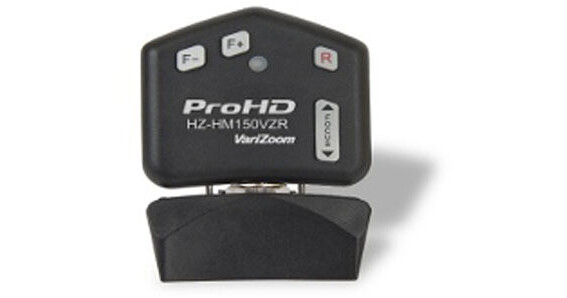
The JVC HZ-HM150VZR Remote Lens Control For GY-HM150U Camcorder is a great tool when operating your camcorder using a tripod, jib, crane or boom. It plugs into the 3.5mm remote connector on the right side of the GY-HM150U. When used on a jib, crane or boom, the device requires a 3.5mm extension cable (not included). The HZ-HM150VZR conveniently enables access to and control of all remote functions with a single hand. Zoom operation is enabled via a wide sweep variable rocker control. Focus is located on the right side, via a rocker style control for manual operation. Iris control is made possible via 2 separate controls, which allow you to either increase or decrease the lens iris. On the top right, you will find the "R" button, enabling manual control over the record start / stop function.
Ask Our Experts800-606-6969
Hello, Log InAccount & Orders
Video Chat with a Pro Video Expert - Live
Key Features
- One-Hand Access To All Remote Functions
- Zoom, Manual Focus, Dual Iris Controls
- Manual Record Start / Stop Button
The JVC HZ-HM150VZR Remote Lens Control For GY-HM150U Camcorder is a great tool when operating your camcorder using a tripod, jib, crane or boom. It plugs into the 3.5mm remote connector on the right side of the GY-HM150U. When used on a jib, crane or boom, the device requires a 3.5mm extension cable (not included). The HZ-HM150VZR conveniently enables access to and control of all remote functions with a single hand. Zoom operation is enabled via a wide sweep variable rocker control. Focus is located on the right side, via a rocker style control for manual operation. Iris control is made possible via 2 separate controls, which allow you to either increase or decrease the lens iris. On the top right, you will find the "R" button, enabling manual control over the record start / stop function.
More DetailsNo Longer Available
JVC HZ-HM Overview
Great tool when operating your camcorder using a tripod, jib, crane or boom; requires a 3.5mm extension cable in such a case (not included)
Plugs into the 3.5mm remote connector on the right side of the GY-HM150U
Conveniently enables access to and control of all remote functions with a single hand
Zoom operation is enabled via a wide sweep variable rocker control
Focus is located on the right side, via a rocker style control for manual operation
Iris control is made possible via 2 separate controls, which allow you to either increase or decrease the lens iris
On the top right, you will find the "R" button, enabling manual control over the record start / stop function
JVC HZ-HM Specs
| Controls | |
| Power |
Packaging Info
| Package Weight | |
| Box Dimensions (LxWxH) |
JVC HZ-HM Reviews
See any errors on this page?