Video Chat with a Pro Audio Expert - Live

Waves Bass Rider - Automatic Bass Levelling Plug-In (TDM)

BH #WABRTDM • MFR #BSRIDTDMQ
Print
Waves Bass Rider - Automatic Bass Levelling Plug-In (TDM)
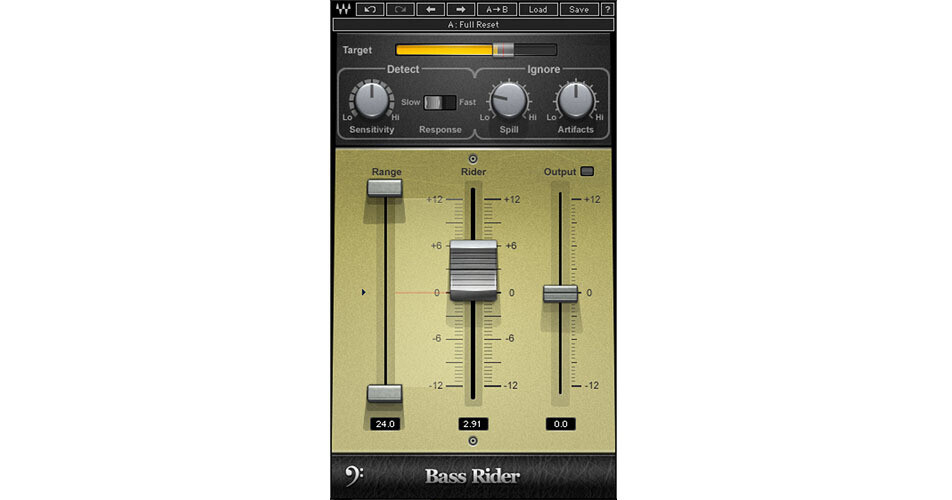
Screenshot image shown
Key Features
  • Optimized for Bass
  • Retains Natural Character of the Bass
  • TDM for Avid Pro Tools HD Systems
  • RTAS/AudioSuite
Bass Rider (TDM) from Waves is an easy-to-use plug-in that rides bass levels automatically, delivering perfect bass levels without changing the natural sound of the instrument. Optimized especially for the frequency range and envelope characteristics of bass instruments, the plug-in functions equally well on any bass tracks, be it DI, amplified, acoustic, synthesizer, upright, etc.
More Details
No Longer Available
No Store Display
Ask an Expert
800-606-6969

Waves Bass Rider Overview

Bass Rider (TDM) from Waves is an easy-to-use plug-in that rides bass levels automatically, delivering perfect bass levels without changing the natural sound of the instrument. Optimized especially for the frequency range and envelope characteristics of bass instruments, the plug-in functions equally well on any bass tracks, be it DI, amplified, acoustic, synthesizer, upright, etc.

With dedicated studio and live components, the plug-in is a real time saver. Unlike a compressor, the processor works note by note without disturbing their inner dynamics, so that they sustain and decay naturally. Since Bass Rider keeps the levels steady with automatic gain adjustment, the user is free to use additional compression to add color and character if required.

Note:
Requires iLok if one is not already present on the system.
Main Features
Rides bass levels automatically
Optimized for bass instruments
Retains the natural character of the bass
Dedicated studio and live components
Up to 24-bit/192 kHz resolution
Mono and stereo components
Controls
  • Target Energy Meter - shows the energy of the input signal
  • Target Slider - sets the desired bass level range and calibrates the Rider Fader "0" position
  • Sensitivity - controls the note detector sensitivity
  • Response - controls the note detector response
  • Spill - controls the amount of spill that the detector should ignore
  • Artifacts - controls the note detector's tolerance to artifacts
  • Max Range - sets the upper boundary of the Rider Fader movement
  • Min Range - sets the lower boundary of the Rider Fader movement
  • Rider Fader - Bass Rider's automatic fader control
  • Output - trims the vocal output gain, post-auto riding
  • Idle Arrow - sets the Rider Fader value when there is no bass activity
  • Effective Range - displays the total gain range available for automatic riding

Waves Bass Rider Specs

System Requirements
Mac
Properly configured Pro Tools HD system running under OS X

Due to constantly changing requirements, for comprehensive hardware specifications and system requirements, please refer to Avid's website at Avid

PC
Properly configured Pro Tools HD system running under Windows XP, Vista, or Windows 7

Due to constantly changing requirements, for comprehensive hardware specifications and system requirements, please refer to Avid's website at Avid

Waves Bass Rider Reviews

See any errors on this page?
Whatever You Need, We've Got It