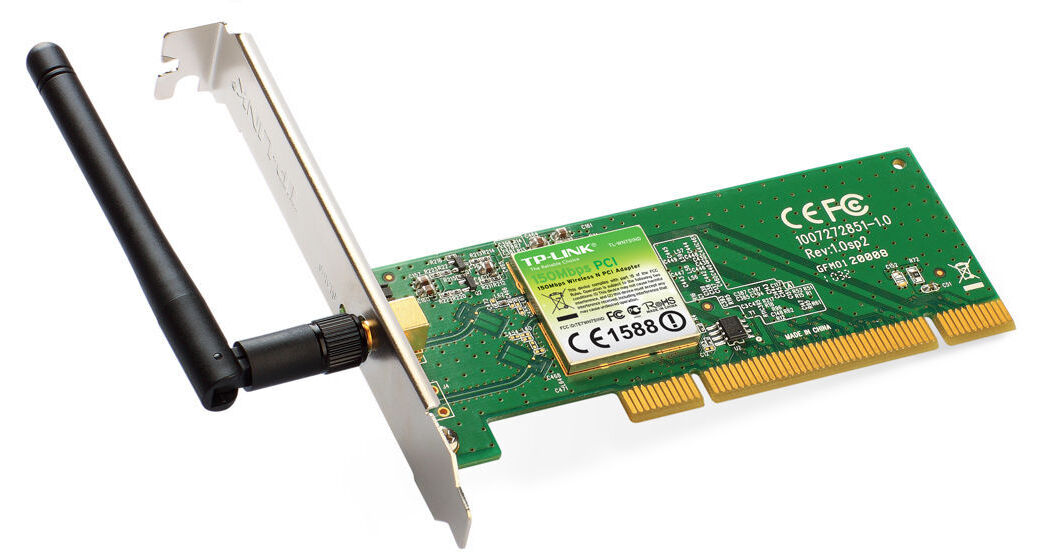
With the TL-WN751ND 150Mbps Wireless N PCI Adapter from TP-Link you can easily connect your desktop computer to your wireless network. With a 32-bit PCI interface, installation is simple. Once installed the bundled utility enables easy management.
Setup is a breeze with the integrated Wi-Fi protected setup and quick security setup making it easy to secure your network with either WEP or WPA encryptions. Take full advantage of ultra fast 150Mbps data transfer speeds ideal for video streaming, online gaming, transferring of data intensive files, and even internet calling.
The multi directional antenna allows for easy manipulation of the antenna to be sure you receive the highest quality signal. The removable antenna can easily be detached allowing for an upgraded antenna for even better reception.
Ask Our Experts800-606-6969
Hello, Log InAccount & Orders
Key Features
- IEEE 802.11 b/g/n Compatible
- Up to 150Mbps Data Speeds
- WEP/WPA/WPA2 Security Standards
- Detachable Antenna
With the TL-WN751ND 150Mbps Wireless N PCI Adapter from TP-Link you can easily connect your desktop computer to your wireless network. With a 32-bit PCI interface, installation is simple. Once installed the bundled utility enables easy management.
More DetailsNo Longer Available
TP-Link TL-WN751ND Overview
Advanced Connectivity
The TL-WN751ND Wireless N PCI Adapter provides a wider compatibility, fitting with any standard 32-bit PCI slot. You can enjoy a fast and advanced connection with increased bandwidth, reliability and more functionality, allowing for faster downloading, the ability to make internet calls and stream video.
Wireless N Speed & Range
The TL-WN751ND complies with IEEE 802.11n standards, allowing you to easily establish a wireless network and get up to 9X the speed and 4X the range of conventional .11g products. When compared with legacy 54M products, this PCI adapter delivers performance enhancements, allowing you to have a more joyful surfing experience, including sharing files, and watching streaming media.
Advanced Security
Take advantage of the WPA/WPA2 encryption standards, effectively securing the wireless network and preventing outside intrusion.
Quick Setup
With the integrated WPS (Wi-Fi protected setup) and QSS (quick security setup) functionality you can easily create a WPA encrypted connection to prevent outside intrusion, as well as maximize the management resources. Not only is this faster than normal security setups, it is much more convenient as you no longer need to remember a password.
Detachable Antenna
The TL-WN751ND offers an external antenna that can be rotated and adjusted in different directions to fit various operational environments, bringing better performance than the internal antenna. For even more demanding applications, the antenna can be replaced with a wide variety of antennas providing greater flexibility and wider wireless coverage.
TP-Link TL-WN751ND Specs
| Hardware Features | |
| Interface | |
| Antenna | |
| Wireless Features | |
| Standards | |
| Frequency | |
| Signal Rate | |
| EIRP | |
| Receiver Sensitivity | |
| Wireless Modes | |
| Wireless Security | |
| Modulation | |
| Other Specs | |
| Certifications | |
| System Requirements | |
| Environmental Requirements | |
| Dimensions | |
| Weight |
TP-Link TL-WN751ND Reviews
See any errors on this page?