Video Chat with a Pro Audio Expert - Live

Waves C6 - Multi-Band Compressor (TDM)

BH #WAC6TDMQ • MFR #C6TDMQQ
Print
Waves C6 - Multi-Band Compressor (TDM)
Key Features
  • 6 Bands
  • Sidechain Input
  • TDM for Avid Pro Tools HD Systems
  • RTAS and AudioSuite
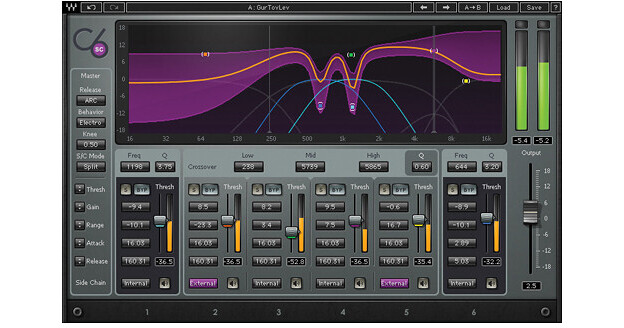
The C6 from Waves is a TDM based plug-in for use with Avid's Pro Tools HD systems. Based on the company's very successful C4 processor, the C6 is a must-have for studio engineers the world over, and in live sound for front-of-house and monitor professionals as well. The C6 takes the functionality of the C4, and adds two additional floating bands, plus a sidechain feature, for one-stop vocal and instrument shaping. Perfect for de-essing and de-popping in the studio or onstage, the C6 gives you all the multi-band compression and dynamic equalization you need to control, tame, and shape your sound.

For mixing and mastering in the studio, the C6 gives you the power to shape any sound, with creative compression, dynamic EQ, flexible side chaining, and more. For FOH and monitor mixers alike, the plug-in provides total control over dynamics and EQ, from reducing crowd ambience to in-depth vocal shaping. For post applications using auto-ducking of music and ambience under speech, the C6 sidechain lets you carve out just the vocal frequency range, instead of attenuating the entire signal.

More Details
No Longer Available
No Store Display
Ask an Expert
866-842-7675

Waves C6 Overview

The C6 from Waves is a TDM based plug-in for use with Avid's Pro Tools HD systems. Based on the company's very successful C4 processor, the C6 is a must-have for studio engineers the world over, and in live sound for front-of-house and monitor professionals as well. The C6 takes the functionality of the C4, and adds two additional floating bands, plus a sidechain feature, for one-stop vocal and instrument shaping. Perfect for de-essing and de-popping in the studio or onstage, the C6 gives you all the multi-band compression and dynamic equalization you need to control, tame, and shape your sound.

For mixing and mastering in the studio, the C6 gives you the power to shape any sound, with creative compression, dynamic EQ, flexible side chaining, and more. For FOH and monitor mixers alike, the plug-in provides total control over dynamics and EQ, from reducing crowd ambience to in-depth vocal shaping. For post applications using auto-ducking of music and ambience under speech, the C6 sidechain lets you carve out just the vocal frequency range, instead of attenuating the entire signal.

Main Features
Internal/external sidechain per band
Individual band Listen mode
Four crossover bands plus two floating bands
Dynamic EQ, compression and expansion
Double precision bit resolution processing
ARC Auto Release Control
Up to 24-bit/192kHz resolution
Mono and stereo components
Controls
  • Input Gain Fader: Infinity to 0.0dB
  • Range: -24dB to +18dB per band
  • Gain: -18dB to +18dB per band
  • Attack: 0.5mS to 500mS per band
  • Release: 5mS to 5,000mS per band
  • Threshold: -80dB to 0.0dB per band
  • Energy Level Meter: -80dB to 0.0dB per band
  • Solo per band
  • Bypass per band
  • Dynamic Line Graph: Shows reduction curve -18dB to +18dB, 16Hz to 20kHz
  • Frequency Band Marker: Graphic control over Frequency/Gain per band
  • Master Controls: Global control of threshold, gain, range, attack and release settings
  • Release Type: ARC or Manual
  • Behavior: Opto or Electro
  • Knee Type: Soft to Hard, 0.00 to 0.75
  • Crossover Bands:

    1. Low: 40Hz to 250Hz
    2. Mid: 100Hz to 5993Hz
    3. High: 2kHz to 16kHz

  • Crossover Band: Q 0.1 to 0.75
  • Floating Bands: 16Hz to 21kHz
  • Floating Band: Q 0.35 to 60
  • Output Gain Fader: -18dB to +18dB
  • Output Meter: -80dB to 0dB with peak hold and clip indicators
  • Sidechain Controls:

    1. Source is used to choose the Sidechain source - Internal/External
    2. Listen is used to monitor the Sidechain signal

  • SC Mode determines the frequency range of the Sidechain signal - Wide/Split

Waves C6 Specs

System Requirements
Mac
Properly configured Pro Tools HD system running under OS X

Due to constantly changing requirements, for comprehensive hardware specifications and system requirements, please refer to Avid's website at Avid

PC
Properly configured Pro Tools HD system running under Windows 7

Due to constantly changing requirements, for comprehensive hardware specifications and system requirements, please refer to Avid's website at Avid

Waves C6 Reviews

See any errors on this page?
Whatever You Need, We've Got It