Video Chat with a Pro Audio Expert - Live

Waves Vocal Rider - Automatic Level-Riding Plug-In (TDM)

BH #WAVRDTDMQ • MFR #VRDTDMQQ
Print
Waves Vocal Rider - Automatic Level-Riding Plug-In (TDM)
Key Features
  • Automatically Keeps Vocal Level Steady
  • Differentiates Signal from Ambient Noise
  • Adds No Artifacts or Sound Coloring
  • TDM for Avid Pro Tools HD Systems
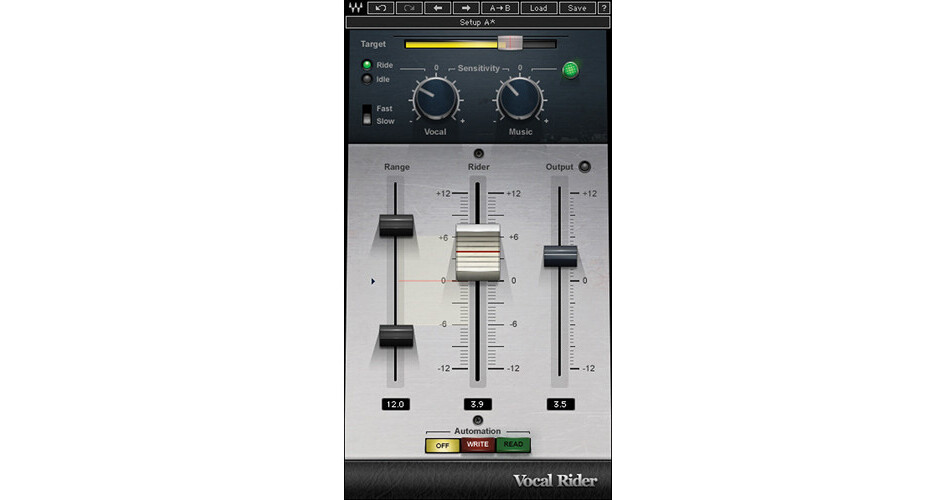
Vocal Rider TDM from Waves automatically rides the levels of vocal tracks during mixdown. Vocal Rider relieves the engineer from having to manually ride a physical mixing console fader, or from drawing in each individual level change on a DAW track.
More Details
No Longer Available
No Store Display
Ask an Expert
866-842-7675

Waves Vocal Rider Overview

Vocal Rider TDM from Waves automatically rides the levels of vocal tracks during mixdown. Vocal Rider relieves the engineer from having to manually ride a physical mixing console fader, or from drawing in each individual level change on a DAW track.

All the engineer has to do is the target range of the vocal level in relation to the rest of the mix. Then, Vocal Rider compensates for all deviations from the target, intelligently raising or lowering the vocal volume, instantly. And unlike everyday compression, Vocal Rider adds absolutely no additional coloring to the track.

The Vocal Rider Live component includes an exclusive Spill control to differentiate the vocal from background instrumentation and noise, for better tracking and performance.

Main Features
Automatically keeps vocal and dialog levels steady
Save time by automating the vocal riding part of the mixing process
Write the automatic riding to an automation track for fine tuning
Real-Time means no latency and no pre-scan needed
Dedicated Vocal Rider Live component
Up to 24bit/96kHz resolution
Controls
Target
Sets the reference range for vocal mix positioning
Vocal Sensitivity
Differentiates vocal content from noise floor and ambience
Vocal Activity LED
Indicates when vocal activity is detected
Spill
Differentiates between vocal signal and ambient stage noise (Vocal Rider Live component only)
Attack
Sets the vocal detection attack behavior
Music Sensitivity
Determines the amount Vocal Rider adapts to instrumental levels
Music Sensitivity LED
Indicates Vocal Rider's response to instrumental levels
Range Min/Max
Set the boundaries of the Rider Fader movement range
Effective Range
Displays the total gain range available for automatic riding
Idle Arrow
Sets the Rider Fader value when there is no vocal activity
Rider Fader
Vocal Rider's automatic control
Automation Mode
Controls the Rider Fader operation
Output
Trims the vocal output gain, post-auto riding
Clip LED
Shows when output is clipping

Waves Vocal Rider Specs

System Requirements
Mac
Properly configured Pro Tools HD system running under OS X

Due to constantly changing requirements, for comprehensive hardware specifications and system requirements, please refer to Avid's website at Avid

PC
Properly configured Pro Tools HD system running under Windows 7

Due to constantly changing requirements, for comprehensive hardware specifications and system requirements, please refer to Avid's website at Avid

Waves Vocal Rider Reviews

See any errors on this page?
Whatever You Need, We've Got It