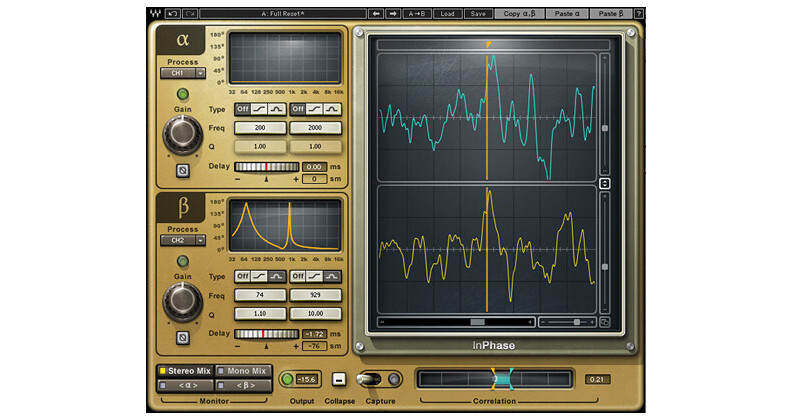
InPhase TDM from Waves is a phase correction plugin for phase shift treatment, phase alignment and complex phase manipulation tasks.
When sources are recorded with more than one microphone, such as drums, guitar amps, etc, phasing can occur. Phasing can cause drops in volume and wreak havoc on your frequency response and stereo image. InPhase features high-resolution dual waveform displays, so you can visually identify phase problems. For correction, InPhase includes phase shift filters with adjustable frequency and Q, and an intuitive correlation meter.
With InPhase, you can move waveforms manually or using the delay control, and even align them in relation to a sidechain input. InPhase includes mono, stereo, and dedicated live components, plus InPhase LT, a simplified version that gives you easy access to creative phase manipulation.
- Alpha and Beta: processing sections
- Process: controls let us choose what to process
- Activity LED: shows when there is input signal activity
- Gain: controls the level of the signal going into the processing section
- Phase Invert: flips the phase by 180 degrees
- Phase Shift Curve Window: displays the phase shift curve across the frequency line
- Type: sets the phase shift curve, and toggles between Off, Shelf and Bell
- Frequency: selects the frequency at which the phase shift is 90° using the 1st order allpass filter, and 180° using the 2nd order allpass filter
- Q: sets the width of the Bell (2nd order allpass filter)
- Delay: moves the signal up to 20 milliseconds in either direction (Live components forward only)
- Monitor: selects the output monitor configuration
- Output LED: displays the peak signal output level
- Collapse: closes the waveform display section
- Capture: Automatic & Manual modes, captures up to two seconds of signal
- Scroll Bar: scrolls the x axis of the captured waveform
- Correlation Meter: displays general correlation metering between the Alpha and Beta waveforms
- Correlation Markers: display the maximum value of the correlation meter
- Correlation Value Box: displays the current correlation value
- Zoom X: zooms in on the x axis, at up to sample resolution
- Zoom Y Alpha: zooms in on the Alpha section y (amplitude) axis
- Zoom Y Beta: zooms in on the Beta section y (amplitude) axis
- Zoom Y Link: links Zoom Y Alpha and Zoom Y Beta
- Reset Zoom: resets the zoom to its default setting
- Alpha Waveform: is the waveform captured in the Alpha section
- Beta Waveform: is the waveform captured in the Beta section