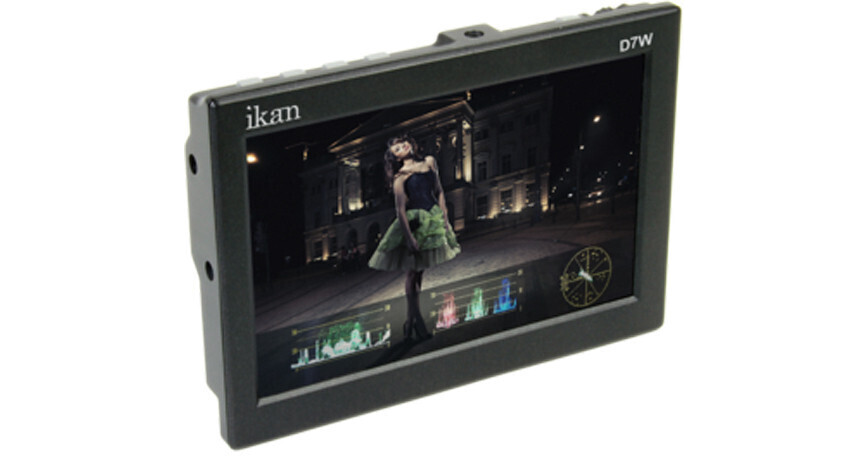
ikan D7w 7" Camera Monitor with HD LCD Panel and Waveform

BH #IKD7W • MFR #D7W
Print
ikan D7w 7" Camera Monitor with HD LCD Panel and Waveform
Key Features
  • 1280 x 800 Hi Definition Screen
  • IPS Screen with 178° Viewing Angle
  • 3G-SDI In/Out / HDMI In / Headphone Out
  • 400 Nit Brightness / 800:1 Contrast
The ikan D7w 7" Camera Monitor with HD LCD Panel and Waveform has of the topmost qualities a camera monitor can offer; in particular -- a hi-def screen, advanced software features, SDI and HDMI connections, and a 7" screen in a beautiful body (which can be used on-camera, and as well off-camera -- handheld or mounted on various parts of a rig by one of four 1/4"-20 screw-holes, each of which is located on a different side of the monitor).
More Details
No Longer Available
No Store Display
Ask an Expert
800-606-6969

ikan D7w Overview

The ikan D7w 7" Camera Monitor with HD LCD Panel and Waveform has of the topmost qualities a camera monitor can offer; in particular -- a hi-def screen, advanced software features, SDI and HDMI connections, and a 7" screen in a beautiful body (which can be used on-camera, and as well off-camera -- handheld or mounted on various parts of a rig by one of four 1/4"-20 screw-holes, each of which is located on a different side of the monitor).

A comprehensive set of software features includes the highly-advanced Waveform, RGB Parade, and Vectorscope, with all three not-so-common to camera monitors. The purpose of these and of the rest is to help you fine-tune factors like exposure and focus before you shoot your scene. In relation, the hi-def screen abovementioned, at 1280 x 800 pixels -- also not-so-common to monitors -- is optimal for displaying and making use of all the features.

The main connections are an SDI input, an SDI output, and an HDMI input. The SDIs both support 3G transfer rates, meaning that they can transfer high-bandwidth data without delay, transferring, for example, very high-resolution data, or data involving a lot of embedded audio; in general, high-info data. You can connect your camera to either of the inputs, whichever of the two your camera can match; and as for the SDI output -- with it you can connect the D7w to a video recorder, such as an Atomos Samurai (and thus record your footage on a separate device in a ready-to-edit format), or you can connect to a big-screen SDI monitor from as far as 300 ft away, with 300 ft being the longest transmission distance that SDI supports and that most other connections don't come close to matching. The last of the D7w's connections is a headphone output, to which you can hook up headphones and monitor any sound that you record onto the camera as you shoot your scene. Even if your recording mic is a wireless lavalier that's a distance away, as long as its end-point is connected to the camera, you'll be able to monitor it by the headphone out.

The D7w has four assignable buttons into which the software features can be programmed, and all four are away from clear view, located at a top corner, more towards the back than the front.

The monitor powers by any of several types of batteries, depending on which of the following ikan BP5 battery plates you employ: the Sony L compatible, Sony BP-U compatible, Panasonic D54 compatible, Canon 900 compatible, and Canon E-6 compatible. Both the plate and battery are separately sold. If you already own a set, you can certainly use it. If not, please search the B&H site for "D7w battery kit" as B&H offers different D7w / plate / battery kit configurations.

Highly functional and very effective, the D7w is a great addition to your DSLR or camcorder, for a smooth and precision-oriented production, whether in videography or filmmaking.

HD Resolution
Although the D7w has a 7-inch screen, with 1280 X 800 HD resolution what you see is what you get! The D7w outputs crisp, clear shots on the field, meaning less time in the editing room.
Flexible Battery System
The D7w has a flexible battery system that supports ikan's BP5 battery plate of your choice:

Sony L compatible
Sony BP-U compatible
Panasonic D54 compatible
Canon 900 compatible
Canon E-6 compatible
Software Features
Waveform
This essential feature assists with the calibration of professional video cameras. It shows the overall brightness of the image assisting the video professional in correcting exposure. The waveform feature also checks the evenness of the lighting when lighting a chromakey or background.
Vectorscope
The D7w uses vectorscope to help set and verify skin tones and monitor white balance. The vectorscope function also verifies and checks the overall tint and hue of an image.
RGB Parade
The RGB parade splits the image into separate red, green, and blue channels and shows you the color values for each. RGB Parade is fundamental in balancing out the shadow region when leveling a shot. Furthermore, this feature helps the video professional to instantly see what color cast might be in an image; thus, making it extremely helpful when verifying the white balance.
Peaking
The D7w is equipped with both Monochrome and Color Peaking features, which highlight the desired focus area in a bright, RED outline. The operator adjusts the focus control until the RED indicator outlines on the desired area are razor sharp, indicating optimal focus. For the best results, be sure the subject is properly exposed.
False Color
The False Color feature utilizes a full spectrum of assigned color indicators, ensuring flawless shot exposure. The under/ over luminance warning enables the video professional to get the quality he/ she desires every time. By adjusting the camera's Iris, the subject of the image will change color based on specific brightness values indicating optimal exposure.
DSLR Scaling
The DSLR Scaling function enables users to extend their DSLR camera's HDMI video output to any option of four: Normal, 3:2, 16:9 or Full Screen - convenience made simple.
Movable Pixel-to-Pixel
The D7w's 1:1 pixel-to-pixel mapping allows the video professional to emphasize on individual chosen elements in the shot. This feature is essential for capturing optimum detail.
Clip Guides
The D7w offers adjustable upper Clip Guide levels to accurately display overexposed images in any shooting condition. The operator simply assigns the upper IRE to their preference and any exposure over the set IRE limit will flash in a vivid purple, indicating only the over exposed area.

ikan D7w Specs

Screen Size
7" diagonally (17.8 cm)
Resolution
1280 x 800
Brightness
400 nit
Contrast Ratio
800:1
Inputs
1x 3G/HD/SD-SDI
1x HDMI
Output
1x 3G/HD/SD-SDI loop-out
1x 3.5 mm headphone jack
Viewing Angle
178 x 178°
Supported Resolutions
3G-SDI:
1920 x 1080p @ 50, 59.94, 60 Hz

HD-SDI:
1280 x 720p @ 50, 59.94, 60 Hz
1920 x 1080i @ 50, 59.94, 60 Hz
1920 x 1080psf @ 23.98, 24, 25, 29.97, 30 Hz
1920 x 1080p @ 23.97, 24, 25, 29.94, 30 Hz

SD-SDI:
720 x 480i @ 60 Hz
720 x 576i @ 50 Hz

HDMI:
720 x 480i & 720 x 480p @ 59.94, 60 Hz
720 x 576i & 720 x 576p @ 50 Hz
1280 x 720p @ 50, 59.94, 60 Hz
1920 x 1080i @ 50, 59.94, 60 Hz
1920 x 1080psf @ 24, 25, 29.97, 30 Hz
1920 x 1080p @ 23.97, 24, 25, 29.94, 30, 50, 59.94, 60 Hz
Dimensions
7 x 4.9 x 1" (17.8 x 12.44 x 2.54 cm)
Packaging Info
Package Weight
2.4 lb
Box Dimensions (LxWxH)
12.2 x 7.7 x 2.8"

ikan D7w Reviews

See any errors on this page?
Whatever You Need, We've Got It