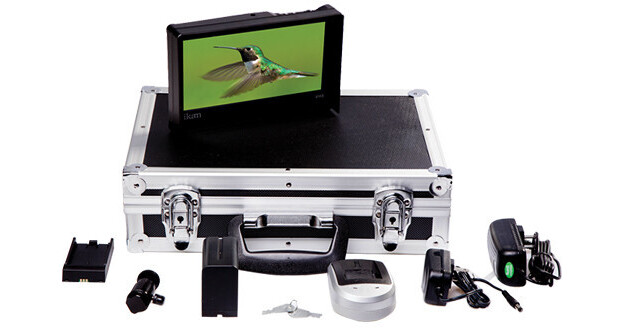
ikan's VH8 Field Monitor Deluxe Kit with Canon 900 Type Battery is thin, lightweight, and wide. The screen is 7" diagonally and has a 1600 x 768 HD resolution. Aspect ratios are selectable between 4:3 and 16:9. A vertical H.U.D. bar (Heads Up Display) can be activated on the right side of the screen to display incoming signal information. A backlight is manually adjustable to display the screen in different brightness levels. Inputs consist of HDMI and Composite and outputs of HDMI and a headphone jack. A second monitor can be connected by the HDMI output. Four touch sensitive buttons are assignable and like the rest of the buttons are away from clear view.
Software Features
These help tune focus and exposure prior to shooting.
Peaking
Highlights the desired focus area in a red outline. As you adjust the focus control, the red outline gets sharper and sharper, until razor sharp, to indicate better and better focus.
False Color
Uses many colors to ensure proper exposure. These colors change at the adjustment of the camera's iris. Under- and Over-Luminance warnings indicate when exposure is out of range.
Movable Pixel-to-Pixel
Displays in full screen a portion of an image in the native resolution of the image, even if the native resolution is bigger than the monitor's. And you can move to other portions. Pixel-to-Pixel helps better analyze an image by letting you see it in top resolution.
Clip Guides
Lets you assign exposure limits. If you go above the limit, a vivid color will flash.
DSLR Scaling
Outputs an HDMI camera signal in your choice of four aspect ratios: Normal, 3:2, 16:9 or Full Screen.
Peaking
Highlights the desired focus area in a red outline. As you adjust the focus control, the red outline gets sharper and sharper, until razor sharp, to indicate better and better focus.
False Color
Uses many colors to ensure proper exposure. These colors change at the adjustment of the camera's iris. Under- and Over-Luminance warnings indicate when exposure is out of range.
Movable Pixel-to-Pixel
Displays in full screen a portion of an image in the native resolution of the image, even if the native resolution is bigger than the monitor's. And you can move to other portions. Pixel-to-Pixel helps better analyze an image by letting you see it in top resolution.
Clip Guides
Lets you assign exposure limits. If you go above the limit, a vivid color will flash.
DSLR Scaling
Outputs an HDMI camera signal in your choice of four aspect ratios: Normal, 3:2, 16:9 or Full Screen.
Additional Features
- Pixel Data Analysis
- Underscan
- Check Field (blue, red, green, monochrome)
- H/V line field delay
- Adjustable RGB