Please update your browser to take advantage of the latest technology security enhancements to ensure your B&H Shopping experience is as safe as it is enjoyable:
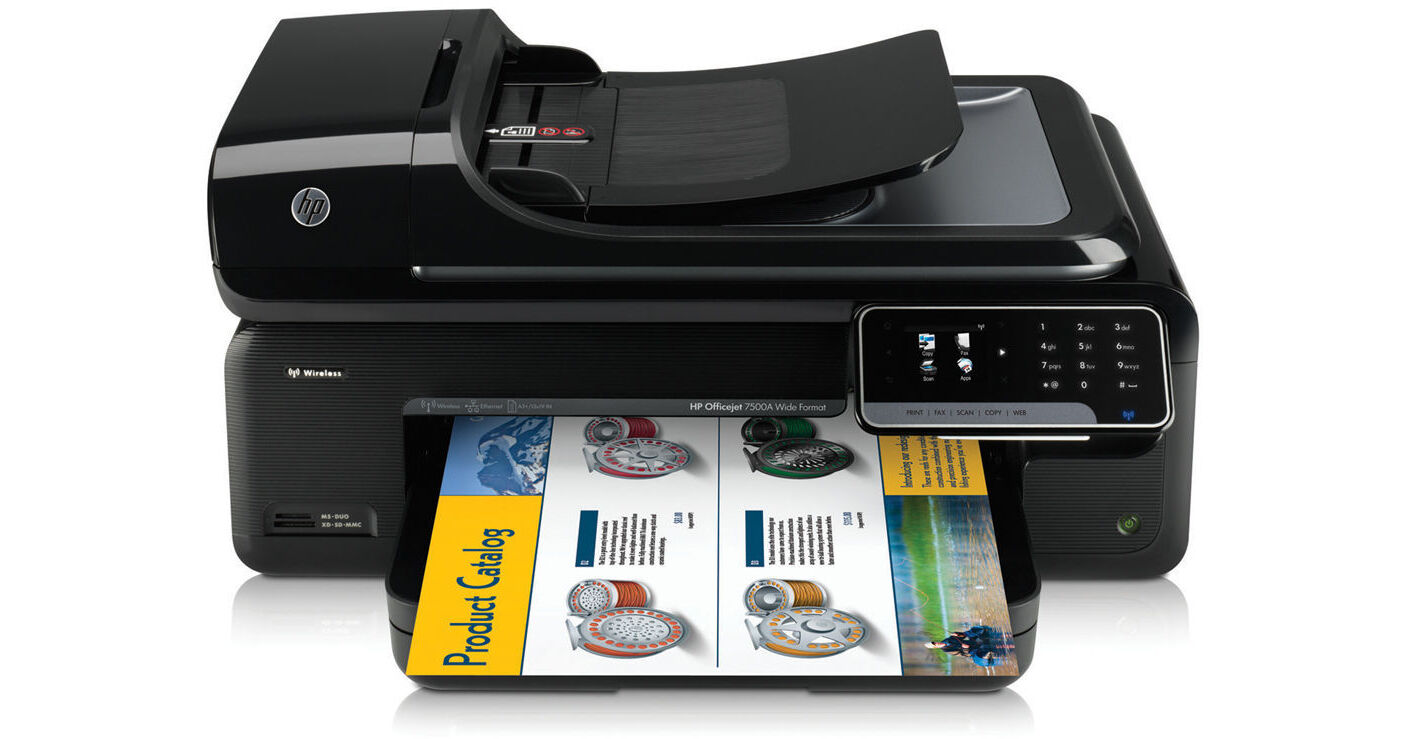
What do you do when you have to print large items such as spreadsheets, proofs, graphics or photos? Consider the HP Officejet 7500A Wide Format Wireless Color e-All-In-One Inkjet Printer. This all-in-one can handle a varied range of paper sizes, including borderless photos, up to 13.0 x 19.0"/Super B, and custom sizes up to 13.0 x 44.0"/330 x 1118mm, plus it is a scanner, copier and fax machine all rolled into one printing dynamo.
Officejet 7500A Wide Format Wireless Color e-All-In-One Inkjet Printer Overview
What do you do when you have to print large items such as spreadsheets, proofs, graphics or photos? Consider the HP Officejet 7500A Wide Format Wireless Color e-All-In-One Inkjet Printer. This all-in-one can handle a varied range of paper sizes, including borderless photos, up to 13.0 x 19.0"/Super B, and custom sizes up to 13.0 x 44.0"/330 x 1118mm, plus it is a scanner, copier and fax machine all rolled into one printing dynamo.
The Officejet 7500A connects to a network wirelessly or via its wired Ethernet interface - with a connection to the internet you can print from web pages and download applications to customize the 7500A to meet your particular needs. For PC freedom - print, or copy by just plugging in a memory card into the built-in card reader and you are good to go! You can also scan directly to memory cards - no problem.
A standout feature of this versatile machine is its compatibility with HP's ePrint. Now you can e-mail an image from your laptop or Smartphone to the printer's assigned e-mail address while on the road - and behold - it is printed before you get home or back to the office or hotel. No special software or drivers are required. To use this feature, all you need is an Internet connection on a wireless network.
The Officejet 7500 boasts a fast maximum print speed of 32 ppm in black, and 31 ppm in color. It employs a four individual ink cartridge system and optimized print and scan resolutions up to 4800 x 1200 dpi for sharp and clear output. With 128 MB of on-board memory, a 35-sheet Automatic Document Feeder/ADF and a 150-sheet input paper capacity work to keep a steady and productive workflow.
A feature that sets the HP Officejet 7500A apart from other printers in its compatibility with HP ePrint, making it possible for Smartphone users to easily print documents, presentations, reports and more, virtually anytime, anywhere. This feature requires an internet connection for registration.
HP ePrint supports these common file types: Microsoft Word documents, Excel spreadsheets; PowerPoint presentations, PDFs, image files, HTML files, text and rich text files, and XPS documents.
Print professional business materials - from 3.5 x 5.0"-13.0 x 44.0" (89 x 127mm-330 x 1118mm) - plus fax, copy and scan with ease.
Connect to your network wirelessly or with built-in Ethernet, or to your PC with Hi-speed USB 2.0.
Handle a range of paper types, using the 150-page, wide-format tray and a 35-page automatic document feeder.
Get more done, faster, with fax and scan solutions-quickly fax files or scan to a PC or e-mail.
Deliver materials with professional color graphics and laser-quality black text, using HP Officejet inks. HP XL 920 cartridges not included.
Get a great value, using individual inks and high-capacity cartridges designed for the office.
Design marketing materials with templates and tools from Marketsplash by HP, and print them affordably.
Use business applications and the 2.36/61mm touchscreen to access, store and print your information in seconds.
Print from anywhere, anytime, directly to your HP all-in-one, using your mobile device. This feature requires an Internet connection to the printer. It works with any Internet- and e-mail-capable device.
For details, http://www.hp.com/go/ePrintCenter.
Copy a two-sided identification card onto one side of a page using the ID copy feature.
Use the memory card slots and 2.4-inch touchscreen to print without a PC.
Fax features include: auto fax reduction; auto redial; fax delayed sending - black only; distinctive ring detection; 20 broadcast locations; fax forwarding; polling; fax telephone mode; funk fax barrier - requires caller ID and PC fax - for sending and archiving.
Use up to 40% less energy than comparable laser products with this ENERGY STAR qualified all-in-one.
Save paper by viewing and storing faxes electronically
Learn simple ways to conserve resources and easily recycle, using the Eco-tips button on the control panel.
Officejet 7500A Wide Format Wireless Color e-All-In-One Inkjet Printer Specs
Printing Technology
HP Thermal Inkjet
Processor
192 MHz ARM9 core
Maximum Resolution
Color: up to 4800 x 1200 optimized dpi color (when printing from a computer on selected HP photo papers and 1200 input dpi)
Black (best): up to 600 rendered dpi black (when printing from a computer)
Print Speed
Color (draft, letter): 32 ppm
Black (draft, letter): 33 ppm
Color: (normal quality, laser comparable): 7 ppm
Black: (normal quality, laser comparable): 10 ppm
4.0 x 6.0" (A6) photo (draft mode): as fast as 17 sec
First Print Out Speed
Color: as fast as 19 sec
Black: as fast as 16 sec
Minimum Ink Droplet Size
14 pl
Ink Type
Color: Dye-based
Black: Pigment-based
Ink Palette
CMYK
Ink Cartridge Configuration
4 x individual ink cartridges
Compatible Ink Cartridges
HP 920 Black Officejet Ink Cartridge (~ 420 pages); HP 920 Cyan, Magenta, Yellow Ink Cartridges (~ 300 pages each)
HP 920XL Black (~ 1200 pages); HP 920XL Cyan, Magenta, Yellow Ink Cartridges (~700 pages each)
Input Buffer
Not Specified by Manufacturer
Printer Duty Cycle
Up to 7000 pages monthly
Recommended: up to 200-450 pages monthly
Print Archival Life
Not Specified by Manufacturer
Printer Language
HP PCL 3 GUI
Scanner
Image Sensor
CIS
Scanner Type
Flatbed, ADF
Maximum Scan Size
Flatbed & ADF: 8.5 x 14.0" (legal, 216 x 356mm)
Optical Resolution
Up to 4800 dpi
Interpolated Resolution
Not Specified by Manufacturer
Hardware Resolution
Not Specified by Manufacturer
Color Depth
Color: 24-bit per RGB color, 8-bit grayscale (256 levels of gray)
Scan Speed
Scan speeds vary according to the complexity of the document
Driver
Twain v 1.9
Dynamic Range
Not Specified by Manufacturer
Light Source
Not Specified by Manufacturer
Transparency Scan Area
N/A
Scan Modes
Scan to memory card
Scan to email for PDF and JPEG
Scan to PC and network folder
Fax
Modem Speed
Up to 33.6 Kbps
Transmission Speed
3 sec/page at 33.6 Kbps
Fax Resolution
Black: 196 x 203 (8-bit grayscale)-photo; 300 x 300 -very fine; 196 x 203-fine, 196 x 98-standard
Color: 300 x 300 -photo; 200 x 200-very fine; 200 x 200-fine; 200 x 200-standard
Photo: 203 x 98 dpi
Memory
Up to 100 pages, up to 110 speed dials
Non-volatile fax memory to retain faxes when out of paper
Fax Input Modes
Ring detect with automatic fax/answering machine switching
Junk fax blocker
Digital fax: Paperless fax archive to PC or network, paperless fax send from PC
Manual fax send and receive
Copier
Copy Speed
Copy speeds vary according to the complexity of the document
Copy Resolution
Color:: up to 4800 x 1200 optimized dpi (from 1200 input dpi on HP Photo Papers)
Black:: up to 1200 optimized dpi (from 600 input dpi)
Reduction/Enlargement
25-400%
Number of Copies
Up to 100
Paper Handling
Maximum Paper Width
8.5" (215.9mm)
Paper Sizes
4.0 x 6.0" (102 x 252mm); 5.0 x 7.0" (127 x 177.8mm); 8.0 x 10.0" (203 x 254mm); 8.5 x 11.0" (letter, 216 x 279mm), 8.5 x 14.0" (legal, 215.9 x 355.6mm), 11.0 x 14.0" (274 x 356mm), 11.0 x 17.0" (tabloid, 274.4 x 432mm), 12.0 x 12.0" (305 x 305mm), 13.0 x 19.0" (Super B, 330 x 483mm); Executive (7.3 x 10.5", 185 x 267mm)
No. 10, Monarch & DL envelopes
Custom media sizes:
3.5 x 5.0"-13.0 x 44.0" (89 x 127mm-330 x 1118mm)
Borderless Printing
Up to 13.0 x 19.0" (super B, 330 x 483mm)
Paper Types
Plain, inkjet and photo papers, index and greeting cards, brochure and flyer paper, transparency films, labels
Maximum Paper Thickness
Paper: 60-105 gsm (16 to 28 lb bond)
Photo media 280 gsm (75 lb bond)
Envelopes 75-90 gsm (20 to 24 lb bond)
Cards: up to 200 gsm (110 lb index)
Paper Capacity
150-sheet input tray:
Up to 150 sheets of plain paper
Transparencies: up to 55 sheets
Photo media: up to 40 sheets
Labels: up to 40 sheets
Envelopes: up to 15 sheets
Cards: up to 40 cards
Automatic Document Feeder
Up to 35 sheets
Duplex Printing
Not supported
Connectivity
Interfaces
1 x USB 2.0
1 x Wireless 802.11b/g/n
1 x Ethernet
1 x RJ-11 fax
2 x Memory card slots
Compatible Memory Cards
Secure Digital (SD); MultimediaCard; Secure MultimediaCard; Secure MultimediaCard Reduced Size MultimediaCard (RS-MMC), xD-Picture Card
With adapter, sold separately:
MMCmobile; MMCmicro; miniSD; microSD
Memory Card Specifications
Maximum recommended number of files on a memory card: 1000
Maximum recommended individual file size: 12 megapixel maximum, 8 MB maximum
Maximum recommended memory card size: 8 GB (solid state only)
Direct Print Capable
Yes, via memory cards
Network Capable
Wired Ethernet and wireless 802.11/b/g/n
Memory
128 MB
Minimum System Requirements
PC:
Microsoft Windows 7: 1 GHz 32-bit (x86) or 64-bit (x64) processor, 1 GB (32-bit) or 2 GB (64-bit) RAM, 1.5 GB hard disk space, CD-ROM/DVD drive or Internet connection, USB port Windows Vista: 800 MHz 32-bit (x86) or 64-bit (x64) processor, 512 MB RAM, 2.0 GB hard disk space, CD-ROM/DVD drive or Internet
connection, USB port
Windows XP (32-bit) (SP2): Intel Pentium II, Celeron or
compatible processor, 233 MHz or higher, 128 MB RAM, 750 MB hard disk space, CD-ROM/DVD drive or Internet Mac:
Mac OS X v 10.5.8, v 10.6: PowerPC G4, G5, or Intel Core processor; 300 MB free hard disk space
Compatible Operating Systems
Microsoft Windows 7, Windows Vista, Windows XP (SP2)
Mac OS X v 10.5, v 10.6
Linux (For more information, see http://hplipopensource.com/hplip-web/index.html)
Network Support
Windows XP (32-bit) (Professional and Home Editions), Windows Vista 32-bit and 64-bit (Ultimate Edition, Enterprise Edition and Business Edition), Windows 7 (32-bit and 64-bit)
Windows Small Business Server 2003 32-bit and 64-bit, Windows 2003 Server 32-bit and 64-
bit, Windows 2003 Server R2 32-bit and 64-bit (Standard Edition, Enterprise Edition)
Windows Small Business Server 2008 64-bit, Windows 2008 Server 32-bit and 64-bit, Windows 2008 Server R2 64-bit (Standard Edition, Enterprise Edition)
Citrix XenDesktop 4, Citrix XenServer 5.5
Mac OS X v10.5, v10.6
Microsoft Windows 2003 Server Terminal Services
Microsoft Windows 2003 Server Terminal Services with Citrix Presentation Server 4.0
Microsoft Windows 2003 Server Terminal Services with Citrix Presentation Server 4.5
Microsoft Windows 2003 Server Terminal Services with Citrix XenApp 5.0
Microsoft Windows 2003 Server Terminal Services with Citrix Metaframe XP with Feature Release 3
Microsoft Windows 2003 Small Business Server Terminal Services
Microsoft Windows Server 2008 Terminal Services
Microsoft Windows Small Business Server 2008 Terminal Services
Microsoft Windows 2008 Server Terminal Services with Citrix XenApp 5.0
Novell Netware 6.5, Open Enterprise Server 2
Network Protocol Support
TCP/IP
Physical
Display
2.4" (61mm)- diagonal Color Graphics Display(CGD), TouchSmart Frame
Image Preview Display
No
Front Panel Controls
Yes
Power Requirements
100-240VAC (±10%), 50/60 Hz (±3 Hz)
Power adapter (included)