
Holiday Kickoff

Video Chat with a Pro Video Expert - Live

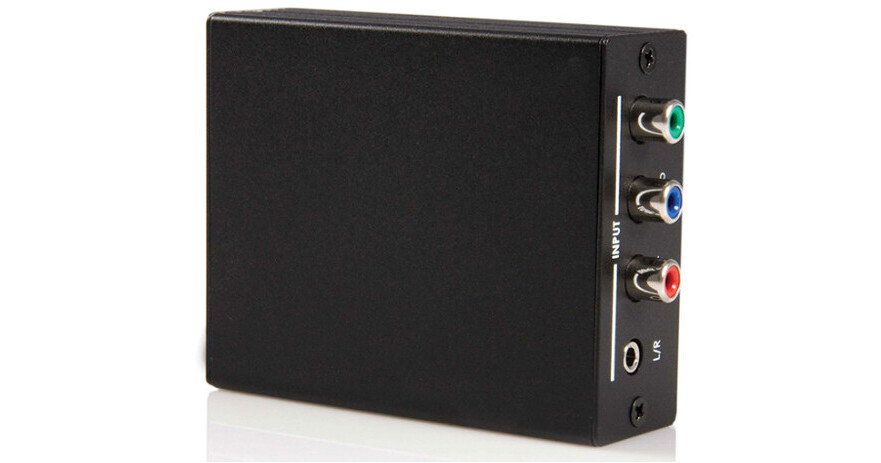
StarTech CPNTA2HDMI Component to HDMI Video Converter with Audio (Black)

BH #STCPNTA2HDMI • MFR #CPNTA2HDMI
Print
StarTech CPNTA2HDMI Component to HDMI Video Converter with Audio (Black)
In Stock
No Store Display
Free Delivery: Fri, Nov 20
to
Protect Your Gear
Add a protection plan from $13.99
Ask an Expert
800-606-6969

StarTech CPNTA2HDMI Overview

The black CPNTA2HDMI Component to HDMI Video Converter with Audio from Startech lets you convert and combine analog component video (YPbPr and YCbCr) with corresponding audio (digital or analog) into a single HDMI output. The component to HDMI converter supports high-definition video resolutions of up to 1080p and 5.1-channel audio, providing the quality and convenience of HDMI without the expense of having to upgrade output devices for HDMI compatibility.

This unit is suitable for use with HDTVs (LCD / PLASMA / DLP) by connecting standard and high-definition devices to an HDTV through an HDMI port.

Component video with audio to HDMI conversion saves you the cost of upgrading your video source device for compatibility with newer displays
Simple plug-and-play installation with no software requirements makes for a simple and easy setup
Compliant with HDMI 1.2/HDCP 1.1/DVI 1.0
Supports a maximum resolution of 1080p
Supports digital and analog audio input
Supports standard and high-definition video output
CE, FC certified
RoHS compliant
Free lifetime technical support
UPC: 065030824682

StarTech CPNTA2HDMI Specs

Hardware
Converter
Format Converter
Standards
HDMI, HDCP 1.1, DVI 1.0
Connectors
Connector 1
1 x 3.5 mm mini-jack (3-position) female
1 x Component video (3 x RCA) female
1 x Digital coax audio (RCA) female
Connector 2
1 x HDMI (19-pin) female
Performance
Maximum Resolution Digital
1080p @ 60 Hz
Power
Output Voltage
5 DC
Center Tip Polarity
Positive
Physical Characteristics
Dimensions
4.3 x 3.1 x 1.2" (110 x 80 x 30 mm)
Weight
6.7 oz (190.0 g)
Packaging Info
Package Weight
1.17 lb
Box Dimensions (LxWxH)
8.25 x 4.75 x 2.4"

StarTech CPNTA2HDMI Reviews

Now my Arcam DV88 Player works with a new LG 4K TV

By CharlieMouse
Rated 5 out of 5
Date: 2025-02-10

I bought a 2022 LG OLED42C2 4K TV which only has HDMI inputs which introduced a problem for my 2002 Arcam DV88 DVD player which only has analog component and composite Video outputs. I tried a few ($20) converters from Amazon which could not handle the video signal conversion. I decided to give this unit a go, and now the DVD player is working perfectly with my LG 4K HDMI TV. Excellent *****

Better Quality & Result

By Stephen
Rated 5 out of 5
Date: 2022-04-13

My house wiring is Component wires to multiple locations with a signal distribution system. Newest TVs do not have Component inputs. I bought some inexpensive converters. The picture would go blank from time to time. I bought one StarTech converter and it solved the problem. I bought two more for the other TVs. Now the pictures in all three places are great.

See any errors on this page?

Could this be useful with a Canon XL H1 camcorder ...

Could this be useful with a Canon XL H1 camcorder to convert the component outputs via this converter to HDMI?
Asked by: Lee
The StarTech CPNTA2HDMI Component to HDMI Video Converter with Audio (Black) may work for such an application, but I think it may be easier to use the Canon XL H1's SDI output and convert to HDMI that way. See: https://bit.ly/3IkYW6N
Answered by: Paige K
Date published: 2023-01-04

Does it work with PAL (25p or 50i) fps?

Does it work with PAL (25p or 50i) fps?
Asked by: Felix
Unfortunately the manufacturer only specifies support for 1080p @ 60 Hz.
Answered by: Eric
Date published: 2022-12-30

Will this work with standard definition input?

Will this work with standard definition input?
Asked by: Herbert
The StarTech CPNTA2HDMI Component to HDMI Video Converter with Audio (Black) is compatible with a 480 standard definition signal.
Answered by: John W
Date published: 2024-12-17

question

Does the converter require an HDCP compliant device to connect to? I would like to use the HDMI output of the converter and connect to the HDMI input of a video capture card in a PC.
Asked by: Robert
The StarTech CPNTA2HDMI Component to HDMI Video Converter with Audio (Black) does not add HDCP to a video feed converted to HDMI through it, so the video feed would not need to be output to an HDCP-compliant device.
Answered by: Kenneth C
Date published: 2025-06-11

Can this go mobile with external power?

Can this go mobile with external power?
Asked by: Roger
This has a standard AC connection. You could use a product like the Xcellon 12,000mAh Power Bank with AC and USB Outlets to power this product on the go. B&H # XCPB1200AC - https://bhpho.to/2jX8gSA
Answered by: Joe P
Date published: 2022-09-17

Could I use this with the Canon XH A1 Camera to ...

Could I use this with the Canon XH A1 Camera to convert the signal to HDMI via the component output of the camera so that I could record the video to some external recorder?
Asked by: Raymond
Yes, use the DTC-1000 Component Video Cable that came with the camera or other D-Sub to Component breakout cable and run from camera to CPNTA2HDMI Component to HDMI Video Converter. You will also want to use an 3.5mm stereo audio cable from camera output to audio input of CPNTA2HDMI. The audio will then be imbedded on the HDMI to your recording device.
Answered by: Aaron
Date published: 2022-10-03

question

Is this Startech converter compatible with a Canon XH-A1 component out cable to an HDMI Atamos Ninja Inferno? If not, what are some cost effective alternatives?
Asked by: Donald
Yes it is - I have used it successfully with component out from an XHA1 and an inferno. Not certain if audio sync is lost, though. I used it some time ago with a ninja 2 and there was a slight sync problem. Havent tested with this unit yet.
Answered by: Tain B.
Date published: 2021-05-27
  • y_2026, m_11, d_16, h_6CST
  • bvseo_bulk, prod_bvqa, vn_bulk_3.0.50
  • cp_1, bvpage1
  • co_hasquestionsanswers, tq_7
  • loc_en_US, sid_918747, prod, sort_[SortEntry(order=HAS_STAFF_ANSWERS, direction=DESCENDING)]
  • clientName_bhphotovideo
Whatever You Need, We've Got It