Video Chat with a Pro Audio Expert - Live

Henry Engineering Sports Pod Microphone/Headphone Controller and Intercom System

BH #HESPORTSPOD • MFR #SP
Print
Henry Engineering Sports Pod Microphone/Headphone Controller and Intercom System
Key Features
  • For Talent at Sports Events & Broadcasts
  • Balanced XLR Mic Input with Gain Control
  • Balanced XLR Mic/Line Output
  • 1/4" Local and Return Audio Inputs
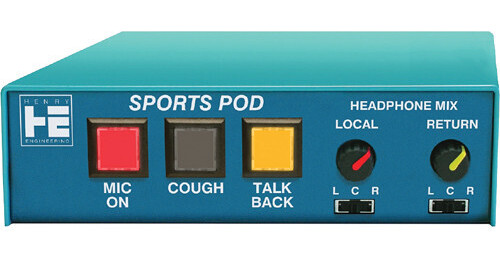
The Henry Engineering Sports Pod is a microphone/headphone controller and intercom system designed to provide talent at sporting events and broadcasts with a mix local and IFB headphone audio in addition to duplex off-air communication with a producer or engineer. It can be linked with multiple Sports Pods via Cat 5 cabling without requiring a power source for each unit.
More Details
Temporarily Out of Stock
No Store Display
Free Expedited Shipping
Ask an Expert
800-606-6969

Henry Engineering SP Overview

The Henry Engineering Sports Pod is a microphone/headphone controller and intercom system designed to provide talent at sporting events and broadcasts with a mix local and IFB headphone audio in addition to duplex off-air communication with a producer or engineer. It can be linked with multiple Sports Pods via Cat 5 cabling without requiring a power source for each unit.

With simple front-panel controls—Mic On, Cough, and Talkback buttons plus a customizable Headphone Mix via local and return volume controls and pan switches—the Sports Pod is easily operable by persons who aren't familiar with technical equipment. A 3.5mm remote jack allows the mic to be turned on or off remotely for added convenience.

The Sports Pod features a balanced XLR mic input with a rear-panel gain control, a balanced XLR mic/line output, separate 1/4" local and return audio inputs, and a 1/4" headphone output. A 1/4" transformer-balanced talkback output allows the mic signal to be sent to a dedicated talkback amp and speaker whenever the talkback button is pressed. The Sports Pod can be powered by a wall transformer, a MultiPhones Master unit, or a SixMix USB audio console (all optional).

Broadcast-Friendly Operation
  • Announcer’s mic/headphone controller and intercom system for use by talent at a remote broadcast
  • Ideal for use at sporting events, on-location broadcasts, or in any studio
  • Similar to Henry Engineering’s Talent Pod, but with three additional features—an integrated intercom system, active mic audio on/off switching, and the ability to remotely control the mic
  • Solves the problem of providing talent with a mix of local and return (IFB) headphone audio, and provides duplex off-air communication with a producer or engineer
  • Simple design allows for error-free use by non-technical users
  • Provides an easy way to link several units for use at broadcasts with multiple announcers
  • When used with a MultiPhones II Master unit (available separately), duplex off-air communication (intercom) is possible, allowing the producer to talk to the talent via the talent’s headphone audio
  • 1/3-rack width, rack-mountable via rack shelf (available separately)
  • Supports mounting using separately available desk mount or wall/cabinet mounting brackets
Simple Controls
  • Illuminated Mic On/Off button lets the announcer control his mic
  • Cough button momentarily mutes mic audio
  • Mic can also be turned on/off via a remote push button, with a Tally LED to remotely indicate when the mic is on
  • Talkback button lets the talent to talk to an off-site producer or engineer—pressing the Talkback button mutes mic audio from the main (air) output and sends it to the Talkback output
  • Individual volume controls for local and return audio
  • Pan switches allow independent positioning of local and return audio in the left, center, or right channel
  • Loc button enables monitoring of the mic via the local headphone input if there is no source of local headphone audio
Flexible Connectivity
  • Balanced XLR female mic input with adjustable gain on rear panel
  • Balanced XLR male mic/line output
  • Separate 1/4" inputs for local and return audio
  • 1/4" headphones output
  • 1/4" transformer-balanced talkback output
  • Dual RJ45 link ports distribute power and local/return audio to all units connected via Cat 5 cable
  • SPST momentary closure turns mic on/off via 3.5mm mic remote jack
Expandable for Multiple Announcers
  • Use additional Sports Pods (available separately) so that each announcer can control their own mic, headphone volume, mix, and pan settings
  • Multiple Sports Pods can be quickly linked with Cat 5 cables, distributing power and local/return audio to all units and eliminating the need for multiple power sources and complicated wiring
  • Compatible with Talent Pods, MiniPods, and Guest Pods (all available separately)
  • Supports standalone use or integration with Henry Engineering’s MultiPhones system or SixMix USB audio console
Powering Options
  • Power Sports Pods with an external wall transformer; one transformer will power several units linked with Cat 5 cables
  • Power via a MultiPhones Master unit or SixMix USB console (transformer not required)
UPC: 837654309179

Henry Engineering SP Specs

Inputs
1 x XLR 3-Pin Female Balanced Mic Input
1 x 1/4" TRS Female Balanced/Unbalanced Local Input
1 x 1/4" TRS Female Balanced/Unbalanced Return Input
Outputs
1 x XLR 3-Pin Male Balanced Mic/Line Output
1 x 1/4" TRS Female Unbalanced Stereo Headphone Output (Do Not Use Older 8-Ohm Headphones)
1 x 1/4" TRS Female Transformer-Balanced Talkback Output
Link Connectors
2 x RJ45 (Power and Local/Return Audio to All Units Connected via Cat 5 Cable)
Remote Input
1 x 1/8" / 3.5 mm TRS Mic Remote Input
Input Level
Local/Return Inputs: -10 to +4 dBu
Output Level
Mic Output: 0 dBu (Line) or -50 dBu (Mic)
Talkback Output: 0 dBu (Line) or -50 dBu (Mic)
Input Impedance
Local/Return Inputs: 20 Kilohms (Balanaced)
Local/Return Inputs: 10 Kilohms (Unbalanced)
Output Impedance
Headphone Output: > 24 Ohms
Tally
20 ma Source for Mic-On Tally LED
Power
12 VAC, 60 mA per Unit (Provided by Optional Wall Transformer, MultiPhones Master Unit, or SixMix USB Audio Console)
Dimensions
6 x 6 x 1.7" / 15.2 x 15.2 x 4.3 cm
Weight
2.5 lb / 1.1 kg
Packaging Info
Package Weight
1.95 lb
Box Dimensions (LxWxH)
8.8 x 6.3 x 2.1"

Henry Engineering SP Reviews

Great Value -- Superior Performance

By Jerry
Rated 5 out of 5
Date: 2020-02-26

I have now purchased eight of these over the past 18 months. It is reliable, works exactly as described and solves the problem that three other components put together could not. You will not regret this purchase for your broadcast.

Great Product

By Michael
Rated 5 out of 5
Date: 2013-06-04

We use this product in a translation system to allow the translator control over their input as well as listen to the program feed. Solid construction, buttons and knobs are well made. We use this in conjunction with a Henry Multiphones II unit which sends power and program feed over CAT5. This is a fantastic feature. We were unsure of Henry Products as we have never used them, but have thus far been very satisfied.

See any errors on this page?

If used with the Henry Sportscaster unit, what ...

If used with the Henry Sportscaster unit, what all channels of audio & comm are carried through the Cat 5 port?
Asked by: Patrick
The dual RJ45 link ports on the Henry Engineering Sports Pod Microphone/Headphone Controller and Intercom System distribute power as well as local and return audio to all units connected via Cat 5 cable.
Answered by: Lisa S
Date published: 2022-06-16

So Bought this through B&H. I notice it does not ...

So Bought this through B&H. I notice it does not come with an AC power Outlet... Is that the case? If so, Where do we buy it from I guess.
Asked by: Scott
That is correct. You would have to buy the Henry Engineering Henry Engineering Multi-System Power Pod. This is the B&H part number for the Power Pod BH #HEPP.
Answered by: John
Date published: 2020-12-29
  • y_2026, m_6, d_3, h_11CST
  • bvseo_bulk, prod_bvqa, vn_bulk_3.0.46
  • cp_1, bvpage1
  • co_hasquestionsanswers, tq_2
  • loc_en_US, sid_945187, prod, sort_[SortEntry(order=HAS_STAFF_ANSWERS, direction=DESCENDING)]
  • clientName_bhphotovideo
Whatever You Need, We've Got It