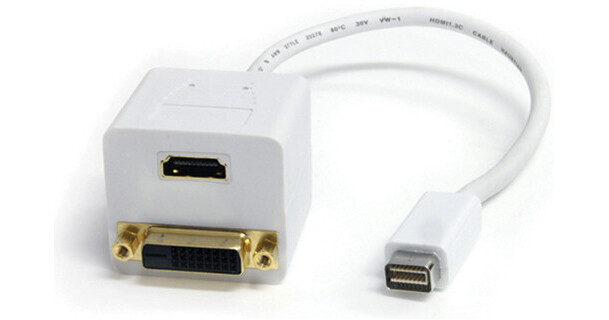
StarTech Mini-DVI Male to DVI-D & HDMI Female Splitter Cable (1', White)

BH #STMDVISPL1DH • MFR #MDVISPL1DH
Print
StarTech Mini-DVI Male to DVI-D & HDMI Female Splitter Cable (1', White)
Key Features
  • Adapter for Apple MacBook & iMac
  • Create a Dual-Display Setup
  • RoHS Compliant
The 1', white Mini-DVI Male to DVI-D & HDMI Female Splitter Cable from StarTech splits the digital DVI signal output from an Apple MacBook or iMac computer into one DVI and one HDMI output. This allows you to view content on one DVI display and one HDMI display simultaneously. This splitter cable offers guaranteed durability and reliability. It is the perfect solution for using HDTV instead of a computer monitor to watch TV shows or movies on your TV from your Apple MacBook or iMac computer.
More Details
No Longer Available
No Store Display
Ask an Expert
800-606-6969

StarTech MDVISPL1DH Overview

The 1', white Mini-DVI Male to DVI-D & HDMI Female Splitter Cable from StarTech splits the digital DVI signal output from an Apple MacBook or iMac computer into one DVI and one HDMI output. This allows you to view content on one DVI display and one HDMI display simultaneously. This splitter cable offers guaranteed durability and reliability. It is the perfect solution for using HDTV instead of a computer monitor to watch TV shows or movies on your TV from your Apple MacBook or iMac computer.

You can simultaneously view MacBook or iMac video on two separate displays
This Splitter cable features high-quality 19-pin HDMI, 25-pin DVI-D and 32-pin mini-DVI connectors
Create a simple dual-display setup by adding an external monitor to an Apple MacBook or iMac computer
Perfect solution for using HDTV instead of a computer monitor to watch TV shows or movies on your TV from your Apple MacBook or iMac computer

StarTech MDVISPL1DH Specs

Cable Length
1' / 0.3 m
Jacket Type
Polyvinyl Chloride (PVC)
Wire Gauge
30 AWG
Packaging Info
Package Weight
0.3 lb
Box Dimensions (LxWxH)
4.5 x 4.1 x 1"

StarTech MDVISPL1DH Reviews

See any errors on this page?
Whatever You Need, We've Got It