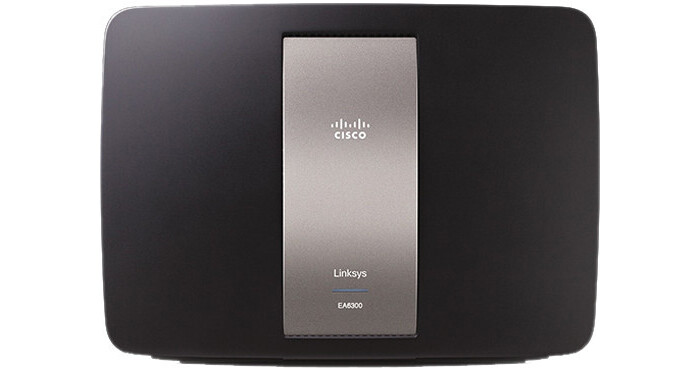
Linksys EA6300 Smart Wi-Fi Router

BH #LIEA6300 • MFR #EA6300
Print
Linksys EA6300 Smart Wi-Fi Router
Key Features
  • Dual Band N300+AC867 Advanced Multimedia
  • Approximately 3x Speed of Wireless-N
  • Smart Wi-Fi Apps, Tools, & Mobility
  • 1 USB 3.0 Port
The Linksys EA6300 AC 1200 Advanced Multimedia Smart Wi-Fi Router is built with 802.11ac wireless technology that offers maximum speed and range to create a powerful network. It offers fast transfer rates and is designed for top-notch performance and connectivity for your computers, Internet-ready television (Smart TVs), game consoles, smartphones, and other Wi-Fi devices.
More Details
No Longer Available
No Store Display
Ask an Expert
800-606-6969

Linksys EA6300 Overview

The Linksys EA6300 AC 1200 Advanced Multimedia Smart Wi-Fi Router is built with 802.11ac wireless technology that offers maximum speed and range to create a powerful network. It offers fast transfer rates and is designed for top-notch performance and connectivity for your computers, Internet-ready television (Smart TVs), game consoles, smartphones, and other Wi-Fi devices.

Upgrade to the latest wireless-AC technology and enjoy seamless video streaming and fast content sharing across devices by using the EA6300 Smart Wi-Fi Router. Its wireless-AC technology provides gigabit Wi-Fi speeds and high-powered signal amplifiers, allowing large video or music files to download faster and sync more quickly for a better streaming and sharing experience.

With the EA6300 Smart Wi-Fi Router, you have double the network bandwidth with simultaneous dual-band AC (2.4 GHz and 5 GHz bands) and an additional Guest network. All these features enable your network and its connected devices to avoid interference, have smoother and faster HD video streaming and file transfers, as well as experience better wireless gaming.

For your connected home, you may use the 2.4 GHz network to connect your wireless devices to surf the Internet and email, share files, and print. The 5 GHz network is best for heavy applications including Voice over IP (VoIP) calls, online gaming, and streaming high-definition videos.

The included SimpleTap Card is a faster and easier way to connect your NFC (Near Field Communication)-compatible smartphone to the EA6300 Smart Wi-Fi Router’s 2.4 GHz wireless network.

Note:
Maximum performance derived from IEEE Standard 802.11 specifications (draft specifications for 802.11ac). Actual performance can vary, including lower wireless network capacity, data throughput rate, range, & coverage, & depends on many factors including products used & interference. 802.11ac 1300 Mbps in the 5GHz Band is approximately 3x faster than 802.11n 450 Mbps in the 2.4GHz Band. An 802.11ac adapter will be needed to achieve 11ac data rates & up to 1300 Mbps wireless speeds may be achieved when connecting to other 802.11ac 1300 Mbps devices.
Wireless AC
Built with the Draft 802.11ac technology for high quality performance and range
Broad Compatibility
Works seamlessly with all a/b/g/n devices
Simultaneous Dual-Band 2.4 + 5 GHz
Double the network bandwidth to avoid interference and maximize throughput
Speed Up to N300 + AC867
Experience speeds approximately 3x faster than Wireless-N
Gigabit Ethernet Ports
Use the 4 Gigabit Ethernet (10/100/1,000) ports for quick file sharing (up to 10× faster than standard Ethernet) between other Gigabit-enabled devices like computers and servers
Ethernet 1-4 (Yellow and Green)
Connect Ethernet cables (also called network cables) to these Gigabit (10/100/1000) ports, color coded blue, and to wired Ethernet network devices on your network
Note:
The yellow light flashes to indicate network activity over that port. The green light turns On when the local network port is connected to a 10/100/1000 port.
Internet (Yellow and Green)
Using an Ethernet cable (sold separately), the Internet port connects the router to your Internet connection, which is typically a Cable or DSL (Digital Subscriber Line) modem
Note:
The yellow light flashes to indicate network activity over that port. The green light turns On when the Internet port is connected to a 10/100/1,000 port.
WPS Button
If you have client devices, such as wireless printers, that support WPS, you can press the WPS button to automatically configure wireless security for your wireless network
Reset
Allows you to reset the router to its factory defaults
Note:
Press and hold the Reset button for approximately 10 seconds.
Power
Power port connects to the power adapter that comes with your router
Easy Setup
Simple installation, no CD required
SimpleTap
A new Smart Wi-Fi Account feature for the EA6300 Smart Wi-Fi Router is the SimpleTap, which is a faster and easier way to connect your NFC (Near Field Communication)-compatible smartphone to the router's 2.4 GHz wireless network
Superior Range
High-powered signal amplifiers deliver high level of range and performance
USB 3.0 Port on Back Panel
Lets you add an external USB (Universal Serial Bus) drive to your network, supplies up to 1,000mA power to devices and supports FAT, NTFS, and HFS+ storage file systems
Note:
The USB port recognizes older USB devices; however, it will only run on the speed allotted to the specific USB standard.
Beamforming Technology
Focuses wireless signals to reduce interference and improve speed and range
Advanced Security
Keep Wi-Fi freeloaders and Internet threats at bay with WPA2 encryption and SPI firewall to help keep your network protected
DLNA (Digital Living Network Alliance)
Features a built-in DLNA media server for seamless streaming of your video and media files to an Xbox 360, PS3, or other DLNA-compatible devices; you can also connect a USB printer and share it across your network
Parental Controls
Easily manage access to content at home or while away with Smart Wi-Fi
Guest Network
Easily secure your network while providing guests with Wi-Fi access
Quality of Service
Traffic prioritization technology delivers smooth performance for music, voice, and video
IPv6 Enabled
Supports the latest Internet Protocol technology to futureproof your network
Wall Mountable
Flexible placement for convenience and optimal performance
Top Panel
The Indicator Light on the top panel stays on steadily while power is connected and flashes slowly during boot up, firmware upgrades, and factory reset
Note:
The Indicator light also designates that a successful WPS (Wi-Fi Protected Setup) connection is established and flashes quickly when there is a WPS error.

Linksys EA6300 Specs

Technology
Wireless-N & AC
Bands
2.4 & 5 GHz
Architecture
Transmit/Receive: 2 x 2 & 2 x 2
Antennas
4 internal
Ports
4 x Gigabit LAN
1 x Gigabit WAN
1 x USB 3.0
Wi-Fi Protected Setup
Wi-Fi Protected Setup push button
IPv6
Native IPv6 and 6rd support
Software
Linksys Smart Wi-Fi:

Setup guest access

Manage parental controls

Advanced network settings

Setup
CD-less
OS Compatibility
Windows: Windows XP with Service Pack 3
Windows Vista with Service Pack 1 or later
Windows 7
Windows 8

Mac OS X: OS X Leopard 10.5.8 or later
OS X Snow Leopard 10.6.1 or later
OS X Lion 10.7 or later
OS X Mountain Lion 10.8
Minimum System Requirements
PC: WI-FI enabled with CD or DVD drive, Windows XP SP3, Windows Vista SP1 or later, Windows 7, or Windows 8
Mac: WI-FI enabled with CD or DVD drive, OS X Leopard 10.5.8 or later, Snow Leopard 10.6.1 or later, Lion 10.7 or Mountain Lion 10.8
Browser Requirements
Internet Explorer 8, Safari 5 (for Mac), Firefox 8, or Chrome configuration
Other
Linksys Smart Wi-Fi Account
Wireless adapter must support WPA/WPA2
Packaging Info
Package Weight
2.35 lb
Box Dimensions (LxWxH)
12.6 x 9.4 x 2.8"

Linksys EA6300 Reviews

See any errors on this page?
Whatever You Need, We've Got It