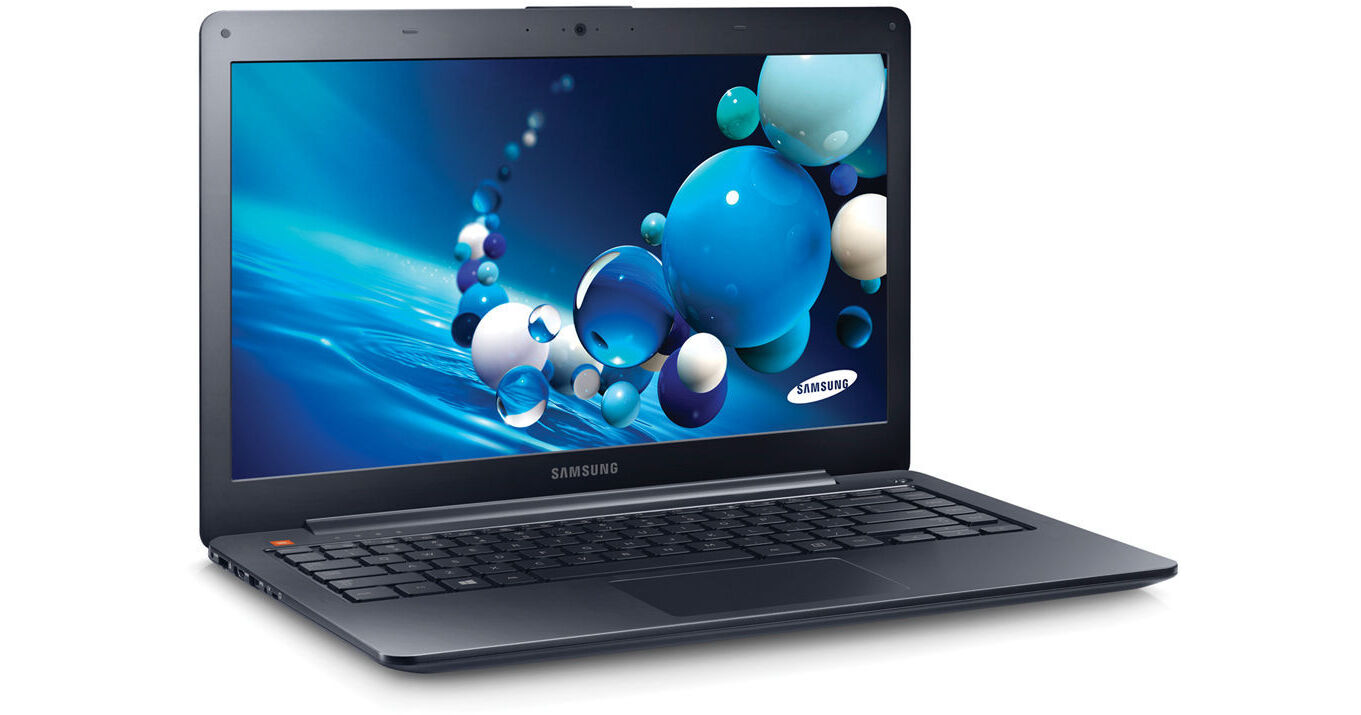
Samsung ATIV Book 5 NP540U4E-K04US Multi-Touch 14" Ultrabook Computer (Mineral Ash Black)

BH #SANP540U4EK4 • MFR #NP540U4E-K04US
Print
Samsung ATIV Book 5 NP540U4E-K04US Multi-Touch 14" Ultrabook Computer (Mineral Ash Black)
Key Features
  • 1.8GHz Intel Core i3-3217U Dual-Core
  • 4GB of 1600MHz DDR3 RAM
  • 500GB 5400rpm HDD + 24GB ExpressCache
  • Integrated Intel HD Graphics 4000
The ATIV Book 5 NP540U4E-K04US Multi-Touch 14" Ultrabook Computer from Samsung measures in at 0.82" thin and weighs just 4.19 pounds. The ATIV Book 5 features an aluminum chassis and a mineral ash black finish for a durable, ultra-slim and ultraportable design.
More Details
No Longer Available
No Store Display
Ask an Expert
800-606-6969

Samsung NP540U4E-K04 Overview

The ATIV Book 5 NP540U4E-K04US Multi-Touch 14" Ultrabook Computer from Samsung measures in at 0.82" thin and weighs just 4.19 pounds. The ATIV Book 5 features an aluminum chassis and a mineral ash black finish for a durable, ultra-slim and ultraportable design.

The 14" widescreen LED-backlit display is a capacitive touchscreen, which utilizes the multi-touch gestures integrated into Windows 8. The screen has a 16:9 aspect ratio and a 1366 x 768 native resolution powered by integrated Intel HD Graphics 4000. You can also output video to an external display via the HDMI port.

The system is powered by a dual-core Ivy Bridge 1.8GHz Intel Core i3-3217U processor. It also has 4GB of 1600MHz DDR3 RAM, a 500GB 5400rpm hard drive with a 24GB ExpressCache, a 3-in-1 media card reader, 10/100/1000Mbps Gigabit Ethernet, 802.11a/b/g/n Wi-Fi, Bluetooth 4.0, an integrated webcam and microphone. There are also built-in JBL stereo speakers with SoundAlive technology.

Windows 8 (64-bit) is the installed operating system. Windows 8 replaces the traditional Start menu with a redesigned Start screen. The Start screen features tiles, which provide notifications in real-time. Windows 8 also focuses more on cloud storage as well as apps, which can be downloaded from the Windows Store. Windows 8 provides a unique user experience that differs from previous versions of Windows.

Samsung ATIV Book 5
14" LED-Backlit Capacitive Touchscreen
The ATIV Book 5 features a 14" LED-backlit display. Its 1366 x 768 native resolution provides sharp text, detailed picture quality and vibrant color. The screen is also a capacitive touchscreen so you'll be able utilize all the multi-touch gestures incorporated into Windows 8. Since the screen has a 16:9 aspect ratio, you'll be able to play 720p HD video content natively. You can also output video to an external display via the HDMI port
Dual-Core Ivy Bridge Intel Core i3 Performance
The ATIV Book 5 houses an Ivy Bridge Intel Core i3-3217U processor. Its dual cores can reach a stock speed of 1.8GHz. With a dedicated 3MB L3 cache, 4GB of 1600MHz DDR3 RAM and Intel Hyper-Threading technology, you'll be able to push the dual cores into four virtual cores for quick and efficient multitasking
Ultraportable Design
With an aluminum enclosure, the ATIV Book 5 measures 0.82" thin and weighs just 4.19 pounds. The ATIV Book 5 provides ultraportability and versatility. Its ultra-slim profile makes it easy to slip the ATIV Book 5 into a bag or a case
JBL Stereo Speakers with SoundAlive Technology
Enjoy realistic sound and a richer multimedia experience through powerful, custom tuned JBL stereo speakers. Experience enhanced movies and music in high definition audio quality while also making the most of your home or office space with the convenience of built-in speakers
Stay Connected
The ATIV Book 5 utilizes 802.11a/b/g/n Wi-Fi so you'll be able to connect to wireless networks with ease. Bluetooth 4.0 technology is also included, which allows you to connect wirelessly to Bluetooth-enabled peripherals and accessories
Samsung SideSync
Your smartphone and the ATIV Book 5 sync together with Samsung SideSync. Docking automatically syncs all files on your smartphone with the ATIV Book 5. It also charges your smartphone as well. Move freely between the ATIV Book 5 and your smartphone while using the wireless keyboard and mouse for both. Copy and paste from the ATIV Book 5 to your smartphone and vice versa. Drag and drop files and view them on your smartphone. Virtual Phone lets you view your phone on your PC screen, in a variety of sizes, while enjoying all your phone functions. Draw on your virtual phone using your mouse with On-Screen Drawing. Record your drawing and view the video on your smartphone
Windows 8
The Redesigned Start Screen
Windows 8 introduces a new Start screen, which has all the information you need in one place. The traditional Windows desktop screen has been replaced with a tablet style design featuring tiles. Tiles are customizable as well as update in real time. News, weather forecasts, sports, contacts, apps and more are available for you to use. It's all right there on the Start screen. If you prefer the traditional Start screen of Windows 7, you have the option to switch to it
Seamless Integration of Multi-Touch Gestures
Windows 8 supports multi-touch gestures. Now, you can use your keyboard, mouse or the touchpad using simple gestures. Whether you're browsing apps, reading a book or typing on the go with touch, you'll be able to seamlessly switch between all three interactive components. With the touchpad, Windows 8 allows you to use multi-touch gestures, such as swipe, drag, tap, slide, pinch-to-zoom and more
To the Cloud
With Windows 8, when signed in using your Microsoft account, you'll have instant access to your personal Start screen, themes, language preferences, browsing history and browser favorites. You can also connect to services such as Microsoft Outlook, Facebook, Linkedin, Twitter and more
Windows Store
In the Windows Store, you can search for or browse thousands of apps. Choose from the featured apps or grab one of the most frequently downloaded apps to see what all the hype is all about. You can also see how other people rate apps. For certain apps, you can try it out before you buy it so you can make sure you absolutely want an app before you spend your hard-earned money on it

Samsung NP540U4E-K04 Specs

Display
Size
14"
Native Resolution
1366 x 768
Finish
Glossy
Maximum Brightness
200 nits / cd/m2
Optical Drive
No
Communications
Wi-Fi
Wi-Fi 4 (802.11n)
Webcam
User-Facing:
General
Security
BIOS Booting, HDD User Password Protection, Kensington Lock Slot
Packaging Info
Box Dimensions (LxWxH)
18.4 x 2.7 x 11.7"

Samsung NP540U4E-K04 Reviews

See any errors on this page?
Whatever You Need, We've Got It