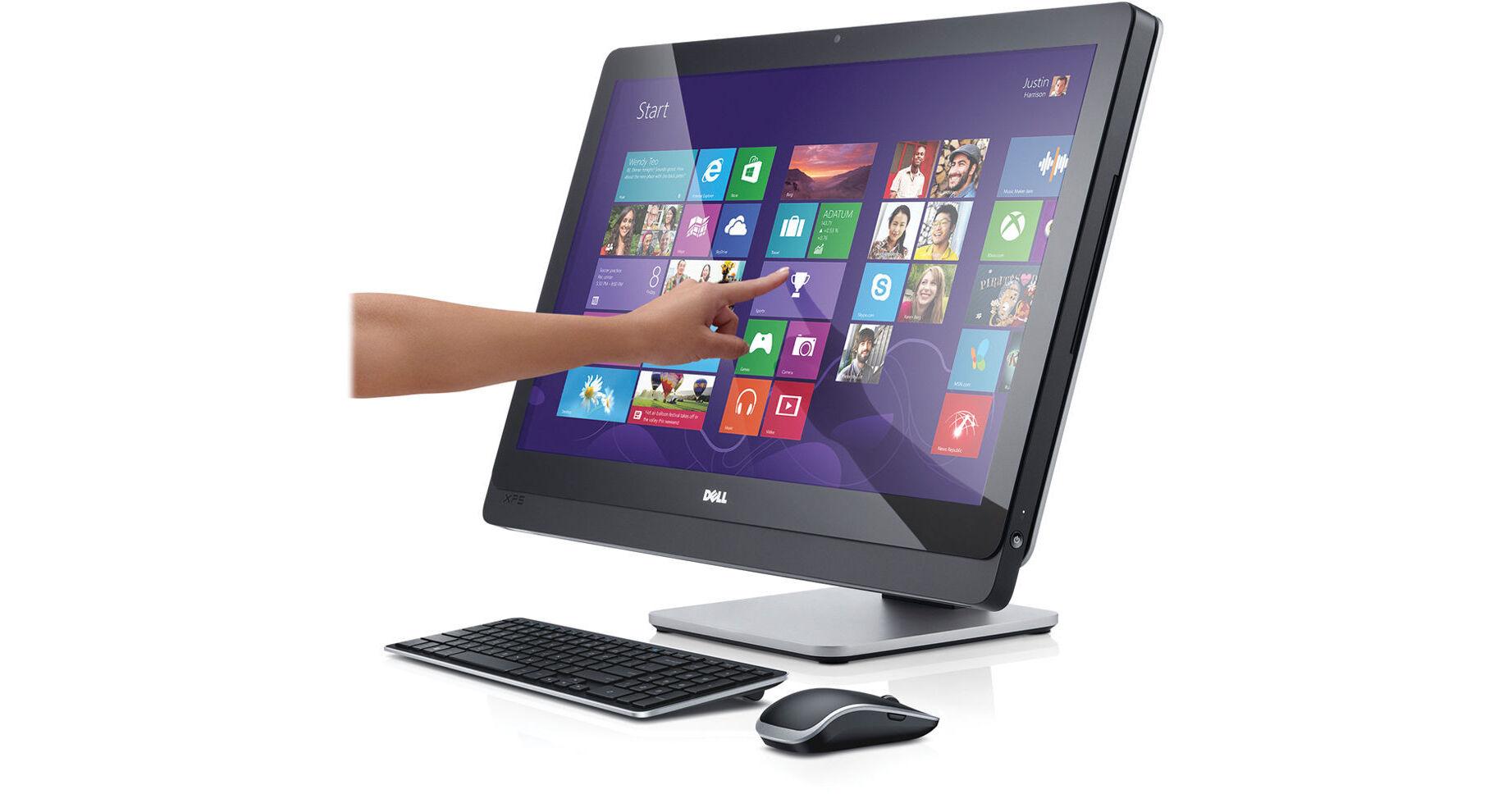
Dell XPS 27 XPSO27-715BLK Multi-Touch 27" All-in-One Desktop Computer

BH #DEXPS272081 • MFR #XPSO27-715BLK
Print
Dell XPS 27 XPSO27-715BLK Multi-Touch 27" All-in-One Desktop Computer
Key Features
  • 2.7GHz Intel Core i5-4430S (Haswell)
  • 8GB of 1600MHz DDR3 RAM
  • 1TB 7200rpm Hard Drive
  • Integrated Intel HD Graphics 4600
The XPS 27 XPSO27-715BLK Multi-Touch 27" All-in-One Desktop Computer from Dell features a dual-hinge articulating stand. Having to reach over your keyboard just to use the touchscreen of the Dell XPS 27 can get tiring so the dual-hinge stand allows you to reposition the Dell XPS 27. You can move the Dell XPS 27 up and down as well as side to side or even fold it down so you can work more naturally.
More Details
No Longer Available
No Store Display
Microsoft 365 Subscription not included: add to your purchase
Ask an Expert
800-606-6969

Dell XPS 2720 Overview

The XPS 27 XPSO27-715BLK Multi-Touch 27" All-in-One Desktop Computer from Dell features a dual-hinge articulating stand. Having to reach over your keyboard just to use the touchscreen of the Dell XPS 27 can get tiring so the dual-hinge stand allows you to reposition the Dell XPS 27. You can move the Dell XPS 27 up and down as well as side to side or even fold it down so you can work more naturally.

The Dell XPS 27 features a 27" IPS LED-backlit touchscreen with 10-point touch support. You'll be able to utilize the multi-touch gestures integrated into Windows 8 to get the full touch experience. The screen has a 16:9 aspect ratio and a QHD 2560 x 1440 native resolution so you'll be able to watch Full HD 1080p HD content without upscaling. The Dell XPS 27 has an HDMI-out port as well as a Mini-DisplayPort so you'll be able to display video on an external screen. It also features a HDMI-in port so you can use the Dell XPS 27 as a monitor as well.

The system is powered by a 4th generation Haswell dual-core 2.7GHz Intel Core i5-4430S processor. It also has 8GB of 1600MHz DDR3 RAM, a 1TB 7200rpm hard drive, a slot-loading SuperMulti DVD burner, a multi-format media card reader, 10/100/1000Mbps Gigabit Ethernet, 802.11b/g/n Wi-Fi, Bluetooth 4.0, an integrated webcam and microphone. There are also built-in stereo speakers. A Dell wireless keyboard and mouse are also included.

Windows 8 (64-bit) is the installed operating system. Windows 8 replaces the traditional Start menu with a redesigned Start screen. The Start screen features tiles, which provide notifications in real-time. Windows 8 also focuses more on cloud storage as well as apps, which can be downloaded from the Windows Store. Windows 8 provides a unique user experience that differs from previous versions of Windows.

Dell XPS 27
Dual-Core 4th-Gen Haswell Intel Core i5 Performance
The Dell XPS 27 houses a 4th-gen Haswell Intel Core i5-4330S processor. Its quad cores can reach a stock speed of 2.7GHz. The processor can also be overclocked up 3.2GHz, thanks to Intel Turbo Boost 2.0 technology. The 4th-gen Haswell Intel Core i5 processor uses less voltage for better energy efficiency. With a dedicated 6MB L3 cache and 8GB of 1600MHz DDR3 RAM, you'll be able to multitask between applications quickly and efficiently
27" QHD IPS Antiglare LED-Backlit Touchscreen
The Dell XPS 27 has a 27" widescreen display that utilizes LED backlight technology, which has low power consumption. The screen features IPS (in-plane switching) technology, which provides uniform color and wider viewing angles. The screen has a 16:9 aspect ratio and a large QHD 2560 x 1440 native resolution powered by integrated Intel HD Graphics 4600. The QHD 2560 x 1440 native resolution provides up to 78% more pixels and 33% more pixels per inch than the Full HD 1920 x 1080 resolution. The display is also a touchscreen with 10-point touch support so you can take full advantage of the multi-touch gestures incorporated into Windows 8
Dual-Hinge Stand
The Dell XPS 27 has a dual-hinge stand so you can change the angle of the screen to better suit your touchscreen needs. The dual-hinge stand allows you to move the display up and down as well as swivels side to side. The display can also fold down for a more comfortable touchscreen experience. The Dell XPS 27 features an integrated power supply that only requires one cable for a clutter-free workspace
Connectivity
If you want the most reliable Internet connection, you'll want to utilize the 10/100/1000Mbps Gigabit Ethernet LAN RJ-45 jack on the Dell XPS 27. If you would rather go wireless, then the 802.11b/g/n Wi-Fi will more than suffice. You can also utilize Bluetooth 4.0 technology on the Dell XPS 27 to connect wirelessly with Bluetooth-compatible devices
USB 3.0
USB 3.0 can reach a data transfer rate of up to 5Gbps, which is 10 times faster than the USB 2.0 standard. USB 3.0 is also backwards compatible with USB 2.0, so you'll still be able to use your older USB-compatible devices
Get Started Right Out of the Box
The Dell XPS 27 is an all-in-one desktop computer that comes with a Dell wireless mouse and keyboard. This allows you to start using your computer right out of the box without having to purchase additional accessories
Windows 8
The Redesigned Start Screen
Windows 8 introduces a new Start screen, which has all the information you need in one place. The traditional Windows desktop screen has been replaced with a tablet style design featuring tiles. Tiles are customizable as well as update in real time. News, weather forecasts, sports, contacts, apps and more are available for you to use. It's all right there on the Start screen
Seamless Integration Between Touch, Keyboard & Mouse
Windows 8 supports multi-touch gestures. Now, you can use your keyboard, mouse or the touchscreen using simple gestures. Whether you're browsing apps, reading a book or typing on the go with touch, you'll be able to seamlessly switch between all three interactive components. With the touchscreen, Windows 8 allows you to use multi-touch gestures, such as swipe, drag, tap, slide, pinch-to-zoom and more
To the Cloud
With Windows 8, when signed in using your Microsoft account, you'll have instant access to your personal Start screen, themes, language preferences, browsing history and browser favorites. You can also connect to services such as Microsoft Outlook, Facebook, Linkedin, Twitter and more
Windows Store
In the Windows Store, you can search for or browse thousands of apps. Choose from the featured apps or grab one of the most frequently downloaded apps to see what all the hype is all about. You can also see how other people rate apps. For certain apps, you can try it out before you buy it so you can make sure you absolutely want an app before you spend your hard-earned money on it

Dell XPS 2720 Specs

Operating System
 (64-Bit)
Display
Size
27"
Native Resolution
2560 x 1440
Finish
Anti-Glare / Matte
Optical Drive
Slot-Load SuperMulti DVD Burner
Communications
Wi-Fi
Wi-Fi 4 (802.11n)
Packaging Info
Box Dimensions (LxWxH)
33.5 x 13 x 23.7"

Dell XPS 2720 Reviews

See any errors on this page?
Whatever You Need, We've Got It