Ask Our Experts800-606-6969
Hello, Log InAccount & Orders
Video Chat with a Photography Expert - Live
Key Features
- Canon EF Lens to Samsung NX Camera
- Brass with Stainless Steel Finish
- Focuses to Infinity
- Leaf Spring System
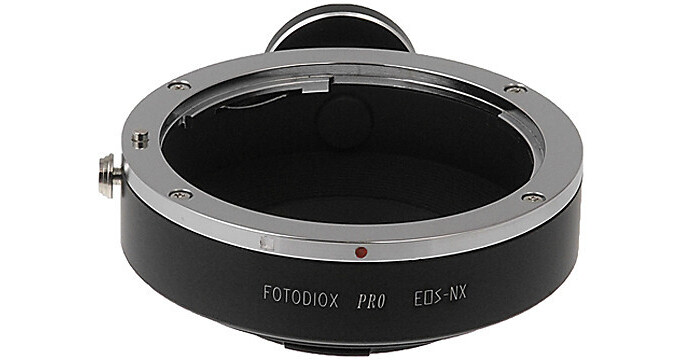
The FotodioX Pro Canon EF Lens to Samsung NX-Mount Camera Adapter with Tripod Mount is a high quality adapter that allows you to mount a Canon EF mount lens to a Samsung NX camera body. It features a brass construction with a stainless steel finish as well as the ability to focus to infinity. This works with a leaf spring system for a secure attachment of the lens to the adapter. Additionally, this adapter features a tripod mount for security when using larger lenses.
More DetailsSpecial Order
Expected availability: 2-4 Weeks
Protect Your Gear
Add a protection plan from $5.99
See Options
See any errors on this page?
question
I have a Samsung NX1000 and want to use my Canon EF 28-135mm f/3.5-5.6 IS USM Standard Zoom Lens. Will this adaptor work?
Yes, the FotodioX Canon EF Pro Lens Adapter with Tripod Mount for Samsung NX Cameras will allow you to attach the Canon EF 28-135mm f/3.5-5.6 IS USM Standard Zoom Lens to the Samsung NX1000 Mirrorless Wi-Fi Digital Camera.
Date published: 2018-08-28
question
I have the Canon 24-105 f4 with image stabilization. Will the image stabilizer still work in video mode If I put this adapter on the Samsung NX1?
no image stabilizer will not work there is no power to the lens available also no auto focus
Date published: 2018-08-28
question
The camera says lens removed, how do I change this?
When the adapter is installed, the camera lens functions in the manual mode only, including aperture and focus. Be sure the adapter is properly installed. I did not get this message when I installed the adapter on my Samsung NX30. It functions well with all of my Canon EF lenses in the manual mode.
Date published: 2018-08-28
question
How can I unmount my lenses after using this adapter? I seems that there is no release button.
The silver thing on the side that looks like a button slides back and forth rather than moving in and out (up and down) like a regular button, so sliding it back and forth pulls the retention pin out of it's lock depression
Date published: 2018-08-28
question
IS there any crop factors with this adapter? Will a 50mm (APSC 80mm) become like a 55mm once the adapter on?
Yes.. It adds a 3.0x crop factor to any sensor your using. ;)
Date published: 2018-08-28
question
Can I use this adapter to mount Canon EF 17-40mm f/4L lens to Samsung NX500?
Yes the adapter will work for any ef lens to nx Samsung. You will have to adjust manually as there is no auto focus when using adapter.
Date published: 2018-08-28
question
Has anyone used this on the new NX-1?
Adapter works as advertised on an NX1. I use it with Tamron 70-300mm because of the lack of long zooms for nx mount. Aperture Tip: To pre-set aperture: Mount lens on Canon camera, turn camera on, set aperture, press AND HOLD depth of preview button, then unmount lens without unpressing depth of preview button and f stop should hold. However, the metering is often inaccurate the smaller a aperture, so use your histogram and double check your photo afterward, adjust with exposure comp or just shoot full manual.
Date published: 2018-08-28