Video Chat with a Pro Audio Expert - Live

Cycling 74 Cyclops Add-On for Max 6 - Software for Analysis/Tracking of Live Video

BH #CYCAOFMAX • MFR #CYCLOPS
Print
Cycling 74 Cyclops Add-On for Max 6 - Software for Analysis/Tracking of Live Video
Key Features
  • Track Dancers and Performers on Stage
  • Use in Interactive Installations
  • Create Video-Tracking Music Instruments
  • Create Performance Interfaces
Cyclops Add-On for Max 6 from Cycling 74 is a Max object for analyzing and tracking live video in real time. Using a simple interface, the software allows the user to track performers or objects with a video camera and to analyze greyscale and color information from the live image in real time. The resulting Cyclops data can then be used to control MIDI, audio, video and anything else that can be done in Max.
More Details
No Longer Available
No Store Display
Ask an Expert
800-606-6969

Cycling 74 CYCLOPS Overview

Cyclops Add-On for Max 6 from Cycling 74 is a Max object for analyzing and tracking live video in real time. Using a simple interface, the software allows the user to track performers or objects with a video camera and to analyze greyscale and color information from the live image in real time. The resulting Cyclops data can then be used to control MIDI, audio, video and anything else that can be done in Max.

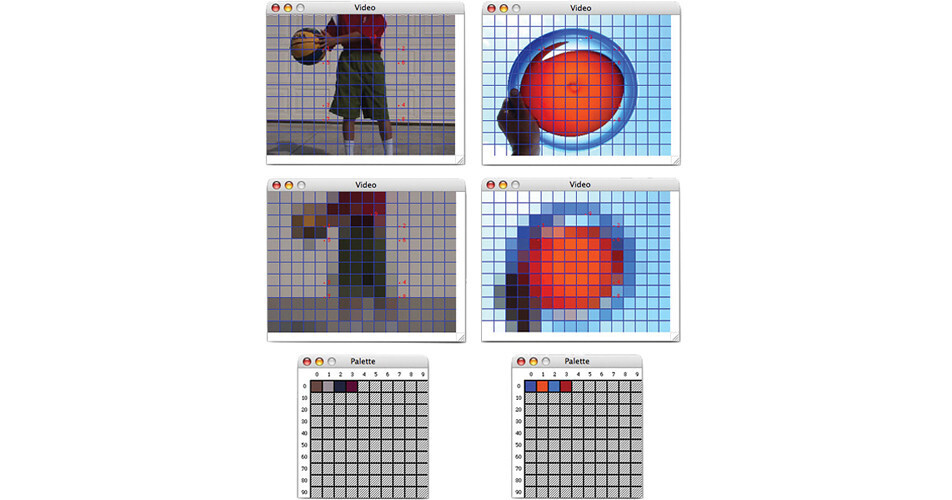
Cyclops receives live video from a QuickTime source and analyzes each frame of video in real time. It divides the image area into a grid of rectangular zones and analyzes the zones for greyscale, threshold, difference (motion) and color. The grid resolution and target zones can be specified for analysis and the type of analysis to be performed in each zone. Cyclops outputs messages for each analyzed video frame that can then be used to trigger any Max processes, or control any patch parameters.

Easy-to-use GUI for specifying zones, analysis modes and tracking colors
Eight analysis modes (four greyscale and four color modes)
Sampling mode captures color data from the image for color matching analysis
Simple and efficient message output format
Works with most QuickTime input hardware (video capture cards, USB and FireWire)
Saves all settings with your patch
Compatibility with Jitter via the included jit.cyclops object
Mac OS X support

Cycling 74 CYCLOPS Specs

System Requirements
Mac
Cyclops
Intel or PPC Macintosh (Max 6 requires Intel)
Max/MSP 5.x (optionally Jitter 1.7) or Max 6
OS X 10.3.9 or later (10.4 recommended) (Max 6 requires 10.5+)
256 MB memory
QuickTime 7 or higher
QuickTime-compatible video input device
Video camera or other video source

jit.cyclops
Intel or PPC Macintosh (Max 6 requires Intel)
Max/MSP 5.x and Jitter 1.7 or Max 6
OS X 10.3.9 or later (10.4 recommended) (Max 6 requires 10.5+)
QuickTime 7 or higher
QuickTime-compatible video input device
Video camera or other video source

PC
Cyclops
Windows XP (Home or Pro)
256 MB memory
Max/MSP 5.x (optionally Jitter 1.7) or Max 6
QuickTime 7 or higher
QuickTime-compatible video input device
Video camera or other video source

jit.cyclops
Windows XP (Home or Pro)
256 MB memory
Max/MSP 5.x and Jitter 1.7 or Max 6
QuickTime 7 or higher
QuickTime-compatible video input device
Video camera or other video source

Cycling 74 CYCLOPS Reviews

See any errors on this page?
Whatever You Need, We've Got It