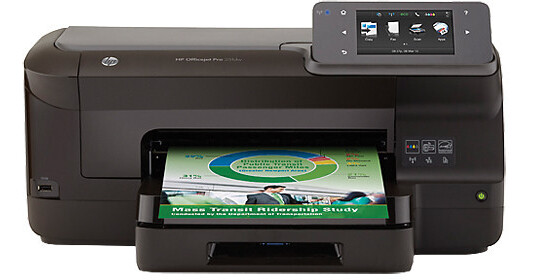
The HP Officejet Pro 251dw Wireless Color Inkjet Printer prints up to 20 ppm in black and 15 ppm in color. The printer supports media up to 28 lb (plain paper) and 75 lb (photo paper). The printer is ideal for large print runs thanks to the optional 2300-page black cartridge and 1500-page color cartridges. In addition to a standard USB port, the printer features wired and wireless Ethernet connectivity so you can easily share the printer with your entire team. The printer also supports ad-hoc connectivity for wireless printing without a network. Additionally, the Officejet Pro 251dw is compatible with HP ePrint which lets you print a file by emailing it to your printer. Print directly from a USB drive using the front-facing USB port and the 4.3" color LCD.
Ask Our Experts866-264-7509
Hello, Log InAccount & Orders
Key Features
- 1200 x 1200 dpi
- 20 ppm Black, 15 ppm Color (ISO)
- Wi-Fi and Ethernet
- ePrint, AirPrint, Google Cloud Print
The HP Officejet Pro 251dw Wireless Color Inkjet Printer prints up to 20 ppm in black and 15 ppm in color. The printer supports media up to 28 lb (plain paper) and 75 lb (photo paper). The printer is ideal for large print runs thanks to the optional 2300-page black cartridge and 1500-page color cartridges. In addition to a standard USB port, the printer features wired and wireless Ethernet connectivity so you can easily share the printer with your entire team. The printer also supports ad-hoc connectivity for wireless printing without a network. Additionally, the Officejet Pro 251dw is compatible with HP ePrint which lets you print a file by emailing it to your printer. Print directly from a USB drive using the front-facing USB port and the 4.3" color LCD.
More DetailsNo Longer Available
HP 251dw Overview
Print for Less and Easily Manage Your Office
Print color documents with Original HP inks for up to 50% lower cost per page than lasers
Use HP Web Jetadmin to centrally deploy updates and manage tasks
Safeguard your print environment with the HP Imaging and Printing Security Center - no expertise necessary
Help protect your investment and extend capabilities as your needs grow
Time-Saving Features
Designed to handle 1500 pages a month
Reload paper less often and handle large print jobs, using the 250-sheet paper tray
Print up to 2300 pages and 1500 color pages using high-capacity Original HP cartridges
Connect and Print at the Office or on the Go
Easily share the printer over your wired or wireless network
Print wirelessly, and share access with PCs, tablets, and mobile devices even with no network or router
Print from your smartphone or tablet from virtually anywhere with HP ePrint
Print PDF files and images directly from memory devices, using the easy-access USB port - no computer required
Conserve Resources without Sacrificing Performance
Recycle Original HP ink cartridges for free through HP Planet Partners
Uses up to 50% less energy and up to 70% less supplies and packaging by weight compared with color laser printers than color lasers
Reduce paper use by up to 50% using automatic two-sided printing
Energy Star qualified
HP 251dw Specs
Printing Method
| Printing Technology | |
| Maximum Resolution | |
| Print Speed | |
| First Print Out Speed | |
| Print Color | |
| Ink Cartridge Configuration | |
| Compatible Ink Cartridges | |
| Printer Duty Cycle | |
| Print Features |
Paper Handling
| Paper-Feed Method | |
| Paper Types | |
| Paper Sizes | |
| Borderless Printing | |
| Media Weight | |
| Paper Capacity |
Connectivity
| Interfaces | |
| Mobile Printing Features | |
| OS Compatibility | |
| Network OS Support | |
| Windows System Requirements | |
| Apple System Requirements | |
| Device Management | |
| Security | |
| Input Buffer | |
| Processor | |
| Fonts | |
| Printer Language |
Physical
| Control Panel | |
| Power Supply | |
| Power Requirements | |
| Power Consumption | |
| Typical Power Consumption | |
| Acoustic Noise | |
| Temperature / Humidity | |
| Dimensions | |
| Weight |
Packaging Info
| Package Weight | |
| Box Dimensions (LxWxH) |
HP 251dw Reviews
See any errors on this page?