
I’d classify Elgato as the king of streaming hardware. Nearly everything I use for content creation comes from Elgato. From the first iteration of their game-changing Stream Deck to the accessories they have created, I can only say that I am massively impressed not just by the hardware itself but how easy it is to integrate into your setup. So, let’s take a look at Elgato’s Stream Deck +, USB Hub, and XLR Dock.
Stream Deck +
Let’s start with Elgato’s centerpiece: Stream Deck +. This device takes what was great about the original Stream Deck and changes it up for the better. Instead of fifteen customizable LCD keys, we have eight. But we also gain four dials and an LCD touch panel. Together you have this incredibly cohesive setup in a small and lightweight package.

Using Elgato’s software, you can customize each key to perform various actions. It also works seamlessly with programs like OBS. Because of all the programs I use, I was able to create multiple pages of buttons that perform a litany of actions. One page allows me to quickly launch my most essential applications while the others control my OBS panels for quick scene switching. The dials are reserved for my mic, desktop outbound audio, and my monitor’s audio.
This enabled me to organize my setup and by placing controls at my fingertips, I didn’t have to click on multiple programs to control one app at a time. I could quickly launch my creative center on Twitch, bring up OBS, and load a custom clock application called Snaz. It only took three key presses. I could also speed this up to be a single button press thanks to the extensive programming options available in Elgato’s software, but I am a person who likes to have specific controls for specific programs.

Otherwise, I think the dials are great. You can actually adjust the steppage of each dial turn, giving you the finest controls over your compatible applications. If you are using it for audio, which in most cases they would be used for, you can easily click the dial in for an instant-mute. Or you can just use the touchscreen that rests between the keys and the dials.
The LCD touch panel is only 4.2 x 0.5”, but Stream Deck + uses up every inch. When you are programming your dials, the LCD display will visualize some elements similar to how the LCD keys act. You can name each dial, and it can directly relay the decibel level on the screen. If you mute your mic, it has an icon to represent it. You can also customize the background to various designs and patterns.

All-in-all, if you are a content creator there is no reason to skip out on Stream Deck +. Even if you are not a content creator and you just like having a ton of shortcuts and options for your games, you can have that right in front of you at all times!
This isn’t the only thing that Stream Deck + can do! Elgato designed it to be the main piece of a modular system, eventually leading to two accessories: the USB Hub and XLR Dock.
USB Hub
Expanding the utility of your system, the Elgato USB Hub for the Stream Deck + is a great addon that adds multiple USB ports and SD card slots to your device. All you need to do is install the USB Hub right onto the back of Stream Deck + and you’ve got yourself a hub.
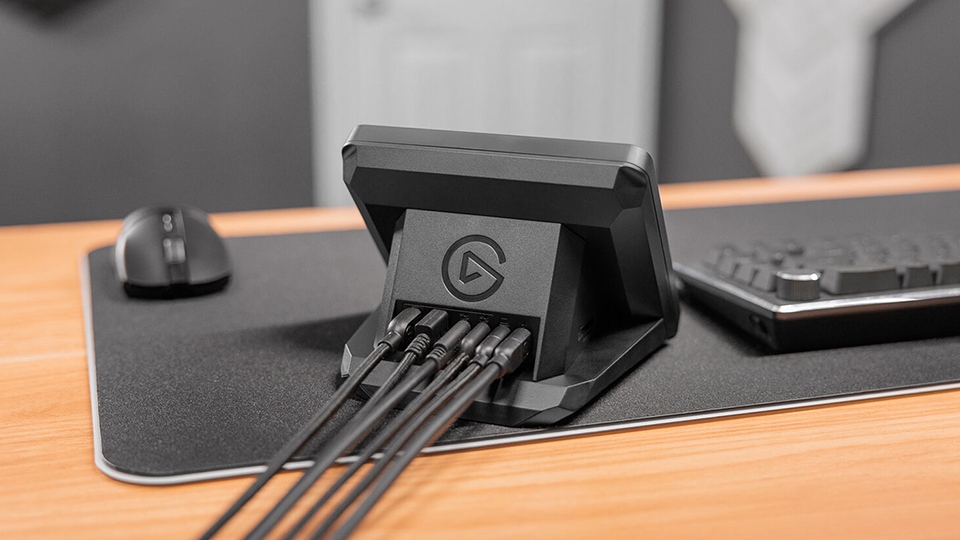
Once installed, the hub provides you with two USB-A and USB-C ports operating on the USB 3.2 Gen 1 standard, giving you up to 5 Gb/s data transfer speeds. Additionally, the USB-A and USB-C ports offer some power support with 4.5 and 7.5W, respectively. Meanwhile you have two additional USB-C ports; one that connects to your host system and provides it with 65W Power Delivery and another to be used with an external 100W power adapter. Additionally, you have two slots to accommodate an SD and microSD card with UHS-I speeds.
I love the idea of the USB Hub and I think it is a great tool to have especially if you are an editor with a slimmer notebook that doesn’t have the ports you need. If you already have a Stream Deck + and need to regain some of your lost USB ports from other devices, then this is a perfect addition.
XLR Dock
If you are a live streamer, then the XLR Dock is one of the best additions to Stream Deck +. Like the USB Hub, it is easy to install. Once set up, I was able to take my existing USB-C cable and plug it right into the XLR dock. I was then able to connect up my mic via the XLR port. It also has a 3.5mm audio jack for monitoring.

What I love about this device is how simple it is. You can go out and buy a separate audio interface but if you are a solo creator or at least one of many voices on a video podcast filmed over the internet, you don’t need anything more!
I like how well it works with the Elgato software as well. You can use the dials on the Stream Deck + to fine tune your gain. With various plugins you can also make quick adjustments to your volume on OBS and Discord.
Honorable Mention: Stream Deck Pedal
One other device that I wanted to briefly mention is the Stream Deck Pedal . This wonderful device is essential to my current setup. With some programming and tuning, I was able to take screenshots with the middle pedal, start and stop recording on the left pedal, and initiate Push-to-Talk (PTT) with the rightmost pedal. Like everything else, it works seamlessly with Elgato’s free software. It also doesn’t move when I press down on the pedals which is great! Even if you don’t have the other devices, the pedal is just a great tool on its own.

Conclusion
Elgato continues to evolve and develop tools designed to streamline your setup. I have been using Elgato products for a long time and I always find the build quality to be great. Their equipment ends up being the longest-lasting devices I have ever purchased, and they are so easy to use, practically plug-and-play.
The only drawback is you cannot use both the XLR Dock and the USB Hub simultaneously. You have to choose one or the other. Or you can really splurge and purchase two Steam Deck + units. A bit overkill but the option is always there. I’ve strongly considered it myself.
